45
Editing Photos
B
Editing Photos
Labeling Photos
or Albums
The display for entering characters
appears when you rename an album/
photo/scrapbook/“x-Pict Story HD”
file.
You can also use the connected USB
keyboard.
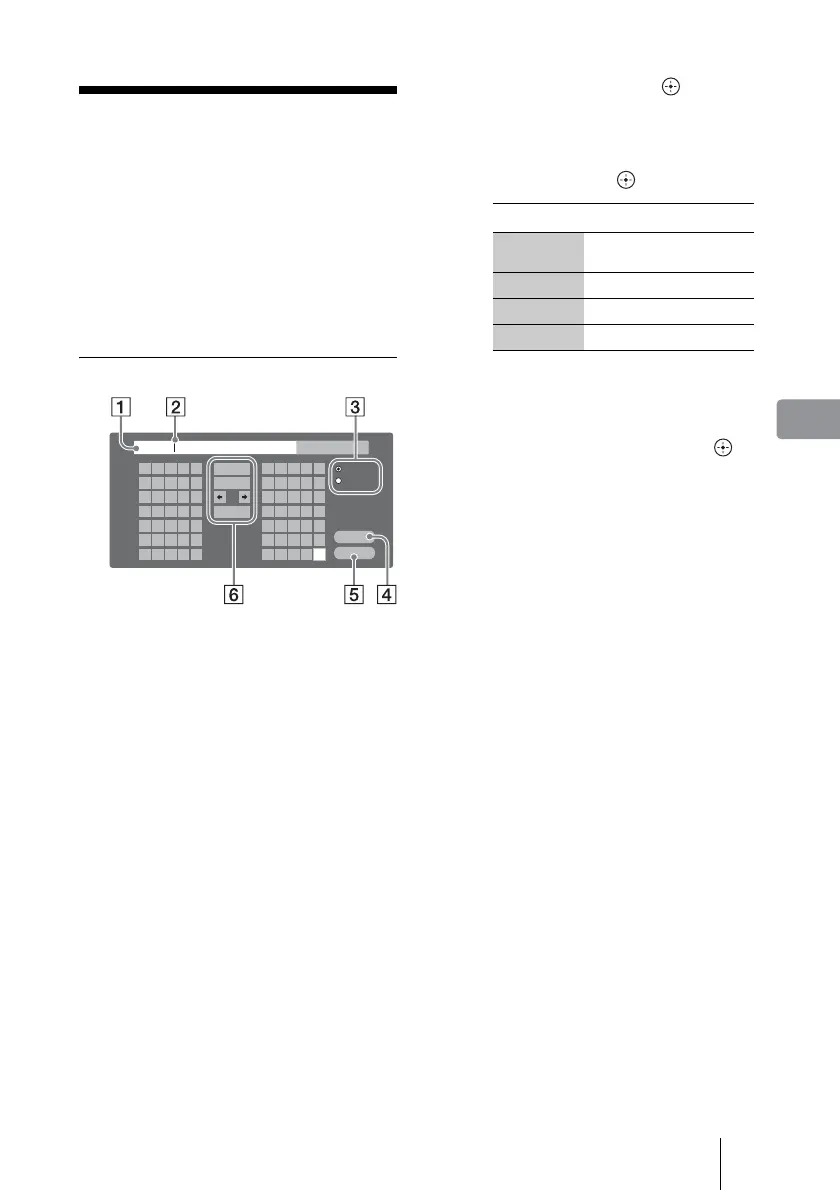
Entering characters
A Entry field
You can enter up to 32 characters
for an album name, and 24 for a
tag name.
B Cursor
C Shift buttons
Switches between alphabet and
numbers/symbols.
D [Enter]
Sets the input name and finishes
the setting.
E [Cancel]
Cancels the setting and returns to
the previous display.
F Setting buttons
Album 0
Alphabet
Symbol
Enter
Cancel
Space
Clear All
Back Space
BA C D E
GF H I J
LK M N O
QP R S T
VU W X Y
?Z / , :
21 3 4 5
ba c d e
gf h i j
lk m n o
qp r s t
vu w x y
@z . - _
76 8 9 0
1 Select the character you want
to enter and press .
The character appears in the entry
field.
If necessary, select the following
items and press .
2 Repeat step 1 to complete
the entry.
3 Select [Enter] and press .
The display returns to the previous
display.
To use a USB keyboard
Connect a USB keyboard to the USB
jack on the front panel of the unit.
Items Details
Back Space
Erases the character to the
left of the cursor.
Clear All Clears all input characters.
< , Moves the cursor.
Space Inserts a space.



 To Next Page