54
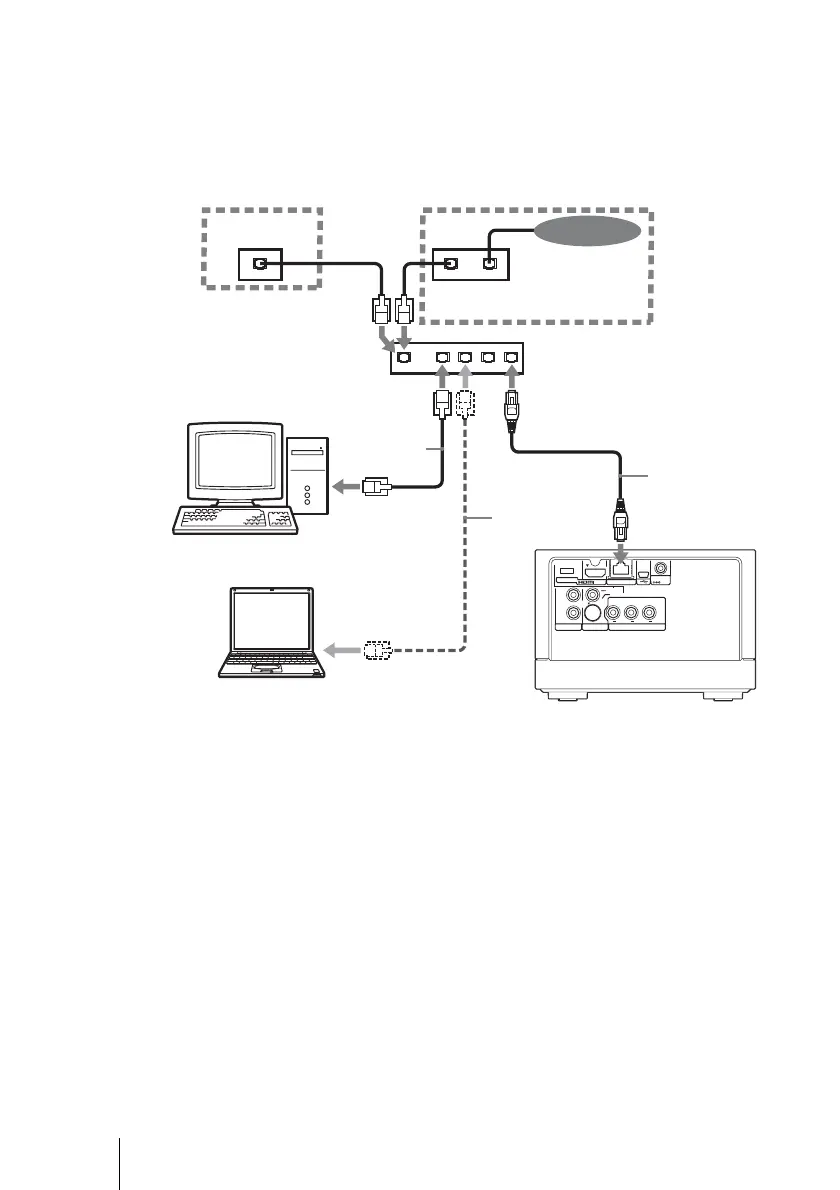
To connect the unit to the network
Connect the unit and computer using a network cable (not supplied) as
illustrated below. You can also connect multiple computers.
Example 1: When connecting using a router with hub (for
connection C, D, G)
480i/480p/
720p/1080i
RESOLUTION
OUT
S-VIDEO
VIDEO
L
R
AUDIO OUT VIDEO OUT COMPONENT VIDEO OUT
Y
LAN
(
10/100
)
DC IN
16V
P
B
P
R
LINELANLAN
LANWAN
Internet
ADSL modem/
cable modem, etc.,
with a router
*1
(commercial item)
When using a
router with
hub in
connection
G, do not use
the WAN port.
Router with hub
*2
(commercial item)
Network cable
*3
(not supplied)
to LAN port
Computer 1
Network cable
*3
(not supplied)
to LAN port
Unit
Network cable
*3
(not supplied)
to LAN port
Computer 2
*1
Depending on the connecting environment, the configuration may vary. For details,
consult your contracted (or contracting) connection service center.
*2
Use a router with hub compatible with 10BASE-T/100BASE-T.
*3
Use a network cable compatible with 10BASE-T/100BASE-T.
DC



 To Next Page