EasyManua.ls Logo

Sony IT-ID80 - Connecting the Telephone Unit

Sony IT-ID80
55 pages
Print Icon
To Next Page IconTo Next Page
To Previous Page IconTo Previous Page
Loading...
ed
Step
2:
Setting
up
the
telephone
(continued)
When
the
batteries
are
expired
*
When
the
batteries
are
expired,
the
display
is
turned
off,
but
you
can
make
or
receive
calls.
You
can’t
do
any
other
operations.
*
When
the
batteries
are
expired,
all
your
data
and
settings
will
be
erased.
Connect
the
telephone
If
you
want
to
hang
the
telephone
on
the
wall,
see
page
23.
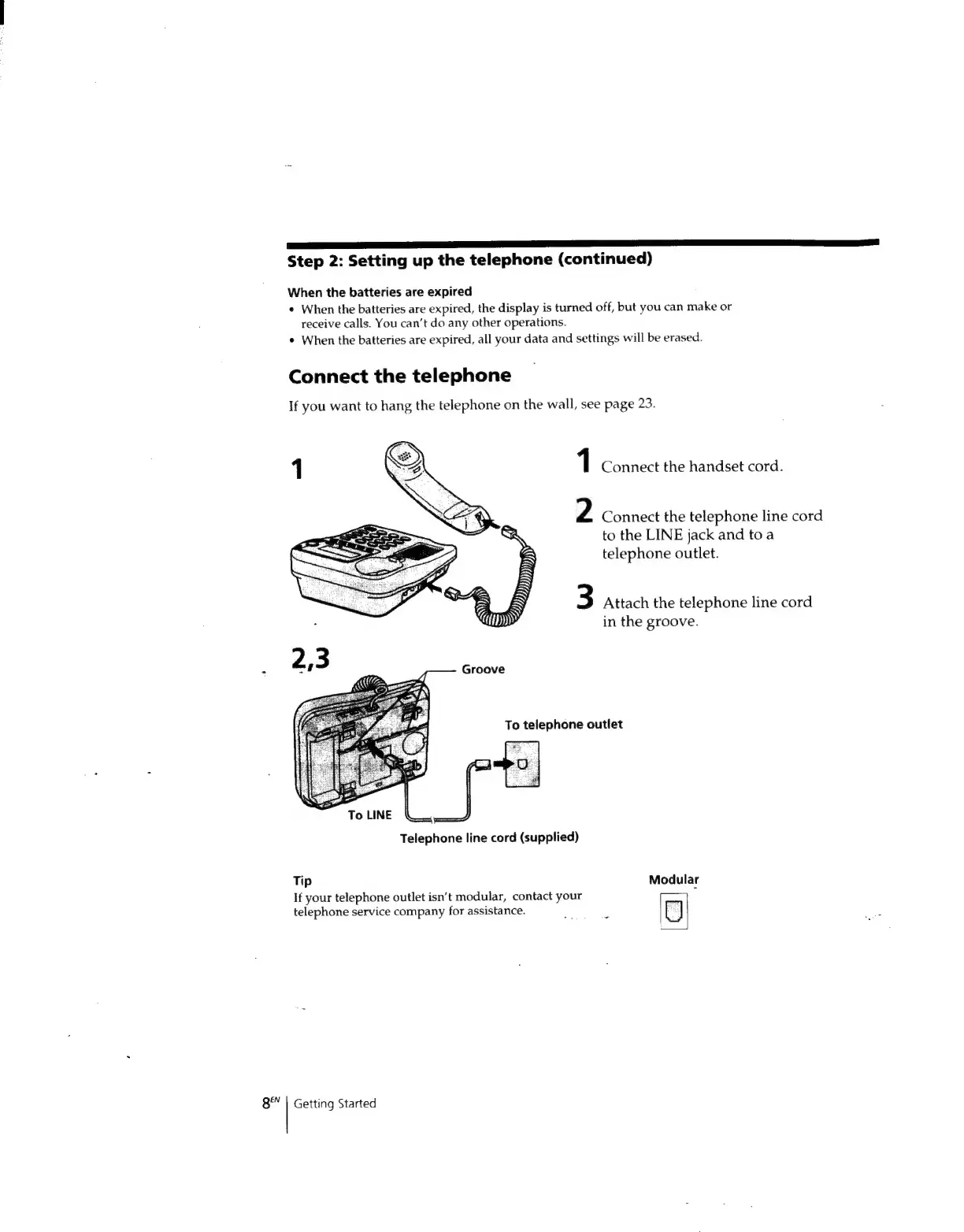
1
Connect
the
handset
cord.
2
Connect
the
telephone
line
cord
to
the
LINE
jack
and
toa
telephone
outlet.
3
Attach
the
telephone
line
cord
in
the
groove.
To
telephone
outlet
fu
Telephone
line
cord
(supplied)
ToLINE
Tip
Modular
If
your
telephone
outlet
isn’t
modular,
contact
your
telephone
service
company
for
assistance.
:
C)
8"
|
Getting
Started

Related product manuals