KDF-46E2000/46E2010/50E2000/50E2010/55E2000/55E2010
KDF-46E2000/46E2010/50E2000/50E2010/55E2000/55E2010
22
1
2
3
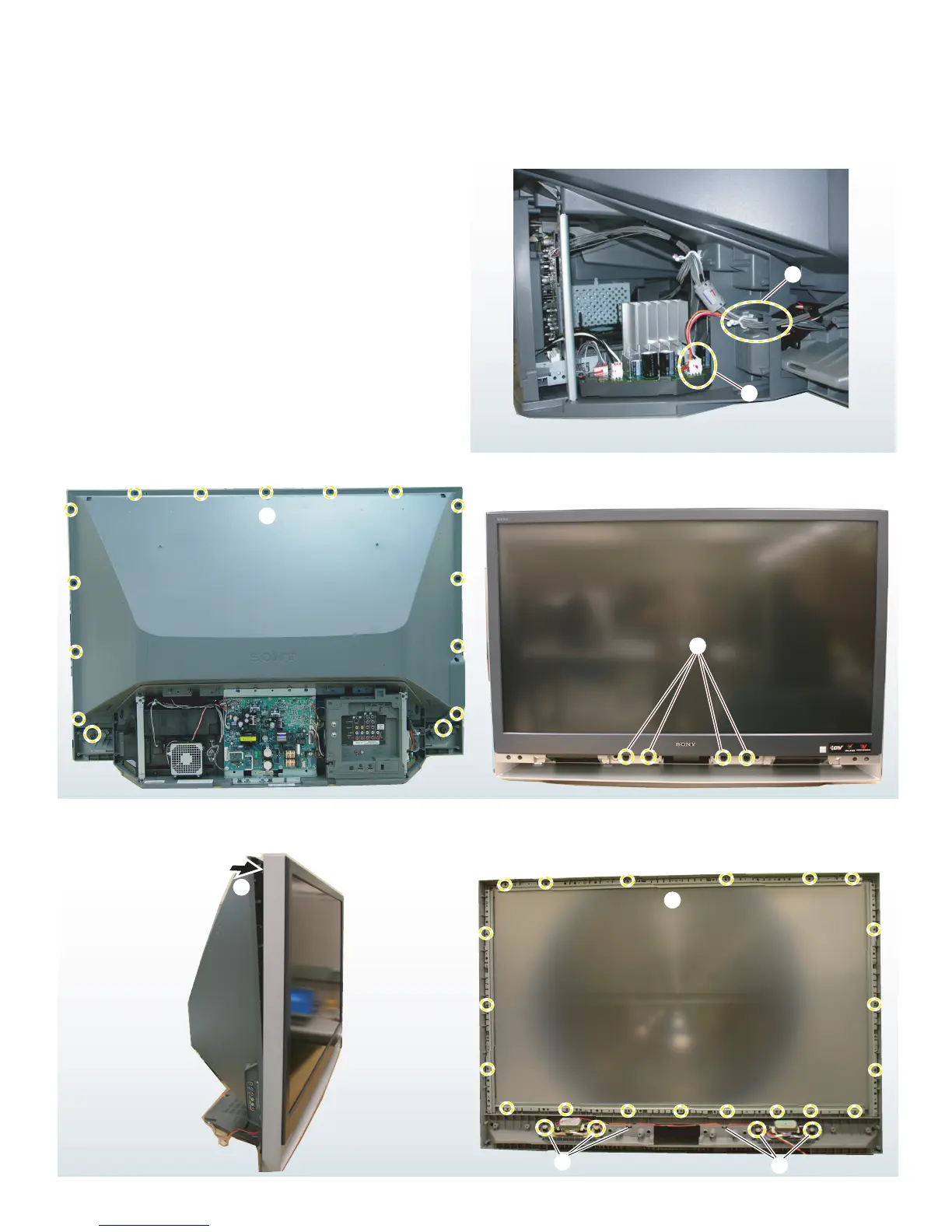
1-9. SCREEN FRAME ASSEBMLY AND SPEAKER REMOVAL
CAUTION: When removing the Screen Frame Assembly be sure to clean the Mirror and Diffusion Plate(s) to remove any dust particles.
5
4
1
Release the wire harness from the purse locks.
2
Disconnect the CN2500 from the K Board.
3
Remove 15 screws to detach the Mirror Cover Assembly
from the Screen Frame Assembly.
4
Remove 4 screws to detach the Screen Frame Assembly
from the front bezel.
5
Gently pull the Screen Frame Assembly forward.
6
Remove 20 screws from the screen frame to release the
disfussion plates. Be sure to keep the retaining brackets.
7
To remove the speakers, remove 2 screws and release the
speaker wires.
6
7
7



 To Next Page