KDF-46E2000/46E2010/50E2000/50E2010/55E2000/55E2010
KDF-46E2000/46E2010/50E2000/50E2010/55E2000/55E2010
49
2-1. USING THE REMOTE COMMANDER
FOR ELECTRICAL ADJUSTMENTS
To adjust various set features, use the Remote Commander to put the
set into service mode to display the service menus and categories.
Equipment Needed:
Pattern Generator (with component outputs)
Oscilloscope
Digital multimeter
2-2. ACCESSING SERVICE ADJUSTMENT
MODE
1. TV must be in standby mode. (Power off).
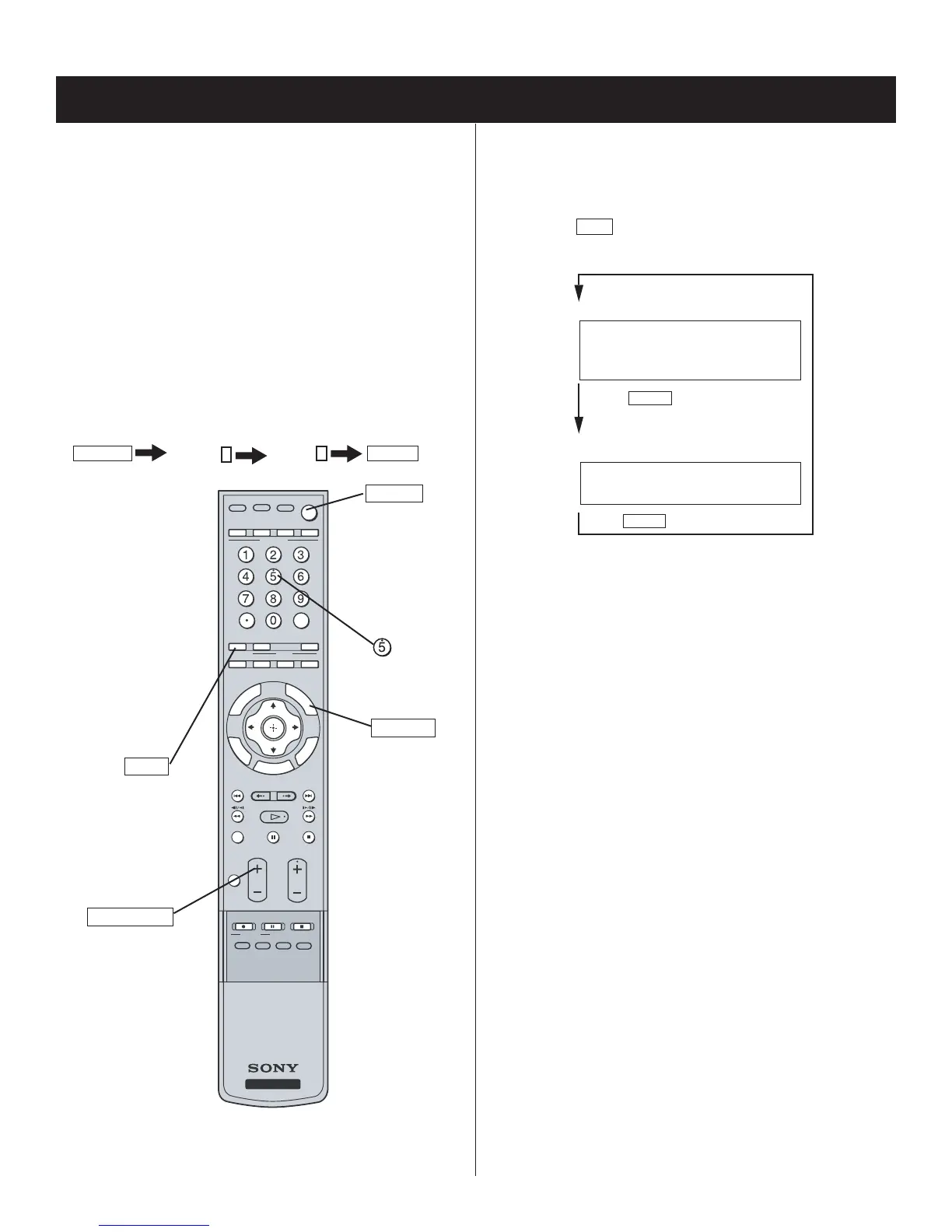
2. Press the following buttons on the Remote Commander within a
second of each other:
DISPLAY
Channel
5
Volume
+
POWER
.
ENT
NRUTE
R
S
LO
O
T
TV/VIDEO
DVR/VCR
SAT/CABLE
FUNCTION
TV
BD/DVD
POWER TV POWER
JUMP ANT FREEZE
SOUND
PICTURE
WIDE
VISUAL SEARCH
PAUSE
PLAY
STOP
REC REC PAUSE REC STOP
TOP MENU MENU F1 F2
G
D
I
U
E
D
I
PSY
AL
REPLAY ADVANCE NEXTPREV
TV
CH
VOL
MENU
MUTING
BD/DVD
MODE
SLEEP
SURROUND
Displays
Service Menus
DISPLAY
VOLUME (+)
POWER
JUMP
RM-YD010
The fi rst service menu (TV) displays.
SECTION 2: CIRCUIT ADJUSTMENTS
2-3. VIEWING THE SERVICE MENUS
Use the Remote Commander to view the 3 service menus options.
1. To display the Service Menu that contains the Category you want to
adjust, press
JUMP
on the Remote Commander.
(For a complete list of the service Categories refer to Service Menus)
Press JUMP
Q Box
TV
Press JUMP
VERSION 00 SERVICE
VERS Wide Zoom Video 1
WSL: 480I
QM 0 0 SERVICE
INFO DTV
Sample TV Service Menu



 To Next Page