KDF-46E2000/46E2010/50E2000/50E2010/55E2000/55E2010
KDF-46E2000/46E2010/50E2000/50E2010/55E2000/55E2010
9
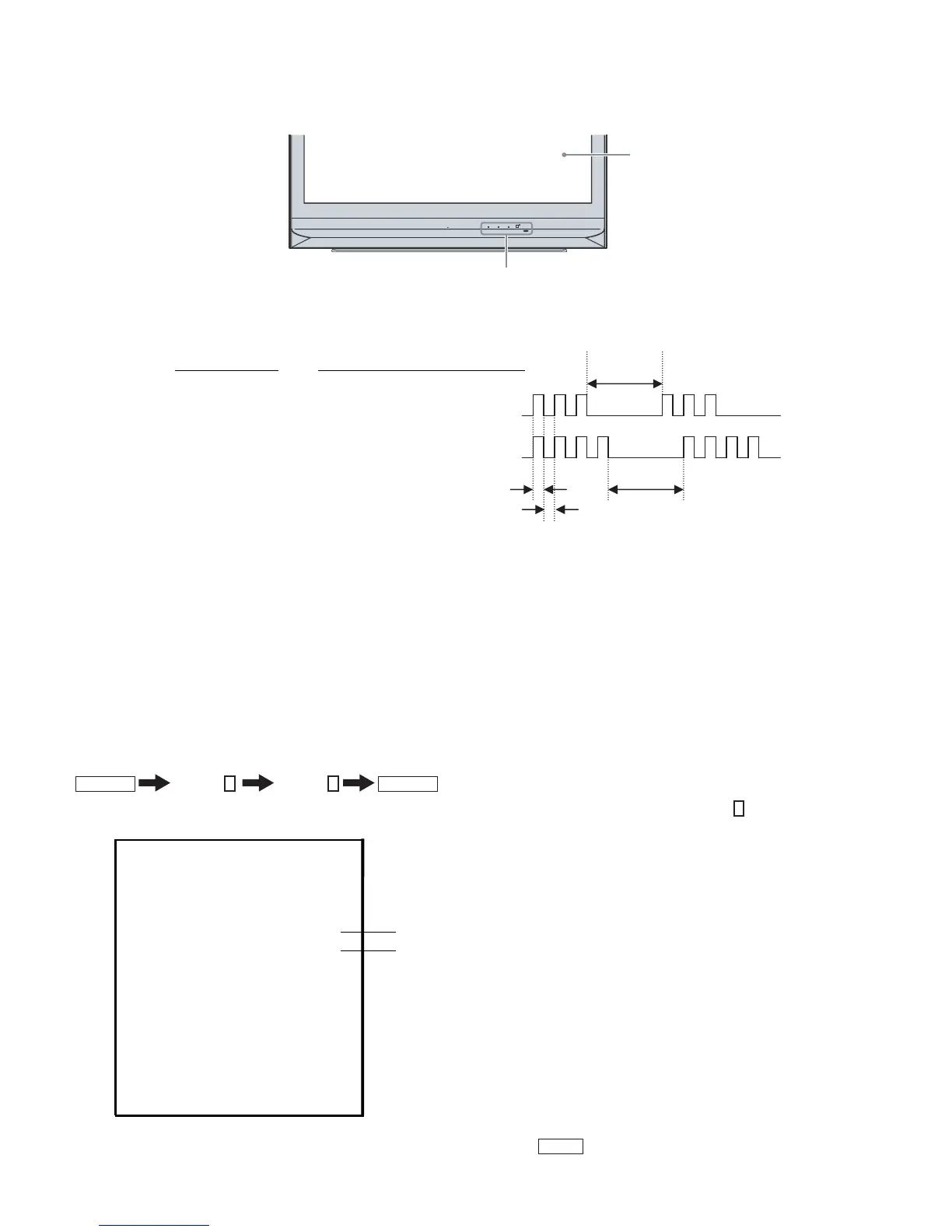
DISPLAY OF POWER/STANDBY OR LAMP LED FLASH COUNT
PUSH OPEN
POWER/STANDBY
POWER
TIMER LAMP
Indicators
Screen
- One flash is not us ed for self-diagnosis.
Number of times LED Flash
Lamp cove r 3 times
Fan 4 times
LED ON : 0.3 sec
LED OFF : 0.3sec
LED OFF
3.0 sec
LED OFF
3.0 sec
Example
Diagnosis
RELEASING THE POWER/STANDBY LED FLASH
Unplug the power cord from the outlet to temporarily stop the POWER/STANDBY lamp from fl ashing.
Self-Diagnostic Screen Display
For failures that are diffi cult to reproduce, or accompany occasional power off and/or picture mute, the Self-Diagnostic screen display is useful to
specify the cause.
VIEWING THE SELF-DIAGNOSTIC SCREEN
1. TV must be in standby mode. (Power off).
2. Press the following buttons on the Remote Commander within a second of each other:
DISPLAY
Channel
5
Volume
-
POWER
NOTE: This differs from the method of accessing service mode which is Volume
+
Sample Self-Diagnostic Screen Display
SELF CHECK
1 : LAMP_ERR 0
0
2 : Lamp Temp Over 0
3:
4:
LAMP_ COVER
FAN_ERR 1
5 : LAMP_DRIVER
6 : LowB-ERROR 0
0
8 : D_OVP 0
WDT101 : 0
Name: KDF-50E2000
Serial: XXXXXXX
"1" is displayed when an error is detected one or more times
"0" is displayed when no error has been detected
NOTE: To refresh the Self Check menu when all the items are not displayed, press
JUMP
on the Remote Commander.
3. Proceed to Viewing the Self-Diagnostic Errors.



 To Next Page