1-13
25
-US
Operations
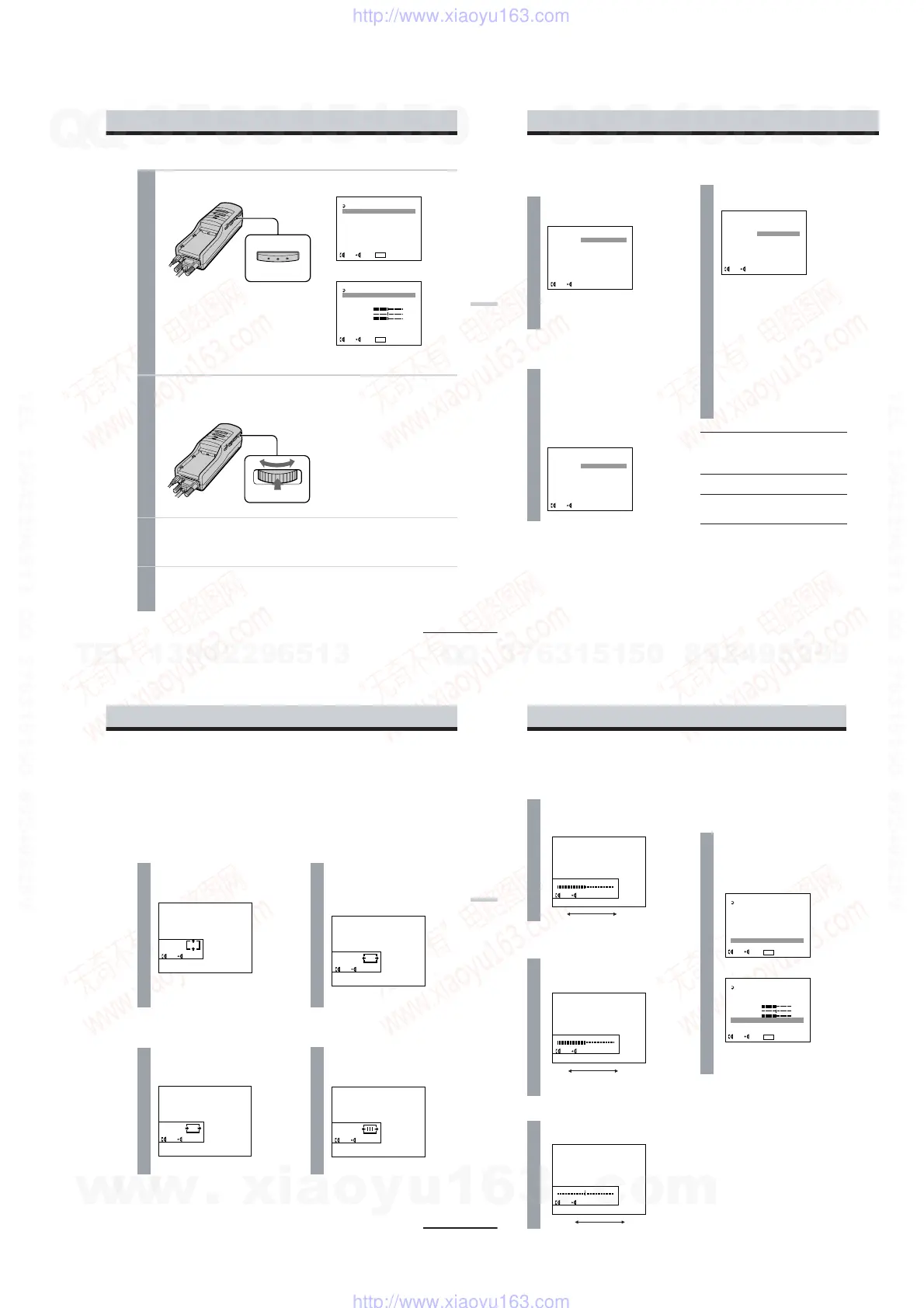
1
Press MENU.
The menu display appears on the screen.
2
Turn the PUSH DISPLAY jog dial to select the desired item, then
press the jog dial.
The setting screen of the selected item appears.
3
Adjust the setting using the jog dial.
For details on each item, see pages 26 to 28.
To set other items, repeat steps 2 and 3.
4
Press MENU.
The menu display goes off.
You can also turn off the menu display by selecting EXIT in the menu using the jog dial.
PC mode
VIDEO mode (S VIDEO)
MENU
MENU
EXIT
AVLS :
MEGA BASS :
POWER SAVE :
V CENT
H CENT
TRACKING
SYNC
PRESET
EXEC
SEL EXIT
MENU
0
OFF
OFF
MENU
EXIT
AVLS :
MEGA BASS :
POWER SAVE :
CONTRAST
HUE
COLOR
RESET
EXEC
SEL EXIT
MENU
OFF
0
OFF
PUSH DISPLAY
continued
26
-US
Adjusting the sound and picture (continued)
AVLS (Auto Volume Limiter
System)
Turn the jog dial to set to
ON, then press the jog dial.
When AVLS is on, the volume does
not become louder than the level you
set even if you turn the VOL control.
MEGA BASS
Turn the jog dial to select
the desired value, then
press the jog dial.
2: Maximize the bass sound.
1: Boost the bass sound.
0: Normal bass sound.
POWER SAVE
Turn the jog dial to set to
ON, then press the jog dial.
When you take off the display unit
while the POWER SAVE is set to ON,
the POWER SAVING SENSOR (page
7) is activated and automatically
turns off the picture and sound. The
picture and sound resume a few
seconds after putting the display unit
back on.
When POWER SAVE is set to ON,
you can monitor the status of the
Personal LCD Display by checking
the POWER/POWER SAVING
indicator.
Status
Normal
Power
save
mode
Note
The power saving function of the Personal
LCD Display works independently from the
power management function of your PC.
POWER/
POWER
SAVING
indicator
Lit in
green
Lit in
orange
Picture
Normal
No
picture
Power
consumption
100%
5%
ON
OFF
EXEC
SEL
AVLS :
POWER SAVE :
EXEC
SEL
ON
OFF
MEGA BASS :
EXEC
SEL
2
1
0
27
Operations
Adjusting the RGB signal
Note
When you display the picture on both the LCD display of the notebook PC and on the Personal LCD
Display, depending on the notebook PC, you may not be able to adjust the picture on the Personal LCD
Display due to the mismatch of the output signal frequencies. In this case, change the display mode on
your PC to the external monitor only. Then, change the screen resolution according to the list on
“Signal compatibility” (page 23).
V CENT
Turn the jog dial to adjust
the center of the picture,
then press the jog dial.
SYNC
Turn the jog dial to adjust
the clearance of the picture,
then press the jog dial.
H CENT
Turn the jog dial to adjust
the center of the picture,
then press the jog dial.
TRACKING
Turn the jog dial until the
stripes on the picture
disappear, then press the
jog dial.
V CENT
EXECADJ
H CENT
EXECADJ
TRACKING
EXECADJ
SYNC
EXECADJ
continued
28
-US
Note
The settings are retained even when you turn
off the power.
Resetting the
adjustments to the
factory preset level
All settings except AVLS, MEGA BASS, and
POWER SAVE settings are reset to the
factory preset level.
Turn the jog dial to select
PRESET or RESET in the
menu, then press the jog
dial.
CONTRAST
Turn the jog dial to adjust
the contrast, then press the
jog dial.
COLOR
Turn the jog dial to adjust
the color intensity, then
press the jog dial.
Adjusting the video signal
less more
less more
PC mode
HUE
Turn the jog dial to adjust the
hue, then press the jog dial.
reddish greenish
CONTRAST
EXECADJ
HUE
EXECADJ
COLOR
EXECADJ
MENU
EXIT
AVLS :
MEGA BASS :
POWER SAVE :
V CENT
H CENT
TRACKING
SYNC
PRESET
EXEC
SEL EXIT
MENU
0
OFF
OFF
MENU
EXIT
AVLS :
MEGA BASS :
POWER SAVE :
CONTRAST
HUE
COLOR
RESET
EXEC
SEL EXIT
MENU
OFF
0
OFF
Adjusting the sound and picture (continued)
VIDEO mode (S VIDEO)
w
w
w
.
x
i
a
o
y
u
1
6
3
.
c
o
m
Q
Q
3
7
6
3
1
5
1
5
0
9
9
2
8
9
4
2
9
8
T
E
L
1
3
9
4
2
2
9
6
5
1
3
9
9
2
8
9
4
2
9
8
0
5
1
5
1
3
6
7
3
Q
Q
TEL 13942296513 QQ 376315150 892498299
TEL 13942296513 QQ 376315150 892498299
http://www.xiaoyu163.com
http://www.xiaoyu163.com


 To Next Page