1-9
9
-US
Getting Started
AUDIO
RGB
Connecting the Personal LCD Display
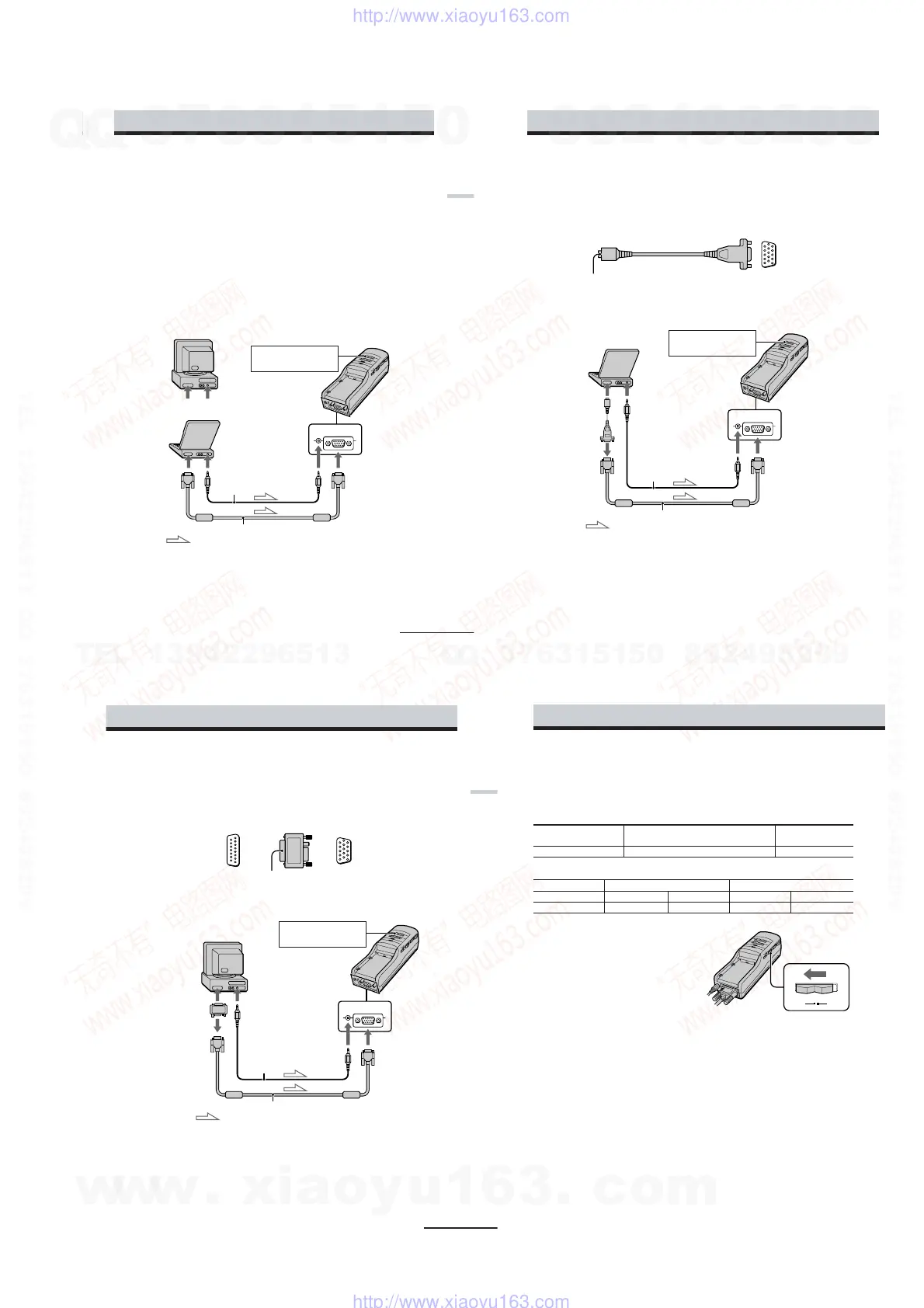
Connecting a PC
Be sure to turn off your PC before connecting the power supply box.
To enjoy 3D stereoscopic pictures, the control signal must be supplied to the CONTROL
connector. See “Supplying the control signal” in page 12.
Notes
•Do not use an RGB signal cable (HD15) which is 6.5 feet (2 m) or longer. The performance may be
reduced.
•Refer to the instruction manual supplied with your PC as well.
•Depending on your computer, the audio port may be indicated as LINE OUT, headphone, speaker,
etc.
•Adjust sound volume on the computer.
Connecting other IBM compatible PCs
Connect the Personal LCD Display to your PC using a commercially available RGB signal
(HD15) cable. When you connect the Personal LCD Display to your PC, set the PC-VIDEO
switch on the power supply
box to “PC.”
to monitor port to audio port
or
to monitor port
to audio port
: Signal flow
Audio cable
RGB signal cable
to AUDIO
connector
to RGB connector
Power supply box
Set the PC-VIDEO switch
to “PC.”
continued
10
-US
AUDIO
RGB
Connecting the Personal LCD Display (continued)
Connecting a Macintosh Powerbook
Depending on the model, you may need to use a commercially available adapter to connect a
commercially available RGB signal cable as shown below. When you connect the Personal LCD
Display to your Powerbook, set the PC-VIDEO switch on the power supply box to “PC.”
VGA type connector
(HD15, female)
Connector should match the monitor
port of your Powerbook model.
to monitor
port of
Powerbook
to RGB
signal cable
<
Set the PC-VIDEO switch
to “PC.”
to monitor port to audio port
: Signal flow
RGB signal cable
to AUDIO
connector
to RGB connector
Audio cable
Adapter
Power supply box
Note on connection
Set the display setting to 16-inch display mode (832 × 624) or 13-inch display mode (640 ×
480).
The Personal LCD Display cannot display images with the 19-inch display mode (1024
× 768) setting or
more.
,
11
-US
Getting Started
AUDIO
RGB
Connecting a Macintosh (desktop models)
Depending on the model, you may need to use a commercially available Macintosh adapter to
connect a commercially available RGB signal cable as shown below. When you connect the
Personal LCD Display to your Macintosh, set the PC-VIDEO switch on the power supply box to
“PC.”
Set the PC-VIDEO switch
to “PC.”
to monitor port to audio port
: Signal flow
RGB signal cable
to AUDIO
connector
to RGB connector
Audio cable
VGA type connector
(HD15, female)
to monitor
port
Power supply box
to monitor port
of Macintosh
to RGB signal cable
Macintosh
adapter
Notes on connection
• Use a commercially available Macintosh adapter which suppors the models after the Macintosh II
series.
• Set the display setting to 16-inch display mode (832 × 624) or 13-inch display mode (640 × 480). The
Personal LCD Display cannot display images with the 19-inch display mode (1024 × 768) setting or
more.
<
,
(D-Sub 15-pin,
male)
continued
12
-US
Connecting the Personal LCD Display (continued)
Supplying the control signal
To enjoy 3D stereoscopic pictures in PC mode, the control signal must be supplied to the
CONTROL connector. There are two signals; “2D/3D stereoscopic control signal” and “frame
control pulse.”
• 2D/3D stereoscopic control signal
2D/3D stereoscopic OPEN (No connection) or high impedance Low (0 - 1.0 V DC)
control signal
PC mode
2D mode 3D stereoscopic mode
• Frame control pulse
POLARITY switch A POLARITY switch B
Frame control pulse H (4.0 - 5.0 V DC) L (0 - 1.0 V DC) H (4.0 - 5.0 VDC) L (0 - 1.0 VDC)
Output video signal
Right side video signal Left side video signal Left side video signal Right side video signal
Setting the POLARITY switch
To display the 3D stereoscopic pictures
correctly, set the POLARITY switch
according to the table above.
AB
POLARITY
w
w
w
.
x
i
a
o
y
u
1
6
3
.
c
o
m
Q
Q
3
7
6
3
1
5
1
5
0
9
9
2
8
9
4
2
9
8
T
E
L
1
3
9
4
2
2
9
6
5
1
3
9
9
2
8
9
4
2
9
8
0
5
1
5
1
3
6
7
3
Q
Q
TEL 13942296513 QQ 376315150 892498299
TEL 13942296513 QQ 376315150 892498299
http://www.xiaoyu163.com
http://www.xiaoyu163.com


 To Next Page