1-11
17
-US
Getting
Started
1
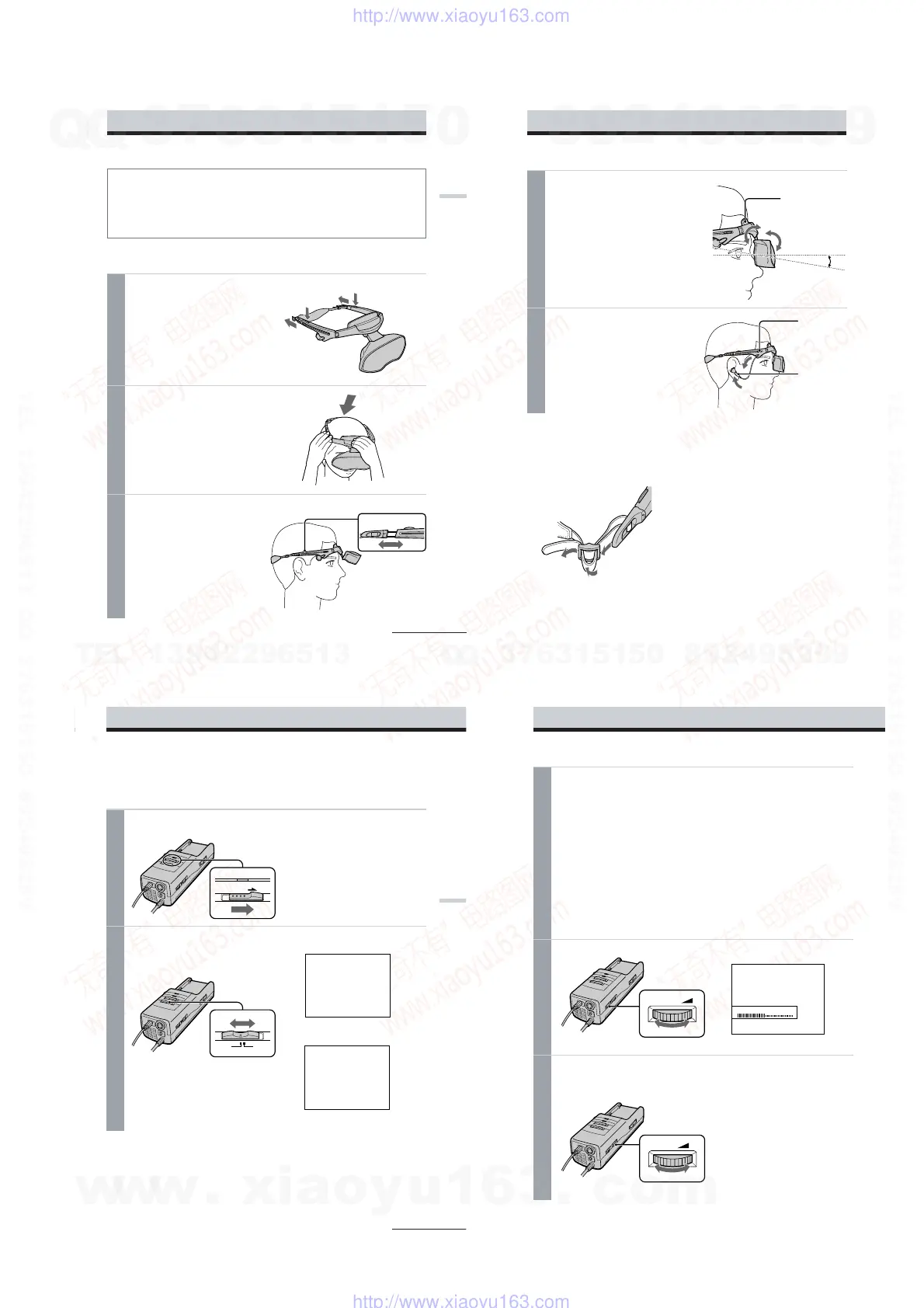
Loosen the back strap.
1 Press and hold the strap release
buttons.
2 Then, loosen the back strap in the
direction of the arrows.
2
Put on the Personal LCD Display.
Hold the front pad against your
forehead and place the rear strap so it is
fixed firmly around the back of your
head.
3
Adjust the strap.
Adjust the strap after putting on the
Personal LCD Display.
Make sure the strap is snug but
comfortable.
2
2
1
1
Wearing the Personal LCD Display
WARNING
• Failure to properly fit the product each time may result in eye fatigue, eye damage, or loss
of visual functions and may result in accident or injury.
• This product should not be used by children age 15 or younger.
The eyes of children are still developing and may be adversely affected by use of this
product, and it may cause eye fatigue, eye damage, or loss of visual functions.
In addition, this product may not be adjusted to fit a child’s head.
If you normally wear glasses while watching TV, you can use the Personal LCD Display while
wearing glasses.
continued
18
-US
4
Adjust the angle of the display unit.
While holding the front pad against
your forehead, adjust the angle of the
display unit using the two hinges. Move
the display unit close to your eyes at a
slight downward angle. If you wear
glasses, move the display unit as close to
the lenses as possible.
5
Adjust the stereo earphones.
Pull the earphones out.
To adjust the slack, reel in the earphone
cord by pressing the slide button in the
direction of the arrow.
Front pad
Stereo
earphones
5 – 10°
Adjusting the back strap
If the strap does not fit properly in step 3,
adjust the strap by changing the belt length.
Earphones
slide button
Wearing the Personal LCD Display (continued)
20
-US
Using the Personal LCD Display (continued)
3
Input the signal from the connected equipment.
When you connect the PC:
Adjust the screen resolution. For details, see “Signal compatibility” on page 23.
When you display VGA pictures (640 × 480), the picture appears about 60% of the entire
screen.
Notes
• If no picture appears, check the default setting of your PC to output the external RGB signal
from the monitor connector.
• Some PCs do not output external display signal when they turn on, or switch to external
display mode. Change the display mode of your PC, referring to the instruction manual
supplied with your PC.
When you connect the video equipment:
Start playback on the video equipment connected to the Personal LCD Display.
When you display NTSC video picture, the picture appears about 60% of the entire
screen. For PAL video picture, the picture appears about 84% of the entire screen.
4
Adjust the brightness by
turning
the BRIGHT control.
5
Adjust the sound volume by turning the VOL control.
When you set AVLS (Auto Volume Limiter System) in the menu to on, you cannot turn
up the volume beyond the defined limit (see page 24 ). If the audio input level is too high,
the sound may be distorted. Turn the volume down using the VOL control.
darker y brighter
lower y louder
BRIGHT
BRIGHTNESS
VOL
19
-US
Operations
When you select PC (PC mode)
When you select VIDEO
(Video mode)
Using the Personal LCD Display
Before you start…
Be sure to follow the procedures in “Connecting the Personal LCD Display” (pages 9 to 16) and
“Wearing the Personal LCD Display” (pages 17 and 18).
1
Turn on the Personal LCD Display using the POWER switch.
The POWER/POWER SAVING lamp lights up green.
2
Select the input signal using the PC-VIDEO switch.
Select PC (RGB signal) or VIDEO (video
signal) depending on the connected
equipment.
“S VIDEO” appears on the screen.
Note
Only the S-Video connector is available to
input the video signal to the Personal LCD
Display.
ON / OFF
POWER / POWER SAVING
PC
VIDEO
PC / RGB
continued
S VIDEO
w
w
w
.
x
i
a
o
y
u
1
6
3
.
c
o
m
Q
Q
3
7
6
3
1
5
1
5
0
9
9
2
8
9
4
2
9
8
T
E
L
1
3
9
4
2
2
9
6
5
1
3
9
9
2
8
9
4
2
9
8
0
5
1
5
1
3
6
7
3
Q
Q
TEL 13942296513 QQ 376315150 892498299
TEL 13942296513 QQ 376315150 892498299
http://www.xiaoyu163.com
http://www.xiaoyu163.com


 To Next Page