3-17
[Preparation for Adjustment]
1. Service Jigs
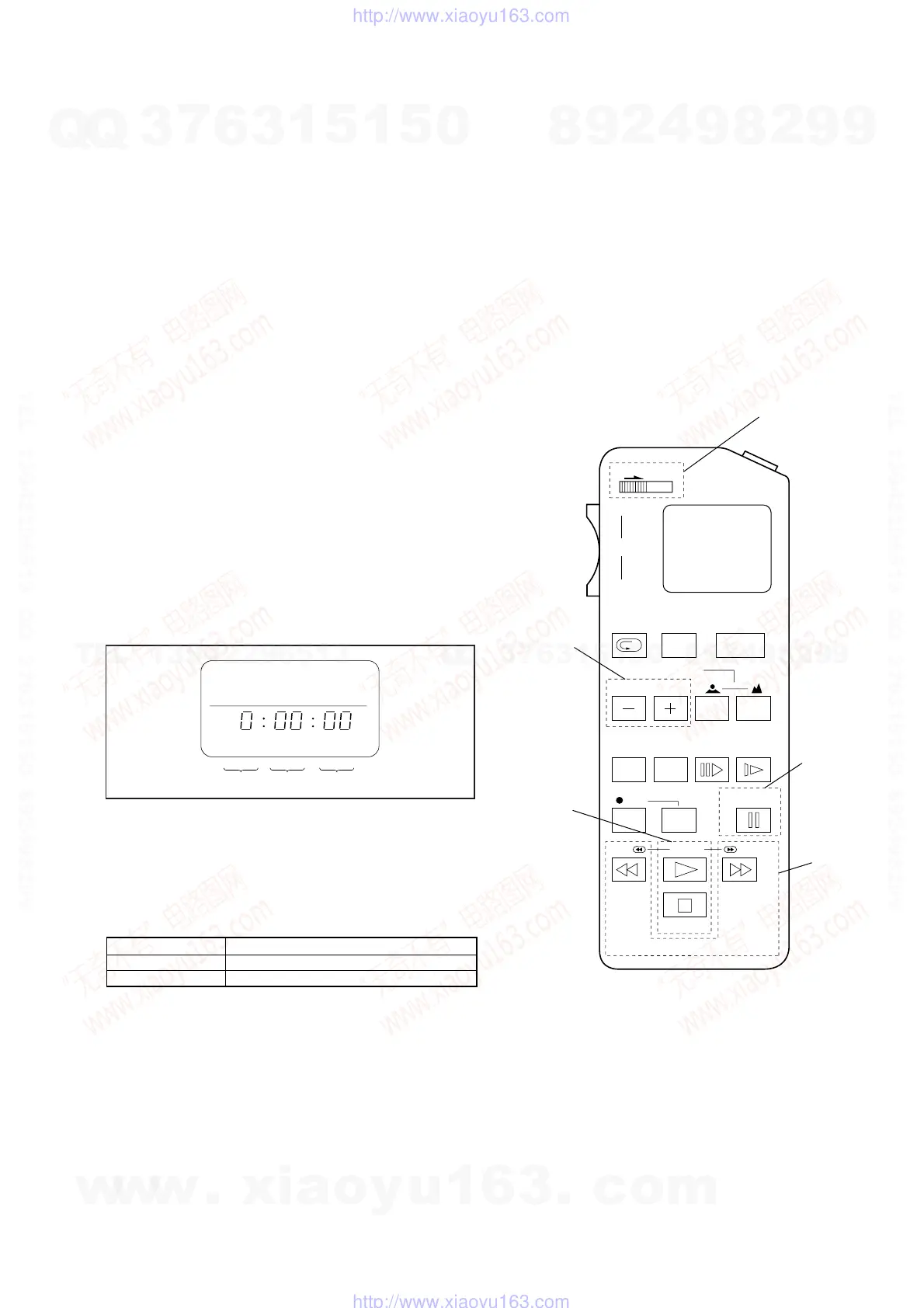
1. Adjusting remote commander (RM-95-modified)
Note: J-6082-053-B
2. Extension cable (for remote commander plug converter)
J-6082-291-A
Note: The page will not be changed over, unless the microprocessor in
the adjusting remote commander is a new one (uPD7503-G-C56-
12). In such a case, replace with new microprocessor (8-759-148-
35).
2. Adjusting Remote Commander
For the adjustment, the adjustment data saved in the nonvola-
tile memory (EEPROM) must be rewritten, and for this pur-
pose the adjusting remote commander is used.
The adjusting remote commander makes two-way communi-
cation with the set using a remote control signal line (LANC).
The adjusting remote commander transmits pages, addresses,
and data up/down commands to the set. The set transmits pages,
addresses, and data to the adjusting remote commander.
3. How to Use The Adjusting Remote Commander
1. Connect the adjusting remote commander to the CN501 on
MA-324 (H) board via extension cable (J-6082-291-A).
At this time, set the switch of extension cable to OFF
(OPEN) position
Set the [PC] or [VIDEO] mode and turn ON the power on the
set.
2. Set the HOLD switch on the adjusting remote commander to
the HOLD (SERVICE) position.
If connection is normal, the LCD display on the adjusting re-
mote commander will be as shown in Fig.3-2.
Fig. 3-2
3. Operate the adjusting remote commander as follows:
• Page change
Press the EDIT SEARCH + button to increase the page.
Press the EDIT SEARCH – button to decrease the page.
There are 16 pages from 0 to F.
• Address change
Press the FF (M) button to increase the address.
Press the REW (m) button to decrease the address.
There are 256 addresses from 00 to FF.
• Data change (data setting)
Press the PLAY (N) button to increase the data.
Press the STOP (x) button to decrease the data.
There are 256 data from 00 to FF.
• Adjustment data writing
The PAUSE button must be pressed to write adjustment data
(E or F pages) to the nonvolatile memory (EEPROM). (Un-
less the PAUSE is pressed, new data are not saved in the
nonvolatile memory.)
4. Select page: 0, address: 01, and set 01 data. Thus, the data
input to page: E or F is enabled.
5. After the adjustment finished, select page: 0, address: 01, and
set 00 data. Thus, the data change on page E or F is disabled.
6. After all adjustments finished, turn OFF the main power sup-
ply (8.4 V) once.
4. Precaution on Use of The Adjusting Remote Commander
Misoperation of the adjusting remote commander could erase
correct data. To prevent this, it is recommended to make a note
of data from page E or F before adjustment, and also to make
a note of new adjustment data each time the adjustment of one
item is finished.
Fig. 3-3
Hexadecimal numbers
LCD display
Decimal conversion
0123456789ABCDEF
10
23456789 A b c d E F
10
2 3 4 5 6 7 8 9 10 11 12 13 14 15
(
)
HOLD
START/
STOP
WIDE
ZOOM
TELE
REC
REVIEW
FOCUS
POWER
AUTO/MAN
EDIT SEARCH
COUNTER
RESET DISPLAY FRAME SLOW
REC
PAUSE
REW
FF
RM-95
STOP
PB
Adjusting Remote Commander RM-95 (J-6082-053-B)
Address
change
NORMAL(NOR)/SERVICE (ADJ)
mode selection
Page change
Data change
Data writing
Page Data Address
w
w
w
.
x
i
a
o
y
u
1
6
3
.
c
o
m
Q
Q
3
7
6
3
1
5
1
5
0
9
9
2
8
9
4
2
9
8
T
E
L
1
3
9
4
2
2
9
6
5
1
3
9
9
2
8
9
4
2
9
8
0
5
1
5
1
3
6
7
3
Q
Q
TEL 13942296513 QQ 376315150 892498299
TEL 13942296513 QQ 376315150 892498299
http://www.xiaoyu163.com
http://www.xiaoyu163.com


 To Next Page