Preparations Prior to Access from a Remote Location
16
Step 5 Registering Your Computer with the Base Station
Pre-release version
2
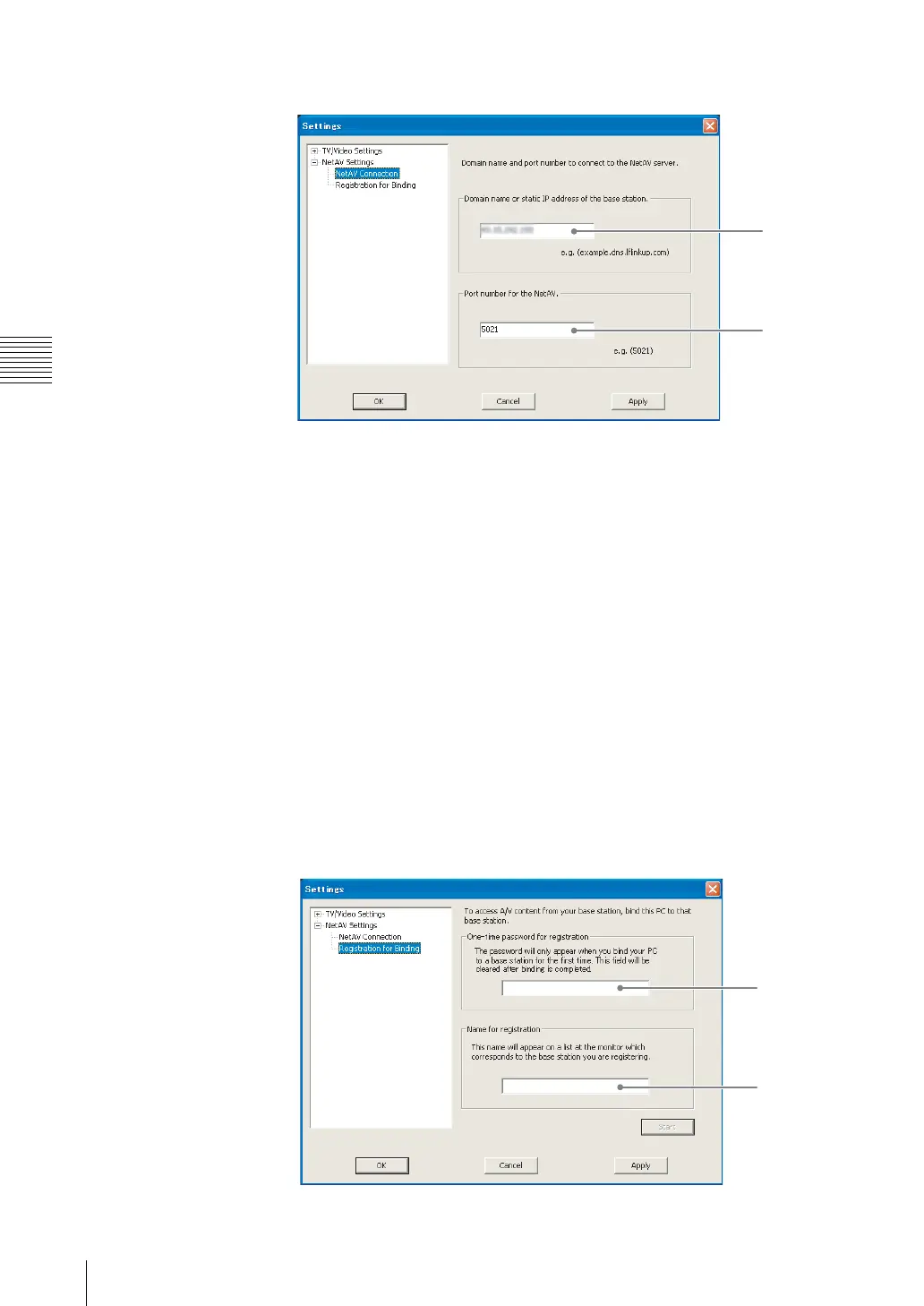
Click [NetAV Settings], [NetAV Connection], and confirm the settings.
(1) Type the domain name or static IP address of the target base station.
(2) Type the port number of the target base station.
z Tip
When connected to the base station, this screen cannot be displayed.
Re-registering Your Computer with the Base Station
Perform registration again if you delete the information for a computer registered
with the base station on the LF-X1 or LF-X5 or initialize the base station.
Re-registering is necessary only if the registered computer does not appear when
you select [Settings], [Base station], [NetAV Settings], and then open the
[Register Other Monitors] screen (1 page 13) on the LF-X1 or LF-X5.
1
Perform the procedure described in “Step 4 Getting the Base Station Ready
to Register Your Computer” (1 page 12).
2
Verify that the information of the target base station is correct (1 page 16).
3
Click [Registration for Binding], and then configure all the settings.
(1)
(2)
(1)
(2)



 To Next Page