NAS-E35HD/SS-CE35HD
7
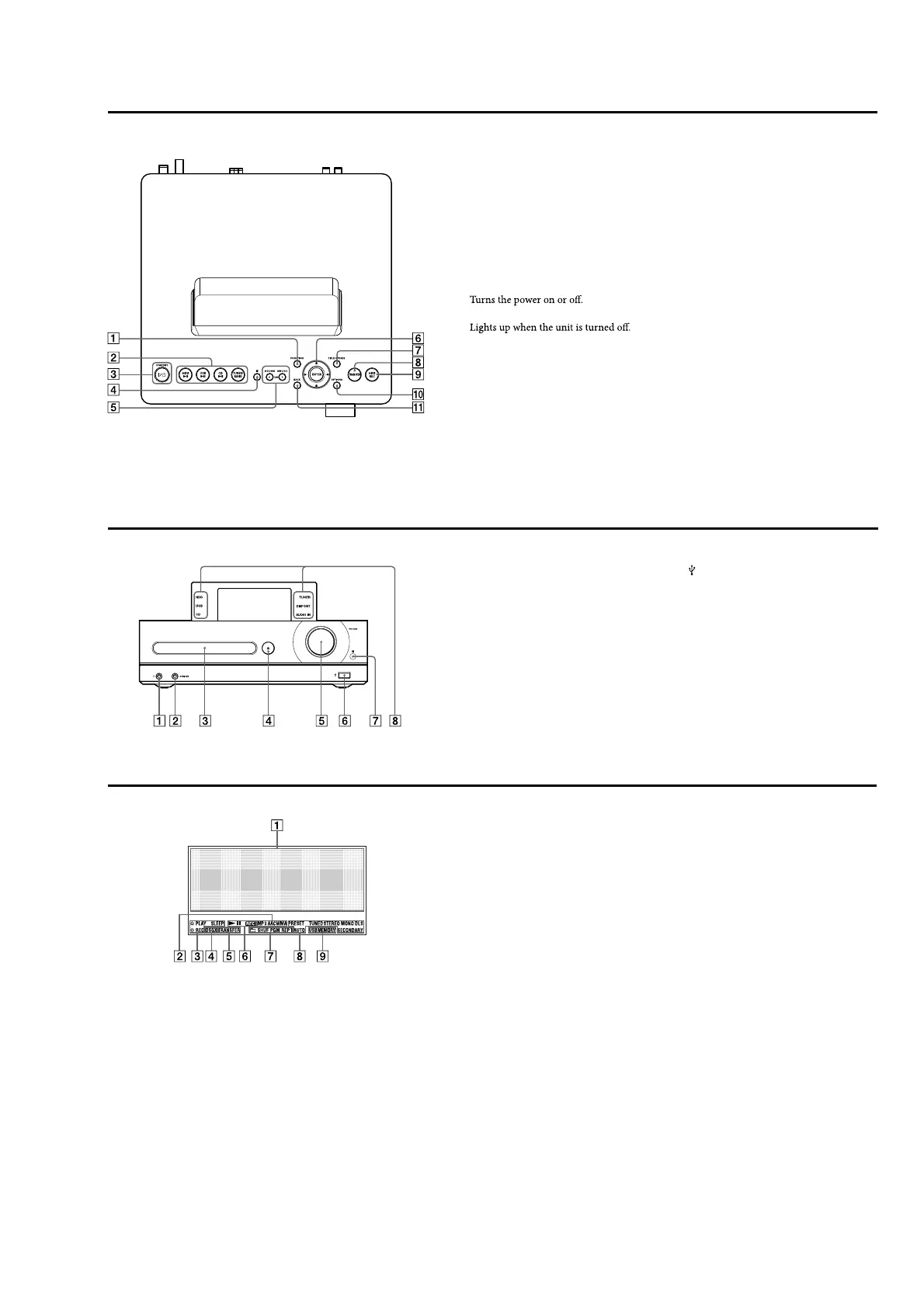
Top of the main unit
FUNCTION button
Use to select a function.
Playback buttons
Usetoselectthefunction directlyandstart
playback at the same time.
•
HDD button
•
USB button
•
CD button
•
TUNER/BAND button
/
(power) button and STANDBY
indicator
•
(power) button
•
STANDBY indicator
(stop) button
Use in each function to stop an operation.
• , • , and TUNE+ •
TUNE– buttons
•
and
buttons
Cues the beginning of a track.
•
and
buttons
Fast rewind and fast forward the playback.
•
TUNE + and TUNE – buttons
Use to adjust the tuning frequency.
Menu operation buttons
Use to select menu items and enter menu
settings.
•
,
,
and
buttons
Use to select a menu item or to change a
setting.
•
ENTER button
Use to enter a setting.
TITLE UPDATE button
Useto displaytheTitleUpdatemenu.
For the UK model
TITLE UPDATE/DAB AUTO SCAN button
•
DAB AUTO SCAN button
Use to scan DAB services automatically
while the unit is in the DAB function.
TRANSFER button
Use to transfer tracks to a USB device.
(headphones) jack
Use to connect headphones.
AUDIO IN jack
Use to connect the audio output jack of an
external component.
Disc tray
Use to load a CD.
CD button
Opens and closes the disc tray.
VOLUME dial
Use to adjust the volume.
Front of the main unit
(USB) port
Use to connect a USB device.
Remote sensor
Function indicators
Lights up to indicate the selected function.
HDD REC button
Useforrecordingtothe HDDJukebox.
OPTIONS button
Displays the Option menu.
Menu items will vary according to the
selected function.
BACK button
Usetogobacktotheprevious display.
Display
Text information
Displays text information, such as a track
name, album name, etc.
Audio format indicators
Lights up to indicate the audio format.
Timer indicators
Lights up when the Play Timer, Recording
Timer, or Sleep Timer is set.
DSGX indicator
Lights up when the DSGX function is set to
“ON”.
TRANSFER indicator
Lights up while audio data is being
transferred.
Operation status indicators
Lights up to indicate the current operation
status (playing, recording, or paused).
Play mode indicators
Lights up to indicate the current play mode.
Tuner reception indicators
Lights up when the respective radio
function is active.
USB MEMORY indicator
Lights up when a USB device is connected.












 To Next Page