NAS-E35HD/SS-CE35HD
6
SECTION 2
GENERAL
This section is extracted
from instruction manual.
Remote control
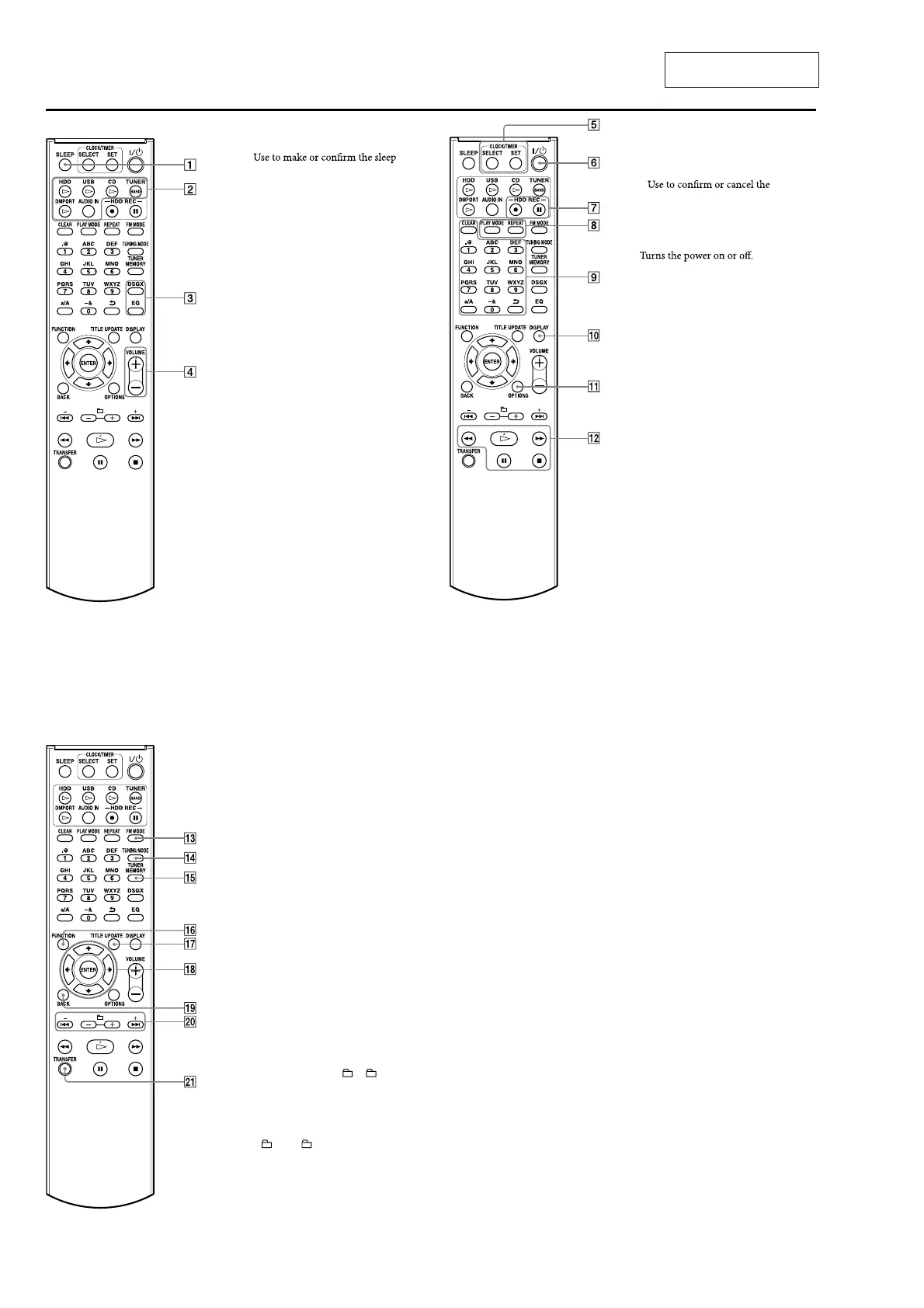
SLEEP button
setting.
Playback buttons
Use to select the function directly and
start playback at the same time.
•
HDD button
•
USB button
•
CD button
•
TUNER/BAND button
•
DMPORT button
•
AUDIO IN button
DSGX and EQ buttons
•
DSGX button
Use to generate a more dynamic sound
(Dynamic Sound Generator X-tra).
Each press of the button switches the
DSGX function “ON” or “OFF”. is
function is factory set to “ON”.
•
EQ (equalizer) button
Use to adjust the bass and treble.
Press this button to display “BASS”,
andthenpressor to adjust
the bass. Aer adjusting the bass
sound, press this button again to
display “TREBLE”, and then press
or to adjust the treble.
VOLUME+* and VOLUME– buttons
Useto adjustthevolume.
An asterisk (*) indicates buttons that
have a tactile dot (the VOLUME +
button).
CLOCK/TIMER buttons
Usetosettheclockortimer.
•
SELECT button
•
SET button
setting.
Use to display the clock or timer menu.
/ (power) button
HDD REC buttons
Use for recording to the HDD Jukebox.
•
HDD REC (start recording) button
•
HDD REC (pause recording) button
PLAY MODE and REPEAT buttons
•
PLAY MODE button
Use to select a play mode.
•
REPEAT button
Use to select a repeat mode.
Numeric*/text buttons
Use to select a track during play or to
enter text.
Use to select a preset FM or AM station
or a DAB service.
DISPLAY button
Use to display information such as time
information, clock, demonstration, etc.
OPTIONS button
Displays the Option menu.
Menu items will vary according to the
selected function.
Operation buttons
Use in all functions to perform basic
operations.
•
(play) button*
•
(fast rewind) and
(fast forward) buttons
•
(pause) button
•
(stop) button
An asterisk (*) indicates buttons that
have a tactile dot (the number “5”
button and (play) button of the
operation buttons ).
FM MODE button
Usetoselectstereoormonauralwhile
listening to an FM broadcast.
TUNING MODE button
Use to select the tuning mode.
TUNER MEMORY button
Use to preset a radio station or DAB
service (UK model only).
FUNCTION button
Use to select a function.
TITLE UPDATE button
Useto displaytheTitleUpdatemenu.
Menu operation buttons
Use to select menu items and enter menu
settings.
•
,
,
and
buttons
Use to select a menu item or to change
asetting.
•
ENTER button
Use to enter a setting.
BACK button
Usetogobacktotheprevious display.
+ • –, • and
+ • – buttons
•
+ and – buttons
Use to adjust the tuning frequency.
•
and
buttons
Cues the beginning of a track.
•
+ and – buttons
Use to select an album or a folder.
TRANSFER button
Use to transfer tracks to a USB device.
timer
timer












 To Next Page