Portable Headphone Amplifier
PHA-3
Summary of settings and connections
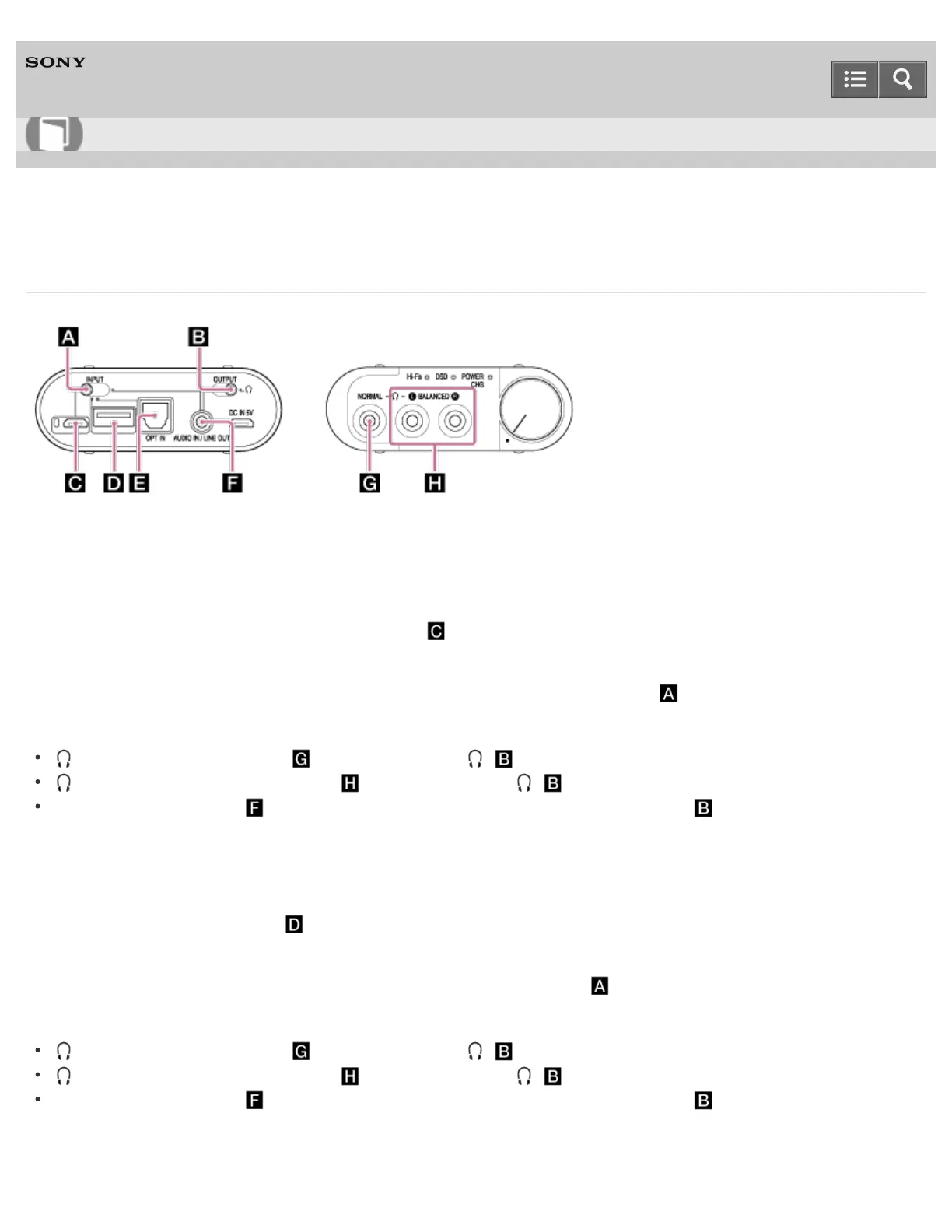
When connecting a Windows computer, Mac, digital output supported
WALKMAN or digital output supported Xperia to the headphone amplifier
The connecting port
Xperia/WALKMAN/PC (USB AUDIO) connecting port
The position of the INPUT select switch
Left edge position where the Xperia/WALKMAN/PC (USB AUDIO) connecting port is
The jack that the audio signal is output from/the position of the OUTPUT select switch
(headphones) NORMAL jack /right edge position ( )
(headphones) BALANCED L/R jack /right edge position ( )
AUDIO IN/LINE OUT jack /left edge position where the AUDIO IN/LINE OUT jack is
When connecting an iPhone/iPad/iPod to the headphone amplifier
The connecting port
iPhone/iPad/iPod connecting port
The position of the INPUT select switch
Second position from the left where the iPhone/iPad/iPod connecting port is
The jack that the audio signal is output from/the position of the OUTPUT select switch
(headphones) NORMAL jack /right edge position ( )
(headphones) BALANCED L/R jack /right edge position ( )
AUDIO IN/LINE OUT jack /left edge position where the AUDIO IN/LINE OUT jack is
When connecting an optical out jack supported device to the headphone
Help Guide
How to Use









 To Next Page