Setting the Time Data
63
Chapter 3 Adjustments and Settings
You can synchronize the internal timecode
generator of this camcorder with an external
generator for the regeneration of an external
timecode. You can also synchronize the timecode
generators of other camcorders/VTRs with the
internal generator of this camcorder.
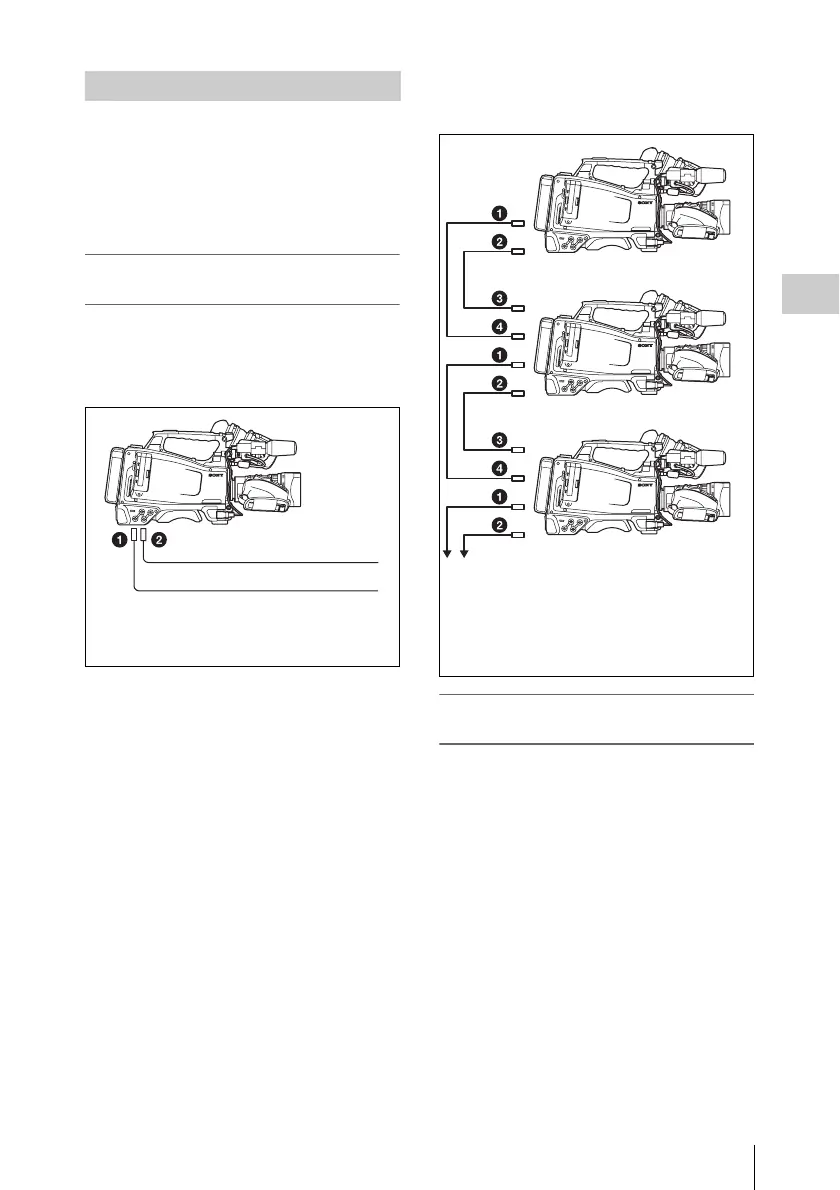
Connections for timecode
synchronization
Connect both the reference video signal and the
external timecode as illustrated below.
Example 1: Synchronizing with an external
timecode
Example 2: Interconnecting a number of
camcorders (including one reference
camcorder)
To lock the timecode to an external
source
1 Turn on the POWER switch.
2 Set the PRESET/REGEN/CLOCK
switch to PRESET.
3 Set the F-RUN/SET/R-RUN switch to
F-RUN.
4 Set the DISPLAY switch to TC.
5 Supply a timecode signal and a
reference video signal complying with
the SMPTE standard and in proper
phase relationship, to the TC IN
connector and to the GENLOCK IN
connector, respectively.
Synchronizing the Timecode
External timecode
1 GENLOCK IN connector
2 TC IN connector
Reference video signal
1 VIDEO OUT connector
2 TC OUT connector
3 TC IN connector
4 GENLOCK IN connector
To another camcorder to be synchronized



 To Next Page