Planning Metadata Operations
79
Chapter 4 Shooting
2 Display the picture that you want to use
as the frame, and then turn on the
assignable switch to which the Freeze
Mix function has been assigned.
The recording review picture is frozen and
overlaps the camera picture.
Note
The following functions are disabled at the freeze mix
times.
• Menu operations
• During Focus Mag display
• Marker display
• Zebra display
• Peaking display
• Skin details display
To cancel the freeze mix display
Do one of the following.
• Press an assignable switch again to which the
Freeze Mix function has been assigned.
The freeze mix display is canceled and the
display returns to the normal camera picture.
• Start recording (see page 70).
Normal recording starts.
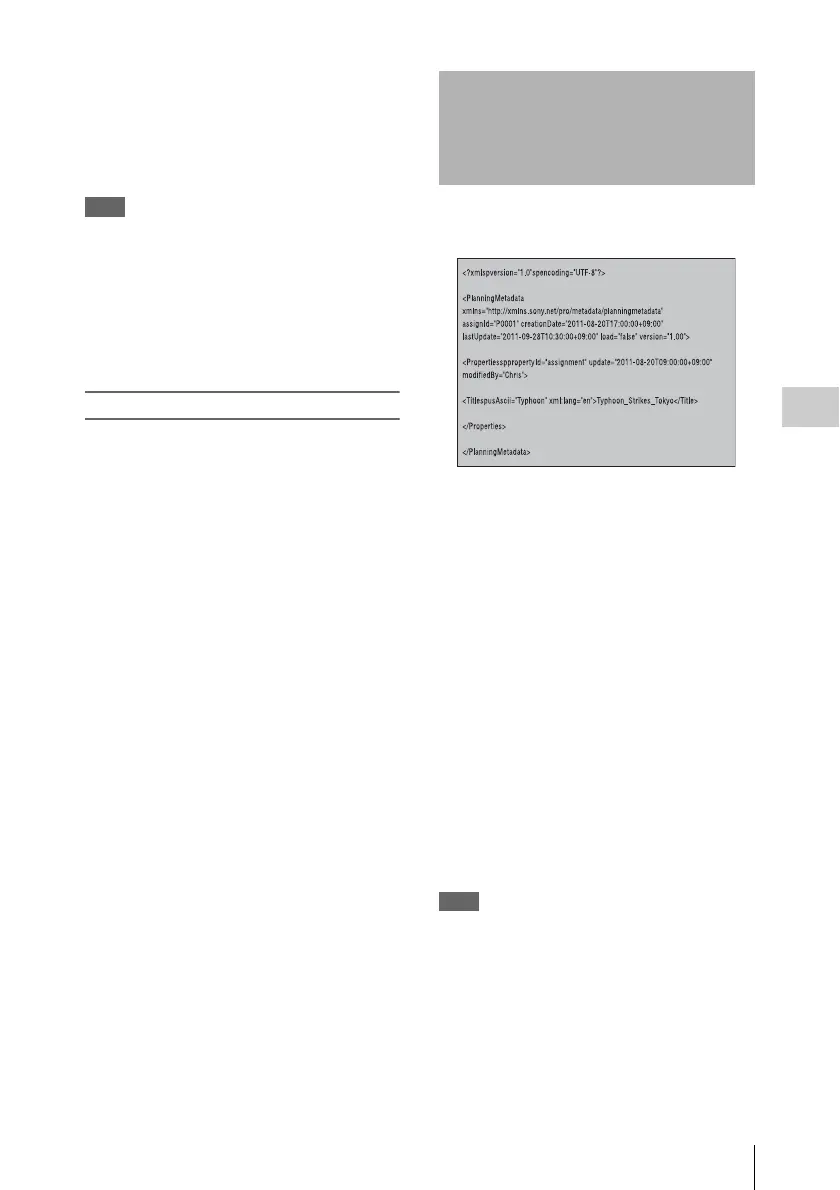
Planning metadata is information about shooting
and recording plans, recorded in an XML file.
Example of a planning metadata file
You can shoot using clip names and shot mark
names defined in advance in a planning metadata
file.
The camcorder can display clip names and shot
mark names defined in the following languages.
•English
•Chinese
•German
• French
1)
•Italian
• Spanish
•Dutch
1)
• Portuguese
•Swedish
• Norwegian
•Danish
•Finnish
1)
1) Some characters are displayed as different but similar
characters.
Note
If you define clip name and shot mark names in
languages other than the above, they may not be
displayed on the viewfinder screen.
On the viewfinder screen, only alphanumeric characters
and symbols can be displayed.
Planning Metadata
Operations



 To Next Page