Clip Playback
84
Chapter 5 Clip Operations
a Index picture
When a clip is recorded, its first frame is set
automatically as the index picture. You can
change to index picture to any frame (see
page 94).
b Lock mark
Indicates the selected clip is marked with an OK
mark and protected.
c Date and start time of recording
d Clip name
e Independent AV file icon
This appears only when a clip is an independent
AV file. SxS memory cards may contain
independent files that have been added directly
from a computer. Because independent files lack
the associated management files, some operations
and information displays may not be available.
f Video format of recording
g Special recording information
This displays the mode of clips that have been
recorded in a special mode (Slow & Quick
Motion, Interval Rec, Frame Rec).
For Slow & Quick Motion clips, the frame rates
are displayed to the right as [Recording frame
rate/Playback frame rate] fps.
h OK mark
An OK mark appears only when the clip has been
marked with an OK mark (see page 90).
i File format
Indicates the file format of the selected clip
(MP4).
j Clip duration
k Timecode
This is the timecode of the index picture.
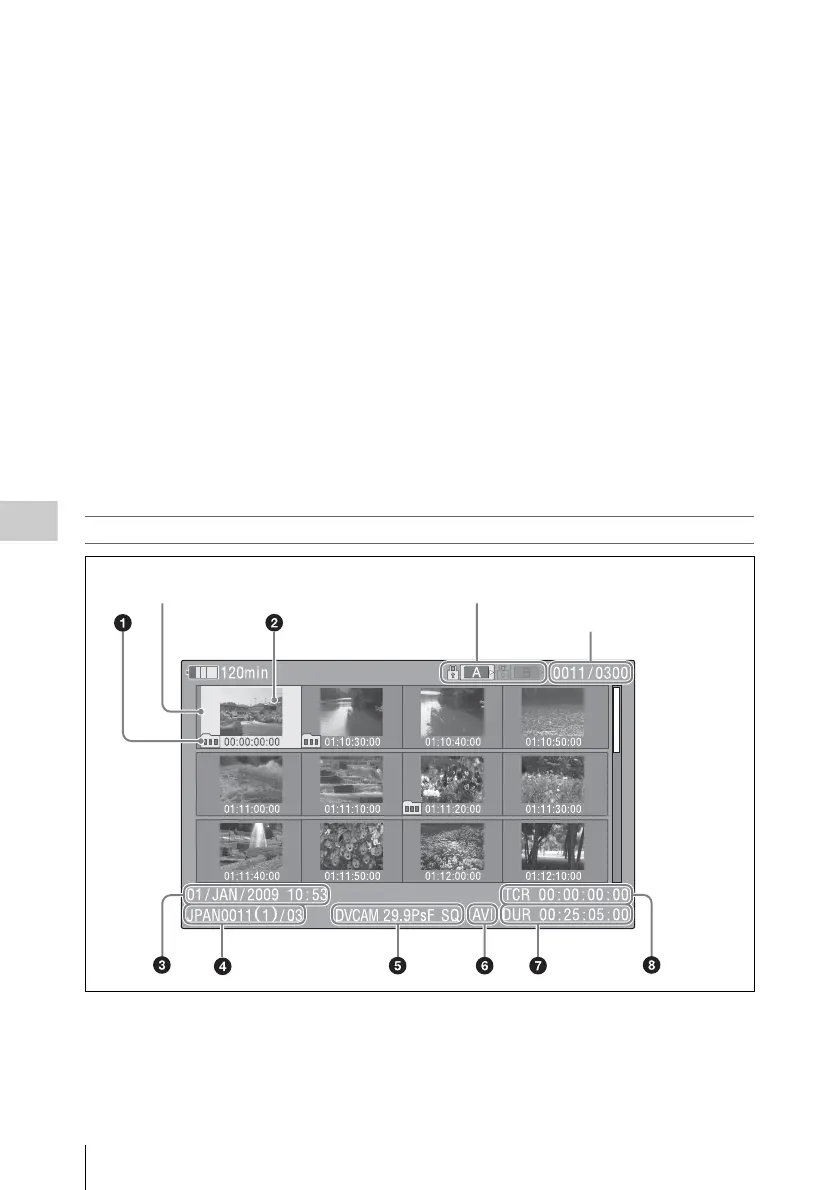
SD mode thumbnail screen
a Take mark
Indicates that the file size is larger than 2 GB, and
that the clip has been split before being saved.
You can check the segment files on the expand
thumbnail screen (see page 92).
b Index picture
When a clip is recorded, its first frame is set
automatically as the index picture.
Clip number/Number of components
Cursor (yellow)
The icon of the currently selected SxS memory card is highlighted.
(If the card is write protected, a lock appears on the left.)



 To Next Page