Checking Camcorder Settings and Status Information (Status Screens)
65
Chapter 3 Adjustments and Settings
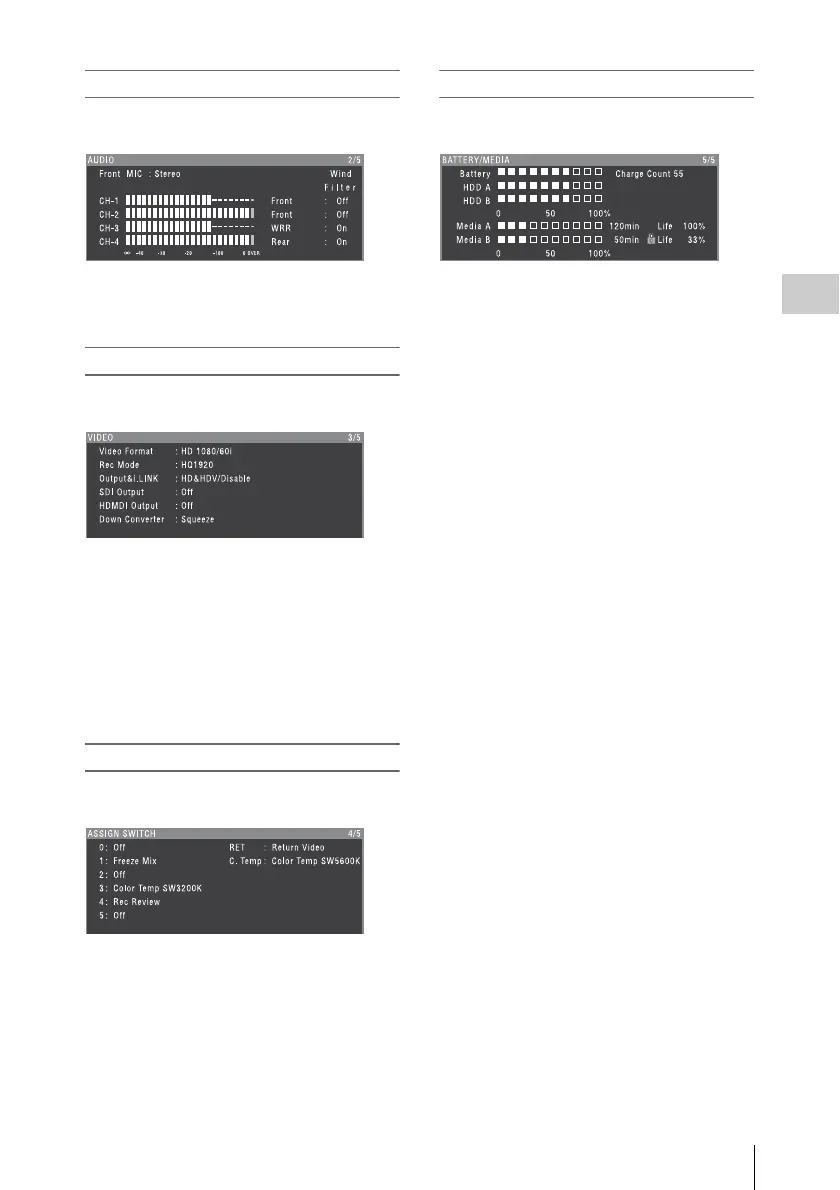
AUDIO status screen
This screen displays settings and status
information related to audio input and output.
CH-1/CH-2/CH-3/CH-4: Audio level meters
and input sources
Wind Filter: Wind filter settings
VIDEO status screen
This screen displays settings and status
information related to recording and playback.
Video Format: Video format
Rec Mode: Recording bit rate (HD mode only)
Output&i.LINK: Output&i.LINK setting and
i.LINK usage status
SDI Output: HD/SD SDI OUT connector output
setting
HDMI Output: HDMI connector output setting
Down Converter: SD output down converter
setting (HD mode only)
ASSIGN SWITCH status screen
This screen displays the names of the functions
assigned to assignable switches
BATTERY/MEDIA status screen
This screen displays the status of the battery
mounted on the camcorder and the media status.
Battery: The remaining battery capacity
Charge Count: The number of times the battery
has been charged
HDD A/HDD B: Remaining battery capacity of
PHU-220R
Media A/Media B:
• Remaining capacity of media
• Recordable time
• Approximate writable lifetime (Life)
“Life 100%” is shown for unused media.



 To Next Page