Parts Identifications
18
Overview
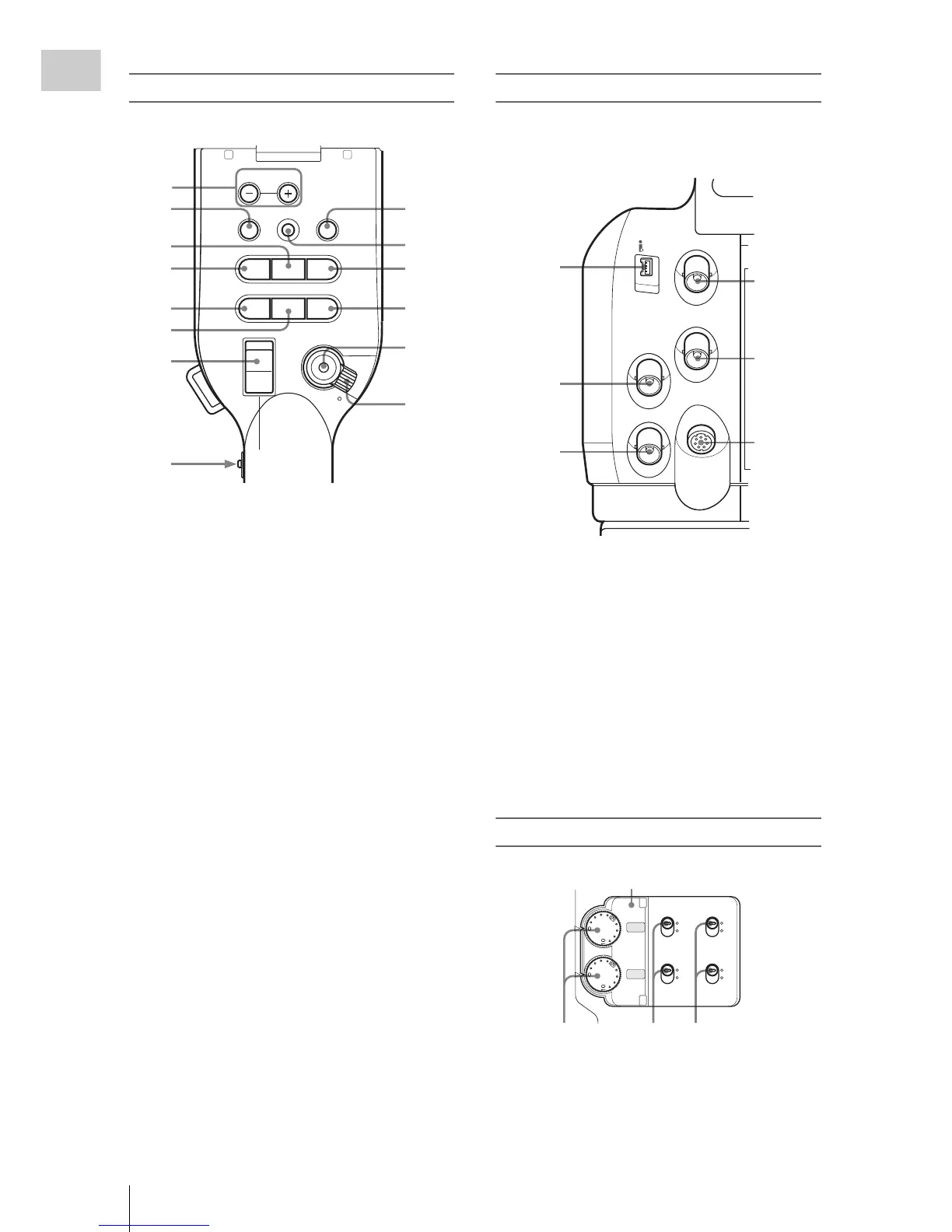
Operation panel on the handle
1.
MONITOR VOL (volume) buttons (page
69, page 96)
2. THUMBNAIL button (page 94)
3. PLAY/PAUSE button (page 94)
4. F REV (fast reverse) button (page 95)
5. PREV (previous) button (page 95)
6. STOP button (page 96)
7. On-handle ZOOM button (page 60)
8. Zoom speed switch (page 60)
9. CANCEL button (page 111)
10. SEL/SET (selection/set) button (Joystick)
(page 111)
It functions accordingly when you move it up
(forward), down (rearward), left, or right, or
you push along the axis.
It is called “the joystick” in the subsequent
operating instructions.
11. F FWD (fast forward) button (pag
e 95)
12. NEXT button (page 96)
13. REC START/STOP button (page 48)
14. REC HOLD lever (pag
e 48)
Rear connector panel
The connectors are located under the respective
caps.
1. i.LINK (HDV) connector (4-pin, S400
conforming to IEEE1394) (page 132)
2. TC IN (timecode input) connector (BNC
type) (page 134)
3. TC OUT (timecode output) connector
(BNC type) (page 135)
4. SDI OUT connector (BNC type) (page 129)
5. GENLOCK IN connector (BNC type)
(page 134)
6. REMOTE connector (8-pin) (page 138)
Audio control block
1. AUDIO LEVEL CH-1 /CH-2 controls
(pag
e 67)
2. AUDIO SELECT (audio level control
m
ode selection) switches (page 67)
THUMBNAIL
F REV
PREV
SEL/SET
PLAY/PAUSE
STOP
CANCEL
F FWD
NEXT
REC
START/STOP
HOLD
lsL
j
G
/SJ
MONITOR
VOL
L
R
H
L
OFF
6
7
8
9
10
11
12
13
14
1
2
3
4
5
SDI OUT
GENLOCK IN
REMOTE
TC OUT
TC IN
HDV
6
1
2
3
4
5
CH-1
AUTO
MANUAL
INT
EXT
AUTO
MANUAL
INT
EXT
CH-2
AUDIO
LEVEL
AUDIO
SELECT
AUDIO
IN
123
Cover



 To Next Page