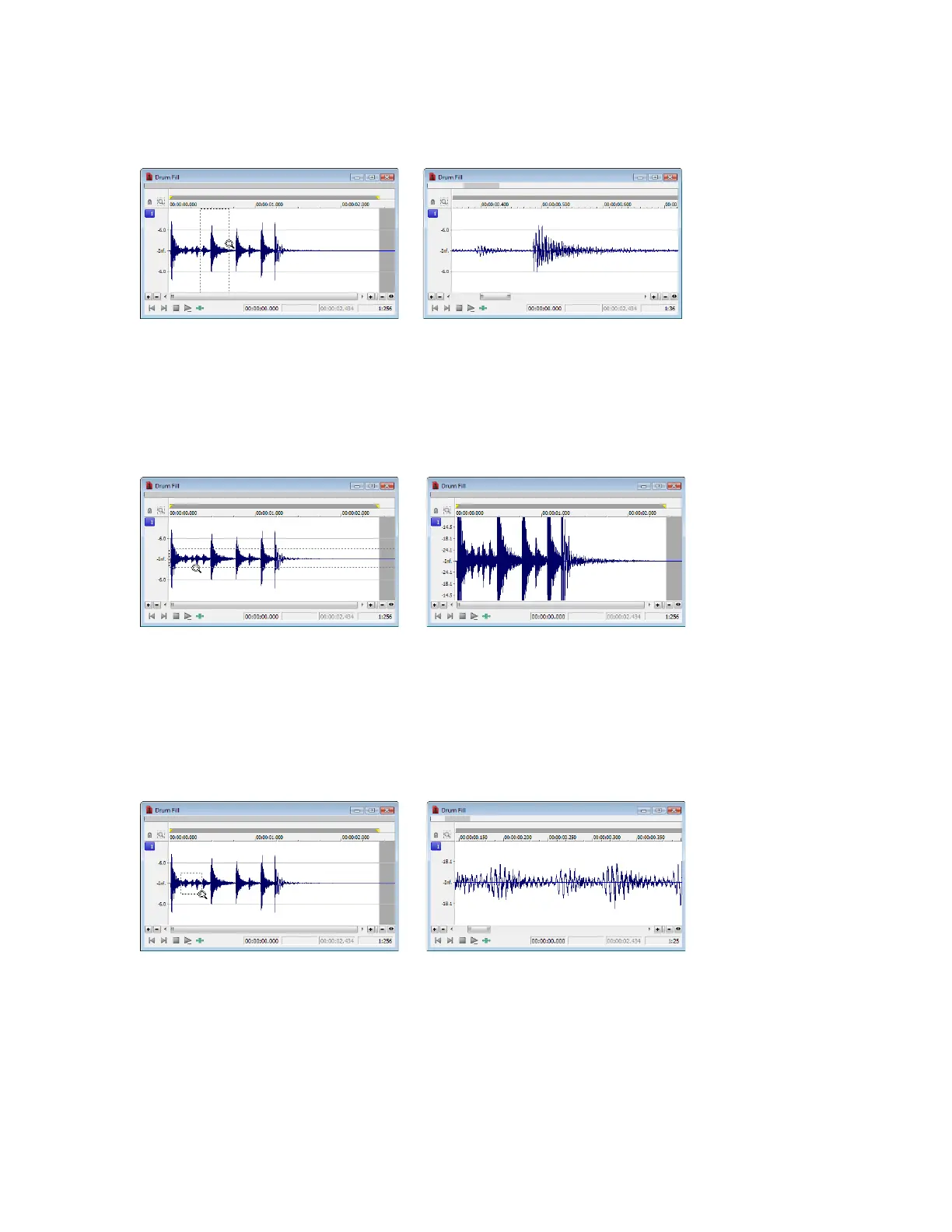
Zooming the time ruler with the Magnify tool
1.
Drag the Magnify tool on the waveform to make a small selection box.
2.
Toggle-click the mouse until the selection box is the same height as the data window.
3.
Drag the Magnify tool to create a time zoom selection and release the mouse button. The zoom ratio of the selection increases.
Selection box spans the height of the window
The selection is time zoomed
Zooming the level ruler with the Magnify tool
1.
Drag the Magnify tool on the waveform to make a small selection box.
2.
Toggle-click the mouse until the selection box is the full width of the data window.
3.
Drag the Magnify tool to create a level zoom selection and release the mouse button. The zoom ratio of the selection increases.
Selection box spans the width of the window
The selection is level zoomed
Zooming both time and level with the Magnify tool
1.
Drag the Magnify tool on the waveform to make a small selection box.
2.
Toggle-click the mouse until the selection appears as a box.
3.
Drag the Magnify tool to create a time/level zoom selection and release the mouse button. The level zoom and time zoom of the
selection increase.
Selection displays as a box The selection time and level are zoomed
NAVIGATING, ZOOMING, AND SELECTING | 91














 To Next Page