2-13
PVM-9L1
2-15. Horizontal Deflection Adjustment
2-15-1. 525 Horizontal Deflection Adjustment
1. Receive 525 SPCB signal.
2. Set to following settings.
CONTRAST 8 80
BRIGHTNESS 8 0
3. Enter service mode.
4. Adjust H.SIZE with [H SIZE] in [DEFLECTION]-
[RASTER H] at SERVICE MENU.
Standard H.SIZE specification
525 SPCB 625 SPCB
4 : 3 17.6 ±0.2 blocks 17.0 ±0.2 blocks
5. Receive 525 Cross-Hatch signal.
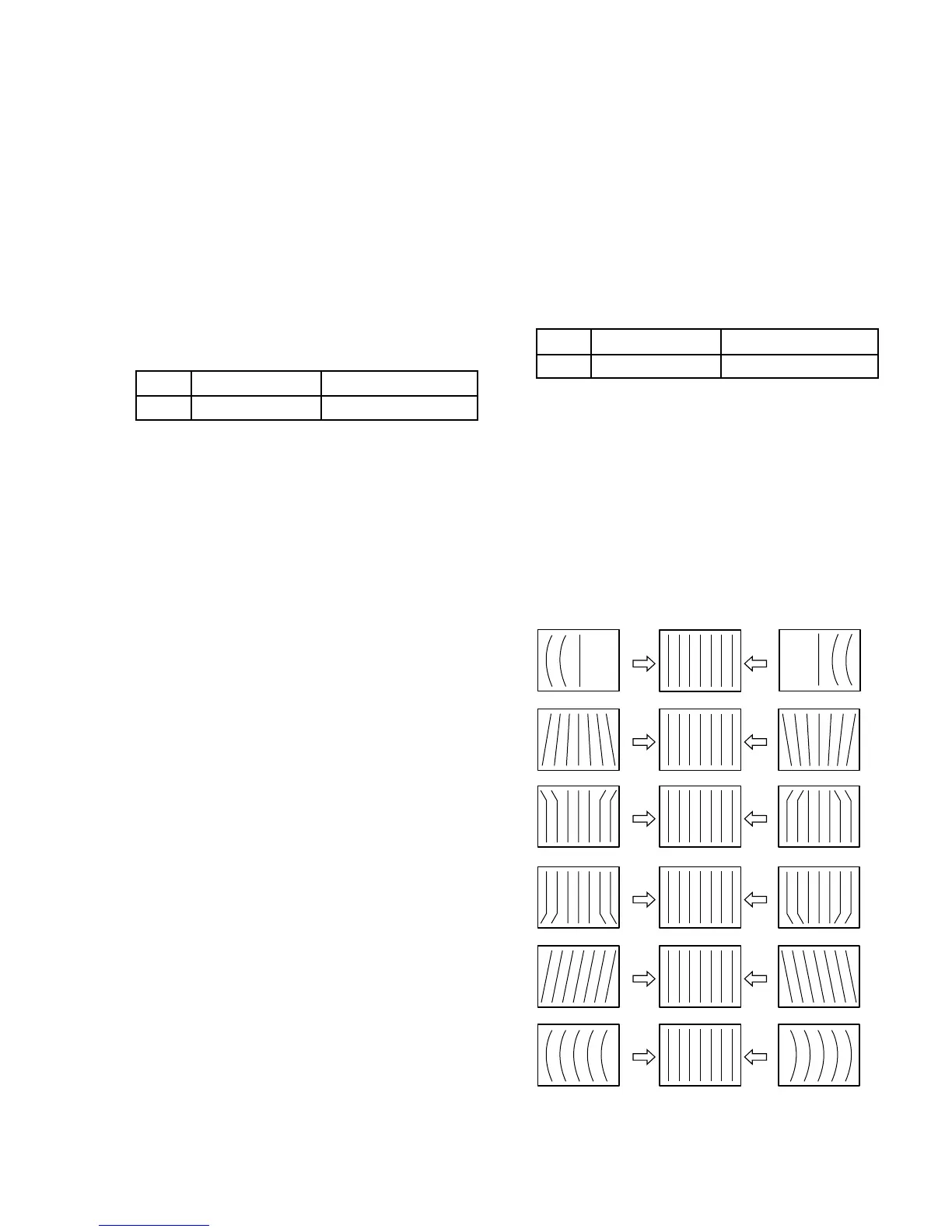
6. Adjust horizontal deflection with [PIN AMP], [PIN
PHASE], [U CORNER PIN], [L CORNER PIN], [V
ANGLE], [V BOW] in [DEFLECTION]-[GEOME-
TRY] at SERVICE MENU.
7. Set to 16:9 mode.
8. Adjust horizontal deflection with [PIN AMP], [PIN
PHASE], [U CORNER PIN], [L CORNER PIN], [V
ANGLE], [V BOW] in [DEFLECTION]-[GEOME-
TRY] at SERVICE MENU.
2-15-2. 625 Horizontal Deflection Adjustment
1. Receive 625 SPCB signal.
2. Set to following settings.
CONTRAST 8 80
BRIGHTNESS 8 0
3. Enter service mode.
4. Adjust H.SIZE with [H SIZE] in [DEFLECTION]-
[RASTER H] at SERVICE MENU.
Standard H.SIZE specification
525 SPCB 625 SPCB
4 : 3 17.6 ±0.2 blocks 17.0 ±0.2 blocks
5. Receive 625 Cross-Hatch signal.
6. Adjust horizontal deflection with [PIN AMP], [PIN
PHASE], [U CORNER PIN], [L CORNER PIN], [V
ANGLE], [V BOW] in [DEFLECTION]-[GEOME-
TRY] at SERVICE MENU.
7. Set to 16:9 mode.
8. Adjust horizontal deflection with [PIN AMP], [PIN
PHASE], [U CORNER PIN], [L CORNER PIN], [V
ANGLE], [V BOW] in [DEFLECTION]-[GEOME-
TRY] at SERVICE MENU.
PIN AMP
PIN PHASE
U CORNER PIN
V BOW
L CORNER PIN
V ANGLE




 To Next Page