22
Basic Operations
Selecting a Video Source
When you watch TV or video programs, we recommend you play audio portion through this system instead of the
speaker on your TV. This lets you take advantage of the system’s surround sound effects, like Dolby Surround, and
lets you use the system’s remote to control the audio.
Before you start, set your TV’s volume control to minimum or turn off your TV’s speaker(s) so you can enjoy the
surround sound from your system.
1
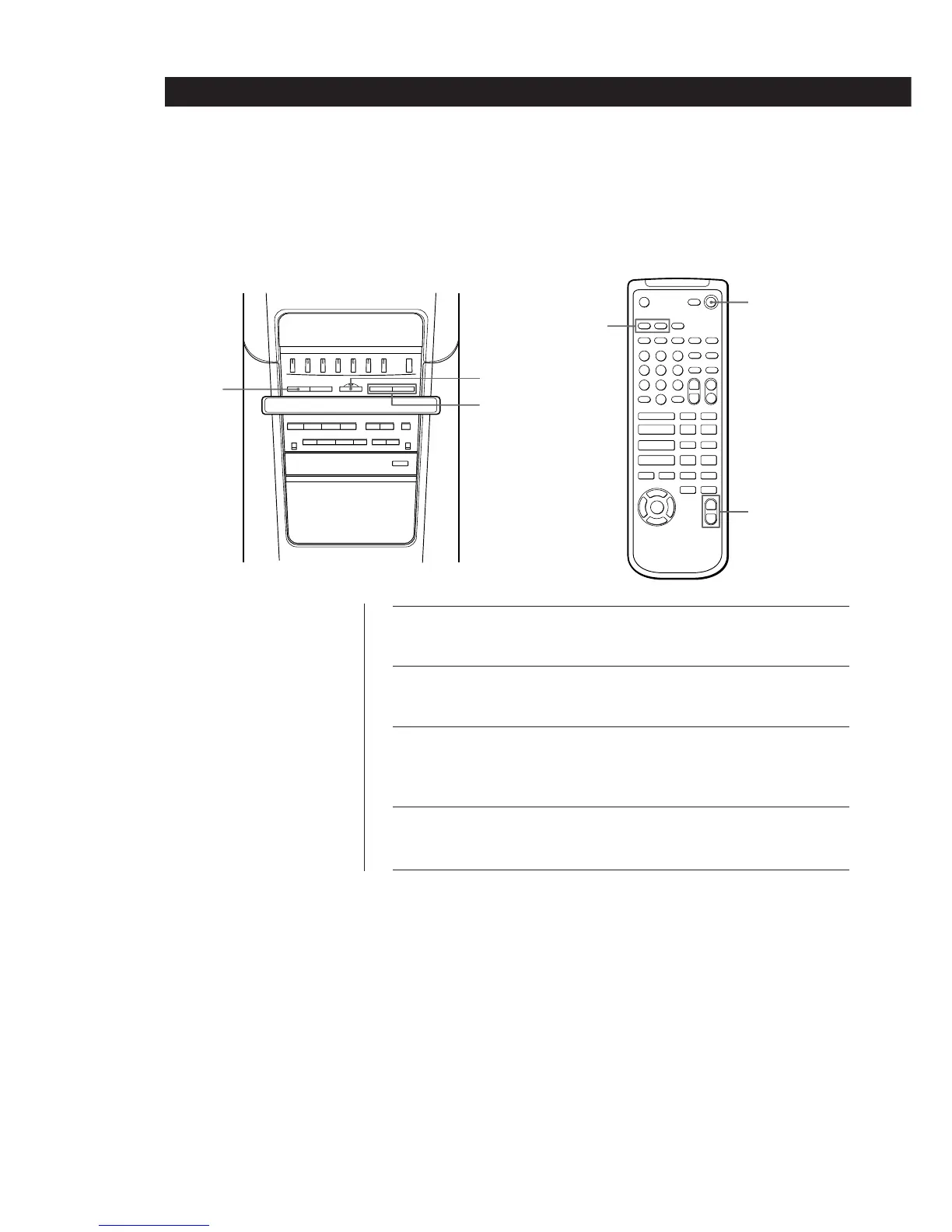
Press SYSTEM POWER (or POWER on the remote) to turn on
the system.
2
Press FUNCTION repeatedly to select “VIDEO 1” or “VIDEO
2”( or press VIDEO 1 or VIDEO 2 on the remote).
3
Turn on the respective component, then start playing (see the
operating instructions supplied with the respective component
for details).
4
Press MASTER VOLUME + or – (or VOL + or – on the remote)
to adjust the volume.
90)(pPr
6
Ȯ
Æ
=
+
pP
p0 )
(P
r
0
)
2
4
1
VIDEO 1
VIDEO 2
POWER
VOL + / –
Right Speaker



 To Next Page