30
Home Theater Operations Using OSD
Using an External Center
Speaker
Since this system incorporates a center speaker (see
page 5), you don't have to connect a center speaker.
However, it is possible to connect a center speaker to
the CENTER SPEAKER terminals if you already have
one. Be sure to use a speaker with a 8 to 16 ohm
impedance for the center speaker.
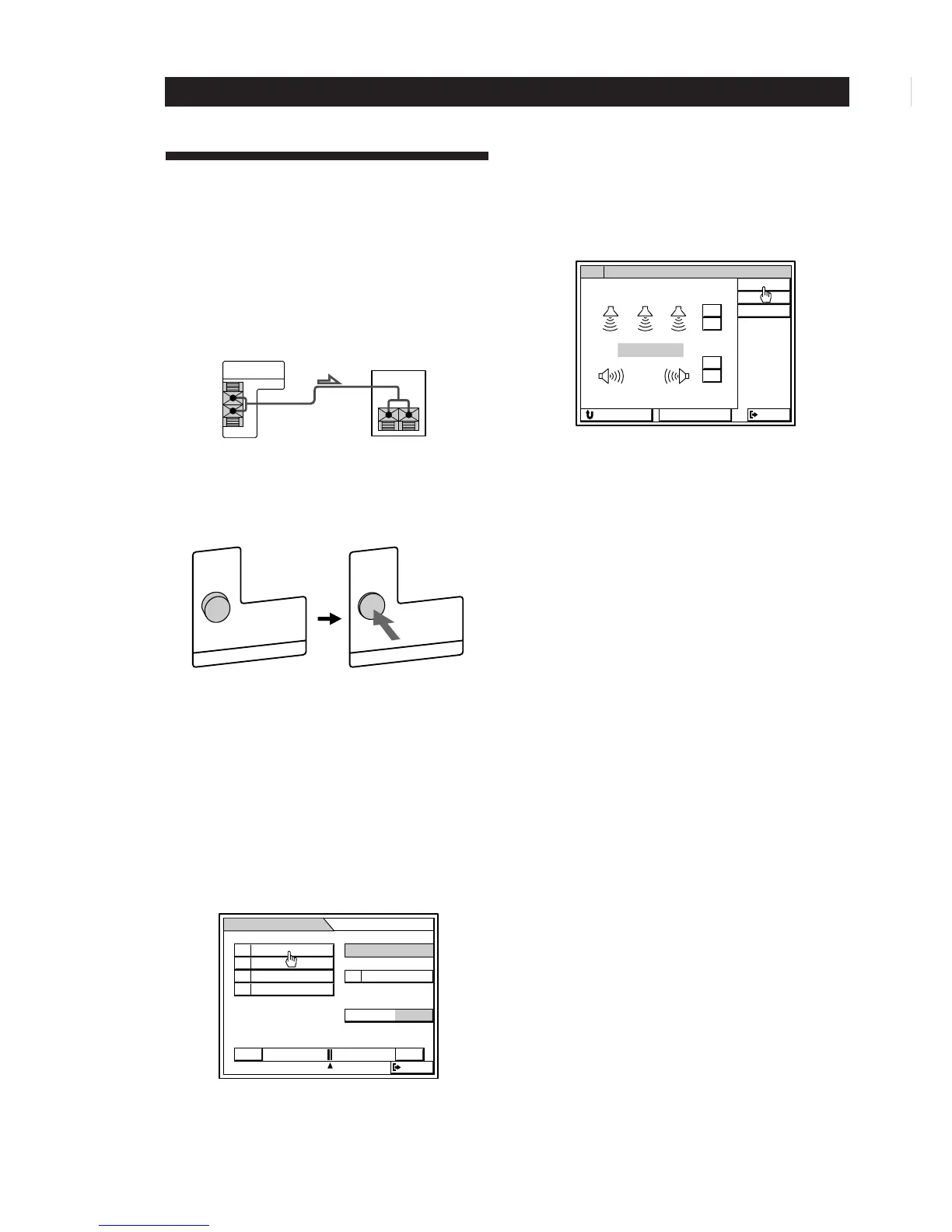
Depress the CENTER SPEAKER button on the rear
panel of the left front speaker. This turns off the
internal center speaker and directs the center channel
signal to the CENTER SPEAKER terminals.
Connecting an external center speaker lets you choose
from 4 different Dolby Pro Logic Surround center
modes: NORMAL, WIDE, 3 CH (3 Channel logic), or
PHANTOM. Use the NORMAL or WIDE mode. For
details on Dolby Pro Logic Surround sound, see the
“Glossary” on page 64.
1 Click SOUND in the main menu.
2 Click PRO LOGIC to select the pro logic sound
field.
3 Click SUR.
The SUR EDIT screen appears.
4 Click C MODE repeatedly until the center mode
you want is displayed.
5 Adjust the speaker volumes and delay time, if
necessary, by referring to pages 27 and 29.
EXTERNAL
CENTER SPEAKER
IMPEDANCE 8Ω MINIMUM
center speaker


 To Next Page