9
Getting Started
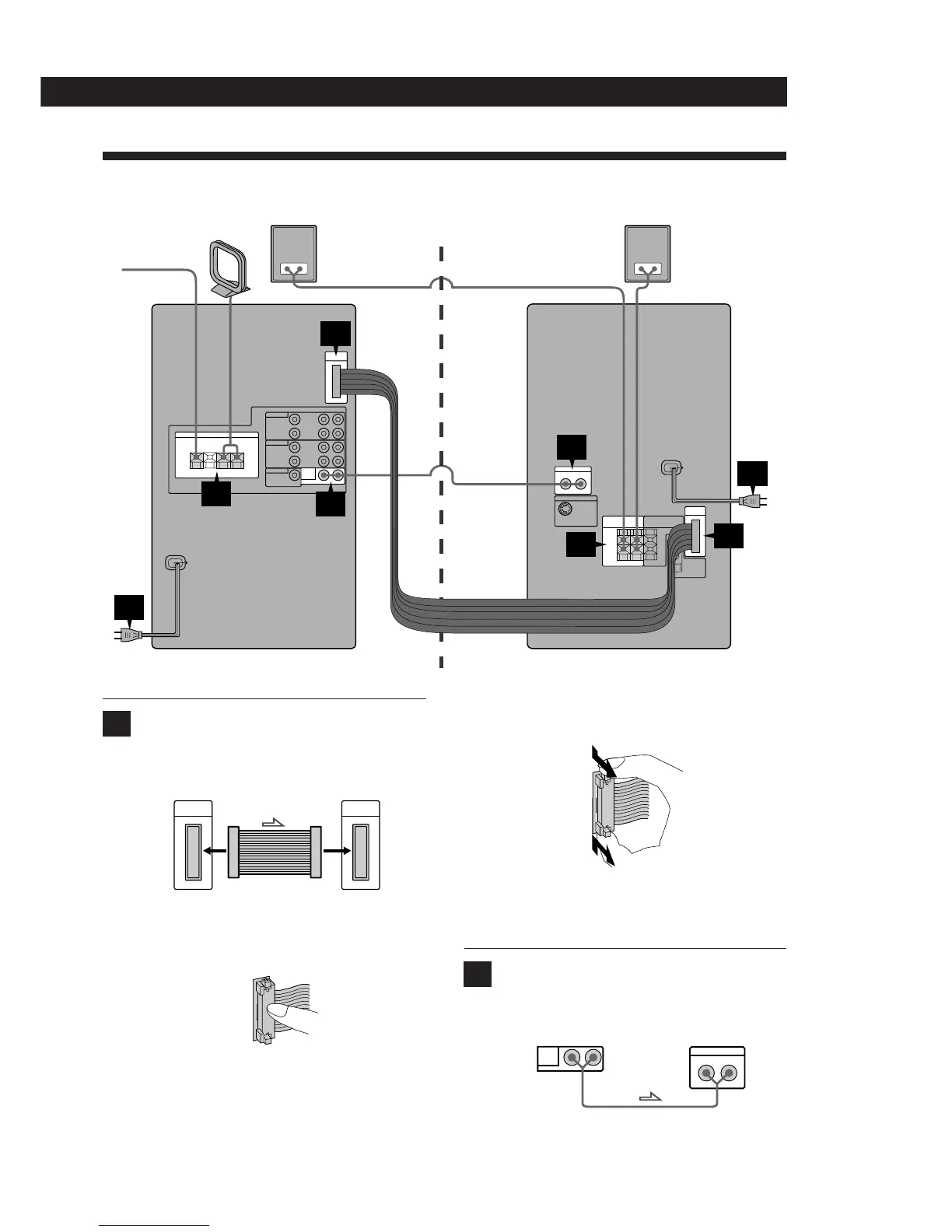
To disconnect, pull the connector out. Never
pull the cord itself.
Note
Be sure to disconnect the AC power cord before
disconnecting or connecting the connector.
Connect the supplied audio cord from the
LINE OUT jacks on the right front speaker to
the LINE IN jacks on the left front speaker.
Connect the supplied flat cord to the SYSTEM
CONTROL CONNECTOR connectors so that it
clicks in place
To connect, depress the middle of the male
connector until it clicks into the female
connector.
Speaker and System Hookups
This section describes how to connect the system.
The arrow ç indicates signal flow.
1
2
Rear speaker
SS-SR151
Rear speaker
SS-SR151
4
5
3
1
5
2
AM loop antenna
FM lead antenna
Right front speaker Left front speaker
Right front speaker Left front speaker
1
SYSTEM
CONTROL
SYSTEM
CONTROL
2
Right front speaker Left front speaker
LINE
OUT
LINE IN
LR
LR
(continued)


 To Next Page