8
Getting Started
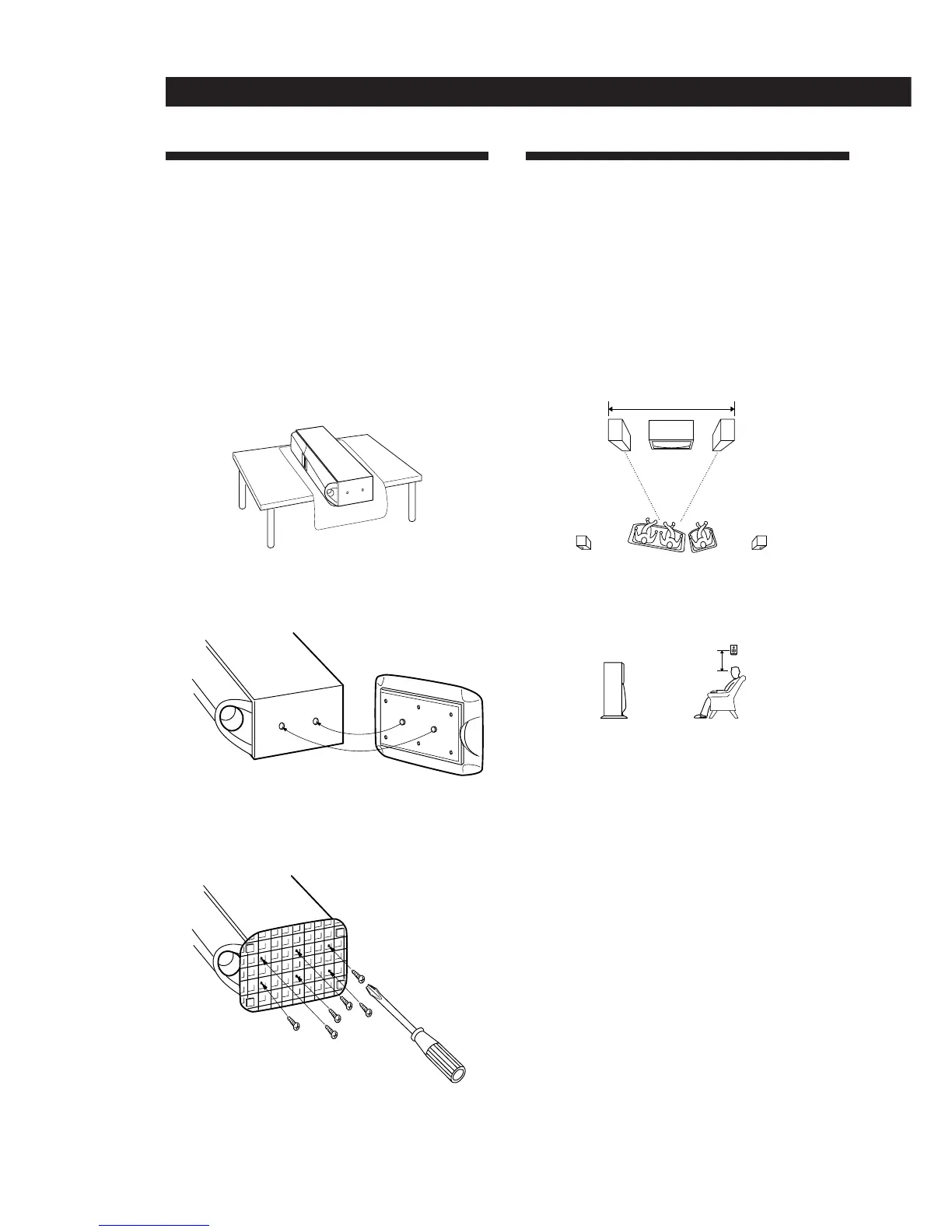
Choosing the Best Location
To obtain high sound quality and a proper sound
image from the front speakers, place the speaker with
the built CD player and cassette deck to the right of
your TV and the other to the left of your TV so that the
center channel tweeters angle towards the center of the
room.
For the best central sound image, place the left and
right speakers within 8 feet of each other and
equidistant from the TV.
Place the rear speakers so that they fire directly across
at each other about 2 to 3 feet above your listening
position.
Installing the Speaker Stands
Be sure to install the supplied speaker stands before
you use the speakers.
Notes
• Be careful! The left and right speakers weigh nearly 23 kg
(50 lbs) apiece and are extremely heavy.
• Although the speakers are wrapped in protective material,
take care not to grab the grill net when removing the
speakers from their cartons. This may damage the grill
net.
1 Spread a towel, or other soft cloth, over a table
and lay the speakers down.
2 Align the pins on the stands with the holes on the
bottom of the speakers.
3 Use a screw driver to fasten the stands to the
bottom of the speakers with the supplied wood
screws (6 for each speaker).
4 Make sure the stands are securely attached and
stand the speaker upright.
8 feet (2.4 m) max
2-3 feet
(60-90 cm)
Speaker stand


 To Next Page