34
Operating the CD Player Using OSD
Playing Tracks in Random
Order (shuffle play)
You can play all the tracks on one CD or all CDs in
random order.
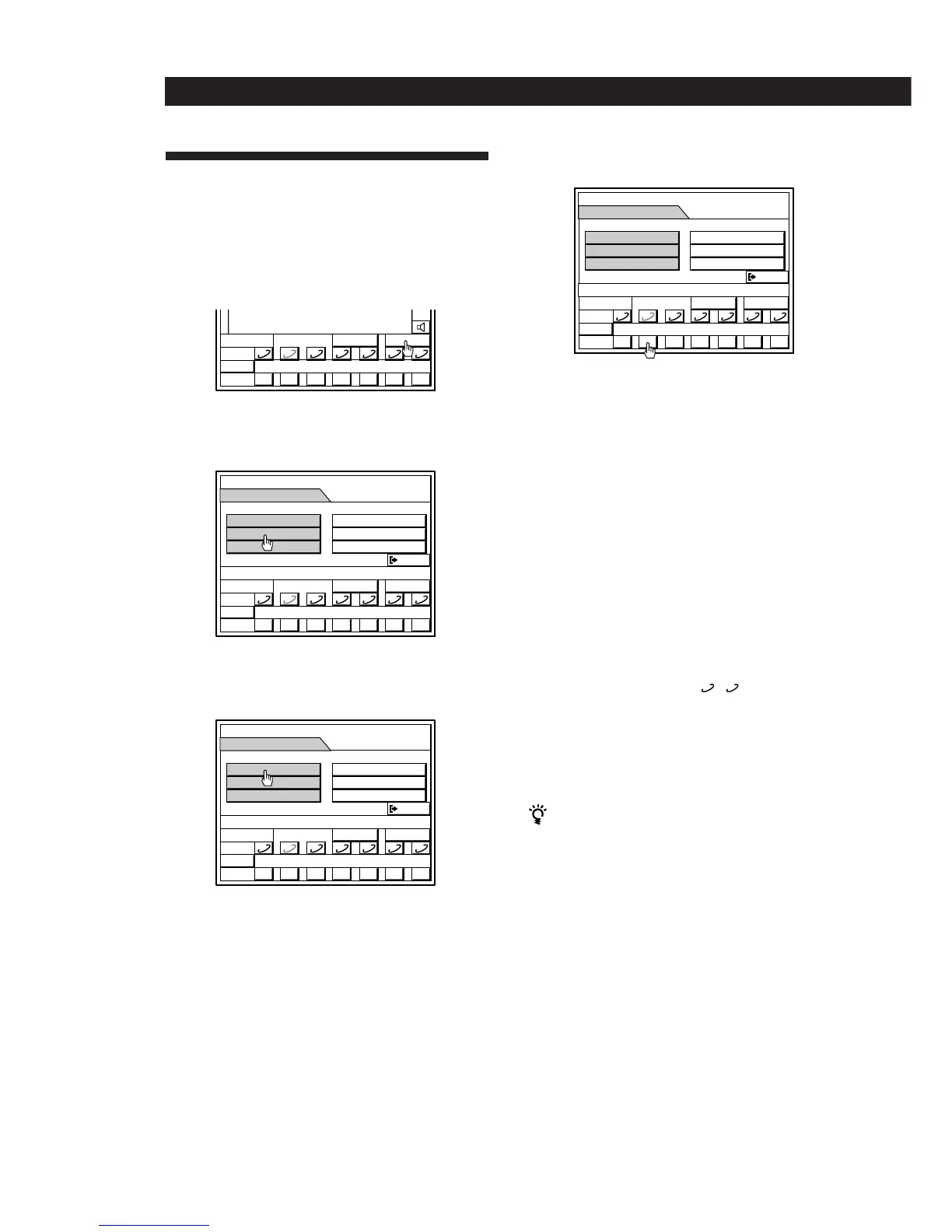
1 Click SUB.
2 Click CONTINUE repeatedly to select
“SHUFFLE”.
3 Click ALL DISCS (or 1 DISC) to select “1 DISC” or
“ALL DISCS”.
“1 DISC” plays all the tracks on the current CD at
random.
“ALL DISCS” plays all the tracks on all the CDs
loaded in the unit at random.
4 Click (.
To stop playing
Click p.
To cancel shuffle play
Click SHUFFLE repeatedly to select “CONTINUE”. The
tracks continue playing in their original order.
To close the SUB menu
Click EXIT or press EXIT on the remote control.
Play the next track during shuffle play
Click +.
To replay the current track from the beginning, click =.
You cannot replay the previous track .
To select the desired disc during “1 DISC” shuffle
Click the respective disc button (
1
~
7
).
To start shuffle play immediately after the current track.
Press CONTINUE repeatedly during playback to select
“SHUFFLE” and shuffle play starts as soon as the current
track finishes playback.
Playing tracks in random order without using the on-
screen display
1 Press PLAY MODE on the remote repeatedly so that
“SHUFFLE” appears in the display on the right
speaker.
2 Press 1/ALL repeatedly to select “1 DISC” or “ALL
DISCS”.
3 Press CD ·.
MEMO
D
TIME
SUB
0
DISC
() p P= +
1 2 3 4 5 6 7
DISC–2
**
MEMO
TIME
SUB
0
DISC
() p P= +
SUB
EXIT
CONTINUE
1 2 3 4 5 6 7
DISC–2
**
MEMO
TIME
SUB
0
DISC
() p P= +
SUB
EXIT
ALL DISCS
SHUFFLE
1 2 3 4 5 6 7
DISC–2
**
TIME
0
DISC
() p P= +
SUB
EXIT
ALL DISCS
SHUFFLE
1 2 3 4 5 6 7
DISC–2
**


 To Next Page