33
Operating the CD Player Using OSD
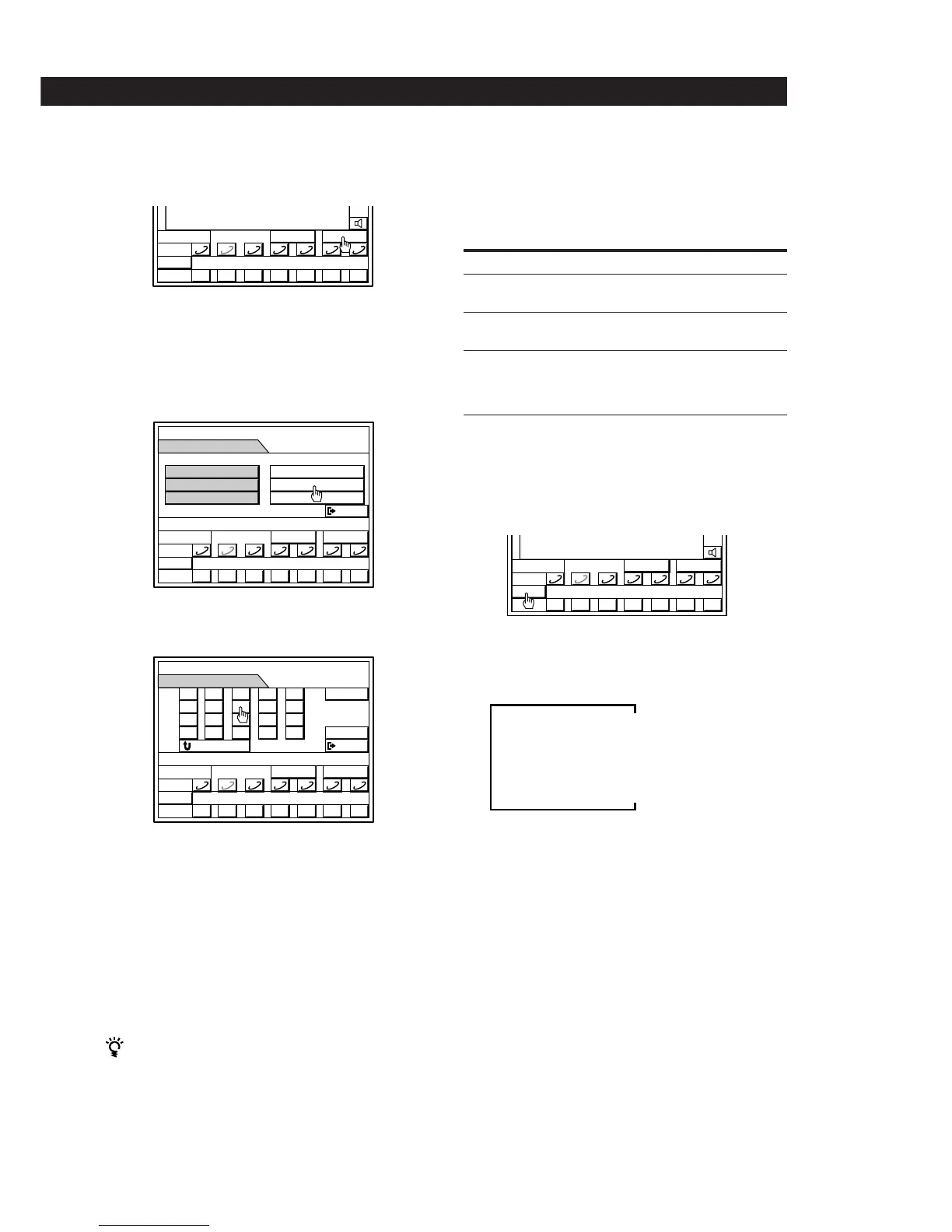
Locating a track directly
1 Click SUB
This function is only available when the CD player is
set to the CONTINUE play mode.
If PROGRAM or SHUFFLE appear in the SUB menu,
click them repeatedly to select “CONTINUE”.
2 Click CALENDAR
3 Click the icon for the track you desire.
To display track numbers not shown on the current
CD calendar (for CDs with more than 20 tracks).
Click the > or . icon located next to the CD calendar.
To return to the previous menu.
Click RETURN or press RETURN on the remote control.
To exit to the main menu.
Click EXIT or press EXIT on the remote control.
Locating a track directly without using the on-screen
display
Press the numeric button on the remote for the track
you want. If the track number is greater than 10, press
>10 and the track number.
e.g. For track number 21, press >10, 2, 1.
For track number 20, press >10, 2, 10/0.
MEMO
D
TIME
SUB
0
DISC
() p P= +
1 2 3 4 5 6 7
DISC–2
**
MEMO
TIME
SUB
0
DISC
() p P= +
SUB
EXIT
CALENDAR
ALL DISCS
CONTINUE
1 2 3 4 5 6 7
DISC–2
**
MEMO
TIME
SUB
0
DISC
() p P= +
CALENDAR
EXIT
v
V
1
6
11
2
7
12
3
8
13
4
9
14
5
10
15
RETURN
1 2 3 4 5 6 7
DISC–2
**
MEMO
D
TIME
2–1
SUB
0
DISC
() p P= +
0.21
(
1 2 3 4 5 6 7
Locating a particular point in a track
You can locate a particular point in a track while
monitoring the sound or quickly by observing the
display.
To Click and hold down
Go forward quickly ) and release it at the
desired point.
Go backwards quickly 0 and release it at the
desired point.
Search quickly by observing 0 or ) until you find
the display during pause the desired point. You
will not hear the sound
during this operation.
Checking the remaining or total playing
time
Click TIME.
Each time you click TIME while playing a CD, the
display changes as follows.
Notes
• You can also check the remaining time on the current track
during shuffle, and program play.
• The total playing time and number of tracks for the
current disc appear in the display if you wait a few
seconds after pressing § OPEN/CLOSE on the front of
the right speaker to close a disc tray.
Playing time on current track
Remaining time on current track
Remaining time on CD (normal play only)


 To Next Page