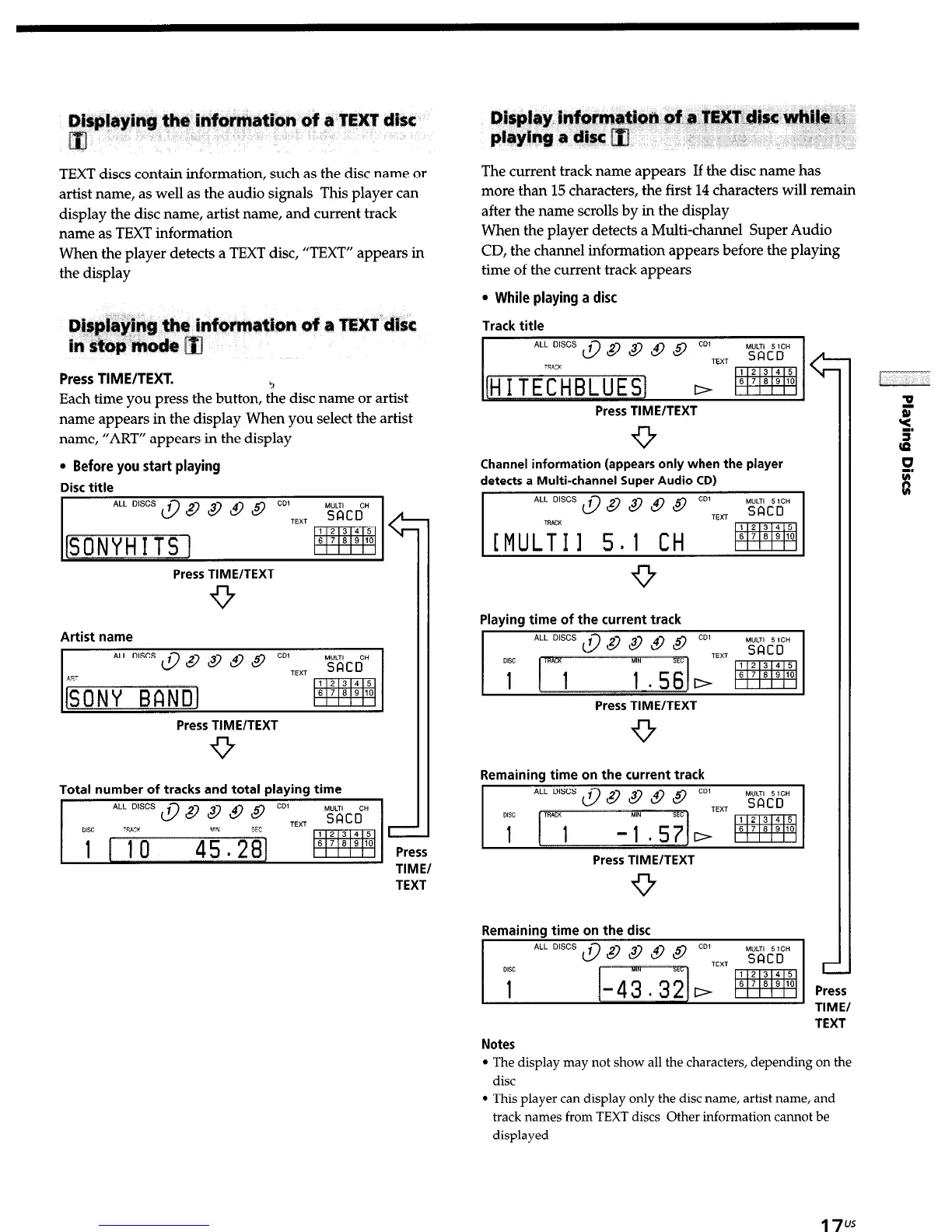
TEXT discs contain information, such as the disc name or
artist name, as well as the audio signals This player can
display the disc name, artist name, and current track
name as TEXT information
When the player detects a TEXT disc, “TEXT” appears in
the display
Press TIME/TEXT.
Each time you press the button, tie disc name or artist
name appears in the display When you select the artist
name, “ART” appears in the display
l
Before you start playing
Disc title
Press TIME/TEXT
9
Artist name
Press TIME/TEXT
9
Total number of tracks and total playing time
ALL D’SCS $ 8 8 @ @ CD’TFyT
TIME/
TEXT
The current track name appears If the disc name has
more than 15 characters, the first 14 characters will remain
after the name scrolls by in the display
When the player detects a Multi-channel Super Audio
CD, the channel information appears before the playing
time of the current track appears
l
While playing a disc
Track title
Press TIME/TEXT
Channel information (appears only when the player
detects a Multi-channel Super Audio CD)
Playing time of the current track
Press TIME/TEXT
-9
Remaining time on the current track
Press TIME/TEXT
9
Remaining time on the disc
c
Press
llMt/
TEXT
Notes
l
The display may not show all the characters, depending on the
disc
l
This player can display only the disc name, artist name, and
track names from TEXT discs Other information cannot be
displayed
17"


 To Next Page