Creating Your Own Program (Program Play)
You can change the contents of the program in stop mode
To Do
the
following:
Erase a track
1
Press CHECK repeatedly until the track
number you want to erase appears
2 Press CLEAR
Erase from the last press CLEAR
track in the Program Each time you press the button, the last
track of the uronram is erased
Add a track to the
Press DISC SKIP +/- and l44 /w to
end of the Program select the track you
want
to add, then press
PROGRAM When using the remote, press
the number button of the track to be added
Erase all tracks
Hold down CLEAR until “Prog CLEAR”
appears in the display
Listening to a Multi-
channel Super Audio CD
(Multi-channel management function)
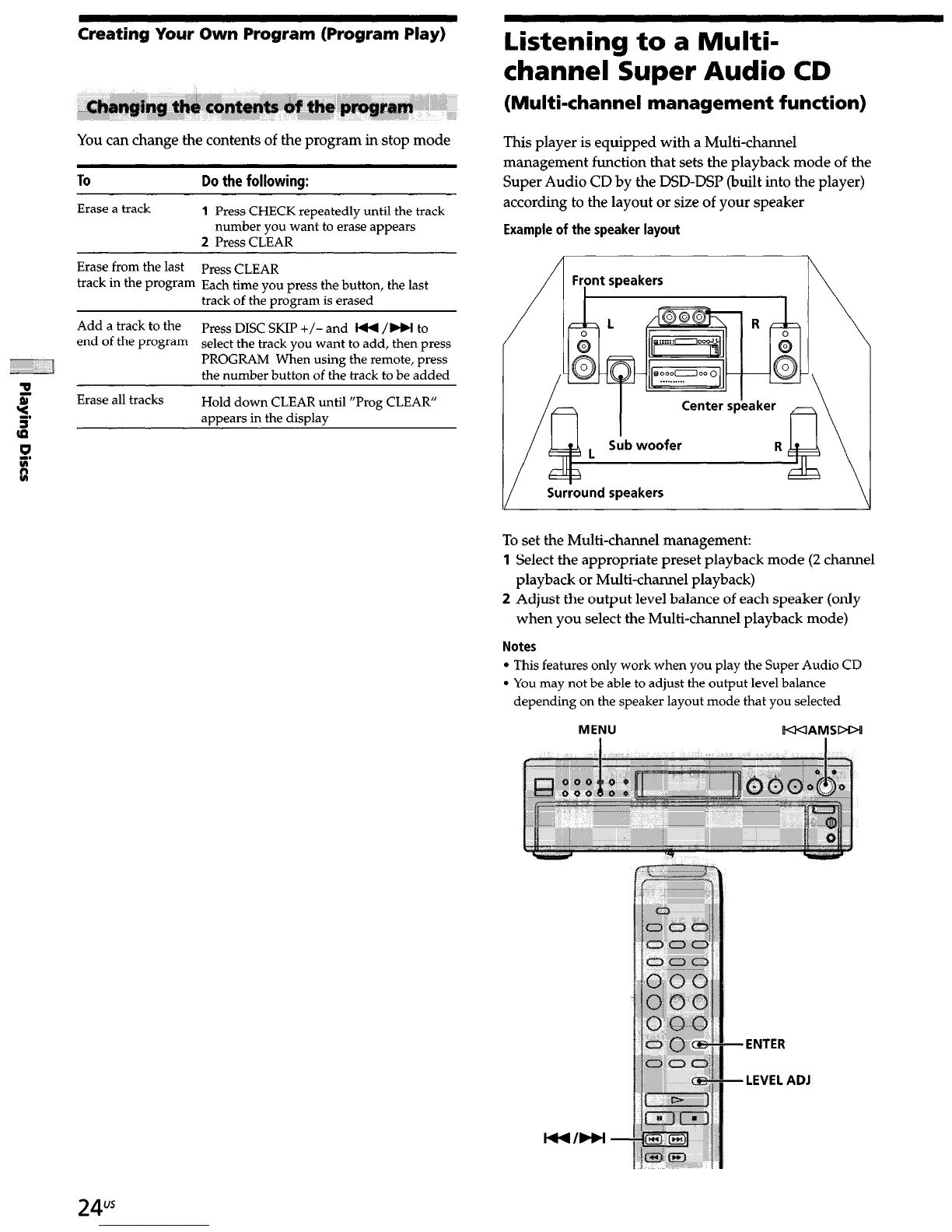
This player is equipped with a Multi-channel
management function that sets the playback mode of the
Super Audio CD by the DSD-DSP (built into the player)
according to the layout or size of your speaker
Example of the speaker layout
Front speakers
1
V
Surround speakers
\
d
To set the Multi-channel management:
1 Select the appropriate preset playback mode (2 channel
playback or Multi-channel playback)
2 Adjust the output level balance of each speaker (only
when you select the Multi-channel playback mode)
Notes
l
This features only work when you play the Super Audio CD
l
You may not be able to adjust the output level balance
depending on the speaker layout mode that you selected
MENU
KKIAMSDDI
24”


 To Next Page