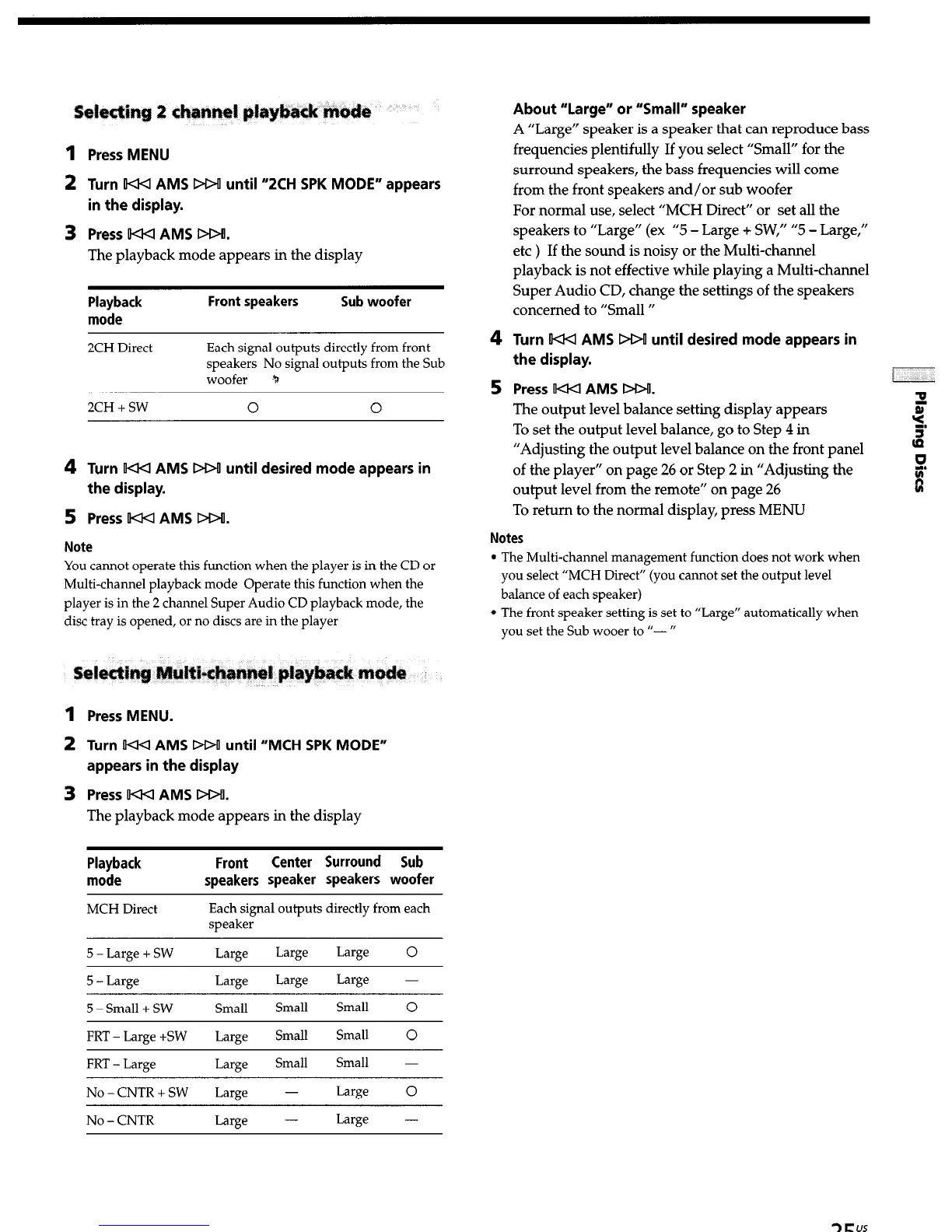
Press MENU
Turn F-4-4 AMS DDf until “ZCH SPK MODE” appears
in the display.
Press UQ4 AMS DDII.
The playback mode appears in the display
Playback
mode
Front speakers
Sub woofer
2CH Direct Each signal outputs directly from front
speakers No signal outputs from the Sub
woofer tn
2CH + SW
0 0
Turn W AMS DOU until desired mode appears in
the display.
Press W-4 AMS DDfl.
Note
You cannot operate this function when the player is in the CD or
Multi-channel playback mode Operate this function when the
player is in the 2 channel Super Audio CD playback mode, the
disc tray is opened, or no discs are in the player
1 Press MENU.
2 Turn IIOU AMS M>o until “MCH SPK MODE”
appears in the display
3
Press F-44 AMS DOU.
The playback mode appears in the display
Playback
mode
MCH Direct
Front
Center Surround Sub
speakers speaker speakers woofer
Each signal outputs directly from each
speaker
5 - Large + SW Large
Large Large 0
5 - Large
5 -Small + SW
Large
Small
Large
Small
Large -
Small 0
FRT - Large +SW Large Small
Small 0
FRT - Large Large
Small Small -
No - CNTR + SW Large -
Large 0
No - CNTR Large -
Large -
4
5
About “Large” or “Small” speaker
A “Large” speaker is a speaker that can reproduce bass
frequencies plentifully If you select “Small” for the
surround speakers, the bass frequencies will come
from the front speakers and/or sub woofer
For normal use, select “MCH Direct” or set all the
speakers to “Large” (ex “5 - Large + SW,” “5 - Large,”
etc ) If the sound is noisy or the Multi-channel
playback is not effective while playing a Multi-channel
Super Audio CD, change the settings of the speakers
concerned to “Small ”
Turn W AMS DDL until desired mode appears in
the display.
Press t-4-4 AMS DO!.
The output level balance setting display appears
To set the output level balance, go to Step 4 in
“Adjusting the output level balance on the front panel
of the player” on page 26 or Step 2 in “Adjusting the
output level from the remote” on page 26
To return to the normal display, press MENU
Notes
l
The Multi-channel management function does not work when
you select “MCH Direct” (you cannot set the output level
balance of each speaker)
l
The front speaker setting is set to “Large” automatically when
you set the Sub wooer to ‘I- ”


 To Next Page