EasyManua.ls Logo

Sony SDP-E800 - Processor Operations: Customizing Sound Fields; Customizing the Sound Fields; Adjusting Sound Parameters; Dynamic Range Compression

Sony SDP-E800
44 pages
Print Icon
To Next Page IconTo Next Page
To Previous Page IconTo Previous Page
Loading...
Processor
Operations
III.Q
VIRTUAL
ENHANCED
(SURROUND)
A
L
C
R
III.©
VIRTUAL
ENHANCED
(SURROUND)
B
L
C
R
III
©
VIRTUAL
REAR
SHIFT
For
REAR
SP
[SIDE]*
L
C
R
.
III.©
VIRTUAL
MULTI
REAR
For
REAR
SP
[SIDE]*
L
C
R
L
:
Front
speaker
(left)
R
:
Front
speaker
(right)
C
:
Center
speaker
SL
:
Rear
speaker
(left)
SR
:
Rear
speaker
(right)
:....
:
Virtual
speaker
For
REAR
SP
[BEHIND]*
L
C
R
SL
SR
For
REAR
SP
[BEHIND]*
L
C
R
SL
SR
*
See
page
8
for
details
on
how
to
set
the
rear
speaker
position.
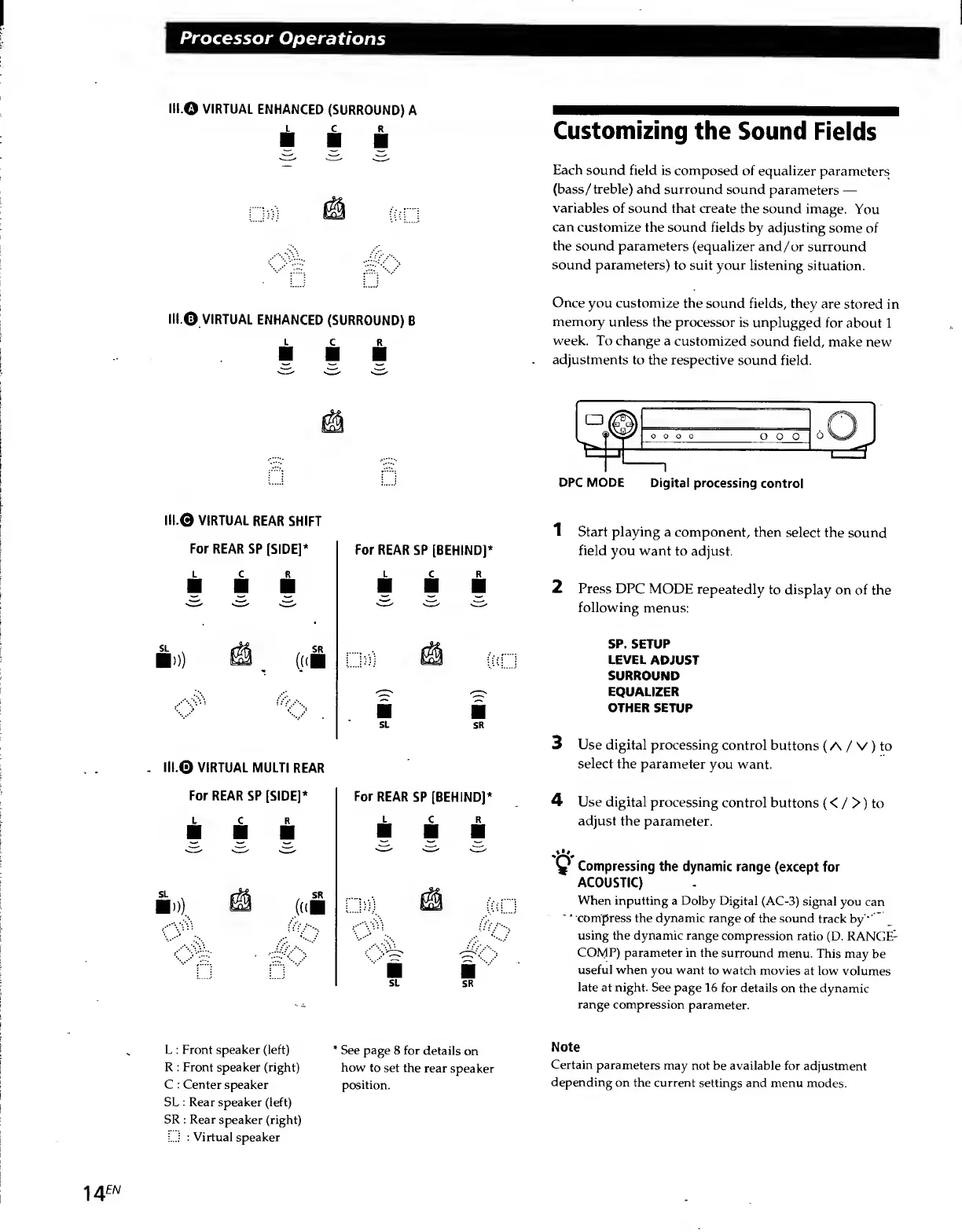
Customizing
the
Sound
Fields
Each
sound
field
is
composed
of
equalizer
parameters
(bass/treble)
ahd
surround
sound
parameters
variables
of
sound
that
create
the
sound
image.
You
can
customize
the
sound
fields
by
adjusting
some
of
the
sound
parameters
(equalizer
and/or
surround
sound
parameters)
to
suit
your
listening
situation.
Once
you
customize
the
sound
fields,
they
are
stored
in
memory
unless
the
processor
is
unplugged
for
about
1
week.
To
change
a
customized
sound
field,
make
new
adjustments
to
the
respective
sound
field.
DPC
MODE
Digital
processing
control
1
Start
playing
a
component,
then
select
the
sound
field
you
want
to
adjust.
2
Press
DPC
MODE
repeatedly
to
display
on
of
the
following
menus:
SP.
SETUP
LEVEL
ADJUST
SURROUND
EQUALIZER
OTHER
SETUP
3
Use
digital
processing
control
buttons
(A
/
V
)
to
select
the
parameter
you
want.
4
Use
digital
processing
control
buttons
(<
/
>)
to
adjust
the
parameter.
y
Compressing
the
dynamic
range
(except
for
ACOUSTIC)
When
inputting
a
Dolby
Digital
(AC-3)
signal
you
can
'
compress
the
dynamic
range
of
the
sound
track
by
'
using
the
dynamic
range
compression
ratio
(D.
RANGED
COMP)
parameter
in
the
surround
menu.
This
may
be
useful
when
you
want
to
watch
movies
at
low
volumes
late
at
night.
See
page
16
for
details
on
the
dynamic
range
compression
parameter.
Note
Certain
parameters
may
not
be
available
for
adjustment
depending
on
the
current
settings
and
menu
modes.
14
EN

Related product manuals