EasyManua.ls Logo

Sony SDP-E800 - Processor Operations: Selecting Program Sources; Selecting a Component; Using the Remote for Input Selection

Sony SDP-E800
44 pages
Print Icon
To Next Page IconTo Next Page
To Previous Page IconTo Previous Page
Loading...
Processor
Operations
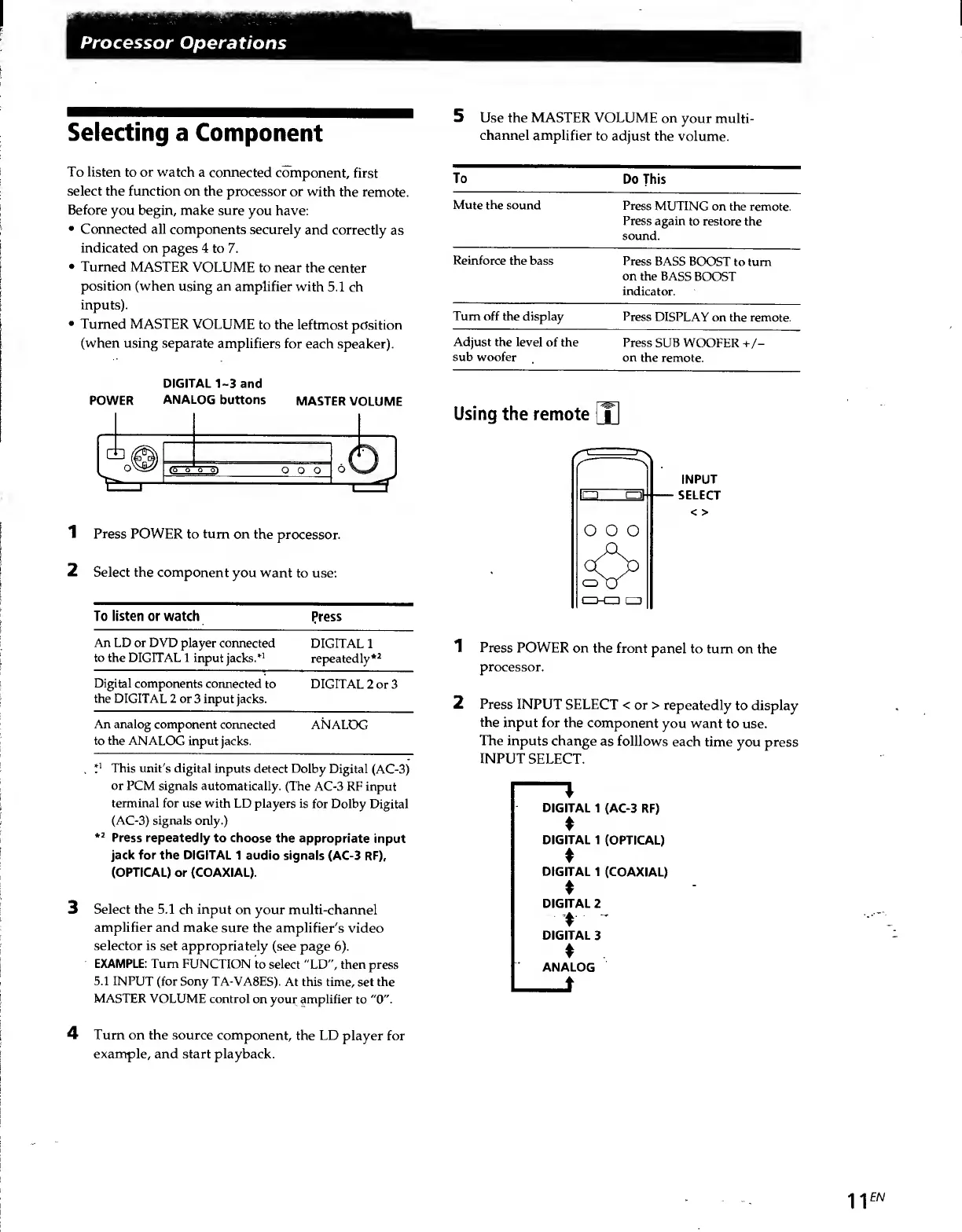
Selecting
a
Component
5
Use
the
MASTER
VOLUME
on
your
multi¬
channel
amplifier
to
adjust
the
volume.
To
listen
to
or
watch
a
connected
component,
first
select
the
function
on
the
processor
or
with
the
remote.
Before
you
begin,
make
sure
you
have:
Connected
all
components
securely
and
correctly
as
indicated
on
pages
4
to
7.
Turned
MASTER
VOLUME
to
near
the
center
position
(when
using
an
amplifier
with
5.1
ch
inputs).
Turned
MASTER
VOLUME
to
the
leftmost
position
(when
using
separate
amplifiers
for
each
speaker).
DIGITAL
1-3
and
POWER
ANALOG
buttons
MASTER
VOLUME
1
Press
POWER
to
turn
on
the
processor.
Select
the
component
you
want
to
use:
To
listen
or
watch
Press
An
LD
or
DVD
player
connected
DIGITAL
1
to
the
DIGITAL
1
input
jacks.*
1
repeatedly*
2
Digital
components
connected
to
the
DIGITAL
2
or
3
input
jacks.
DIGITAL
2
or
3
An
analog
component
connected
to
the
ANALOG
input
jacks.
ANALOG
,
P
This
unit's
digital
inputs
detect
Dolby
Digital
(AC-3)
or
PCM
signals
automatically.
(The
AC-3
RF
input
terminal
for
use
with
LD
players
is
for
Dolby
Digital
(AC-3)
signals
only.)
*2
Press
repeatedly
to
choose
the
appropriate
input
jack
for
the
DIGITAL
1
audio
signals
(AC-3
RF),
(OPTICAL)
or
(COAXIAL).
3
Select
the
5.1
ch
input
on
your
multi-channel
amplifier
and
make
sure
the
amplifier's
video
selector
is
set
appropriately
(see
page
6).
EXAMPLE:
Turn
FUNCTION
to
select
"LD",
then
press
5.1
INPUT
(for
Sony
TA-VA8ES).
At
this
time,
set
the
MASTER
VOLUME
control
on
your
amplifier
to
"0".
To
Do
This
Mute
the
sound
Press
MUTING
on
the
remote.
Press
again
to
restore
the
sound.
Reinforce
the
bass
Press
BASS
BOOST
to
turn
on
the
BASS
BOOST
indicator.
Turn
off
the
display
Press
DISPLAY
on
the
remote.
Adjust
the
level
of
the
Press
SUB
WOOFER
+/-
sub
woofer
on
the
remote.
Using
the
remote
o
o
o
oa
a
INPUT
SELECT
<
>
1
Press
POWER
on
the
front
panel
to
turn
on
the
processor.
2
Press
INPUT
SELECT
<
or
>
repeatedly
to
display
the
input
for
the
component
you
want
to
use.
The
inputs
change
as
folllows
each
time
you
press
INPUT
SELECT.
DIGITAL
1
(AC-3
RF)
DIGITAL
1
(OPTICAL)
DIGITAL
1
(COAXIAL)
DIGITAL
2
'
DIGITAL
3
ANALOG
•j
-|
EN
4
Turn
on
the
source
component,
the
LD
player
for
example,
and
start
playback.

Related product manuals