EasyManua.ls Logo

Sony SDP-E800 - Getting Started: Pre-Operation and Speaker Configuration; Before You Use Your Processor

Sony SDP-E800
44 pages
Print Icon
To Next Page IconTo Next Page
To Previous Page IconTo Previous Page
Loading...
Getting
Started
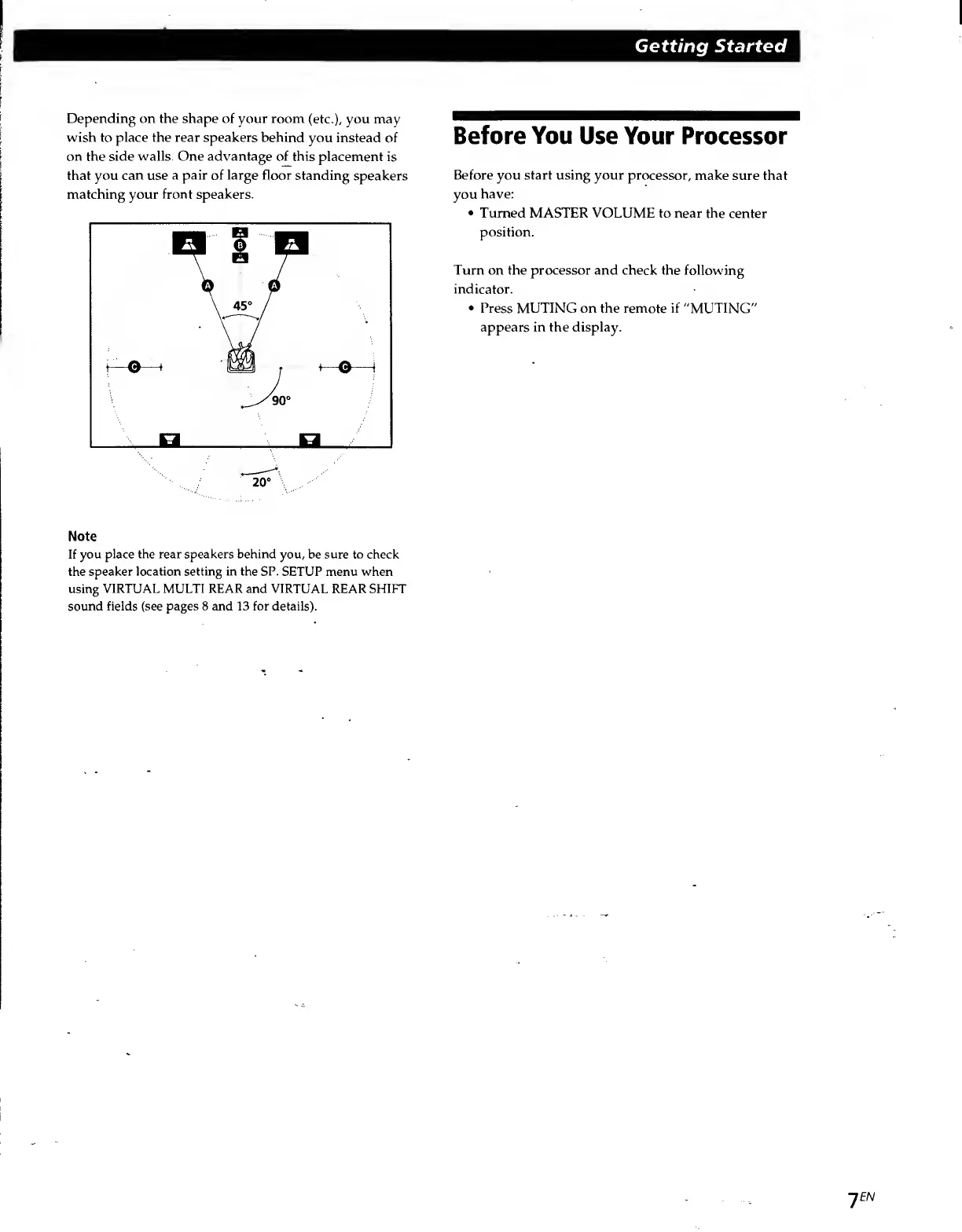
Depending
on
the
shape
of
your
room
(etc.),
you
may
wish
to
place
the
rear
speakers
behind
you
instead
of
on
the
side
walls.
One
advantage
of
this
placement
is
that
you
can
use
a
pair
of
large
floor
standing
speakers
matching
your
front
speakers.
Note
If
you
place
the
rear
speakers
behind
you,
be
sure
to
check
the
speaker
location
setting
in
the
SP.
SETUP
menu
when
using
VIRTUAL
MULTI
REAR
and
VIRTUAL
REAR
SHIFT
sound
fields
(see
pages
8
and
13
for
details).
Before
You
Use
Your
Processor
Before
you
start
using
your
processor,
make
sure
that
you
have:
Turned
MASTER
VOLUME
to
near
the
center
position.
Turn
on
the
processor
and
check
the
following
indicator.
Press
MUTING
on
the
remote
if
"MUTING"
appears
in
the
display.
JEN

Related product manuals