EasyManua.ls Logo

Sony SDP-E800 - Speaker Set Up

Sony SDP-E800
44 pages
Print Icon
To Next Page IconTo Next Page
To Previous Page IconTo Previous Page
Loading...
Getting
Started
Speaker
Set
Up
To
obtain
the
best
possible
surround
sound,
first
specify
the
type
of
speakers
you
have
connected.
Then
use
the
test
tone
to
adjust
the
speaker
volumes
to
the
same
level.
Specifying
the
speaker
type
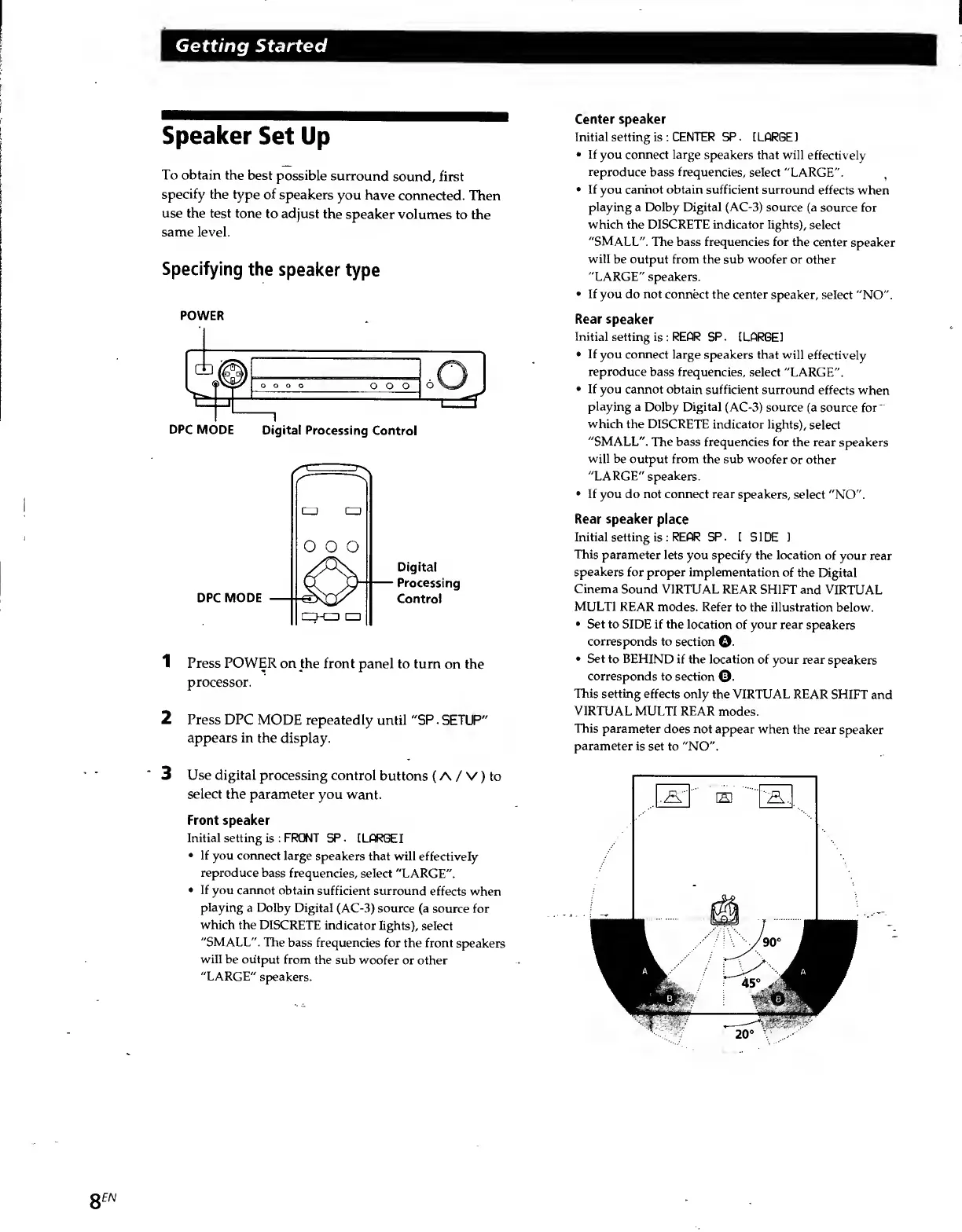
POWER
DPC
MODE
Digital
Processing
Control
DPC
MODE
Digital
Processing
Control
1
Press
POWER
on
the
front
panel
to
turn
on
the
processor.
2
Press
DPC
MODE
repeatedly
until
"SP.
SETUP"
appears
in
the
display.
3
Use
digital
processing
control
buttons
(
A
/
V)
to
select
the
parameter
you
want.
Front
speaker
Initial
setting
is
:
FRONT
SP.
[LARGE]
If
you
connect
large
speakers
that
will
effectively
reproduce
bass
frequencies,
select
"LARGE".
If
you
cannot
obtain
sufficient
surround
effects
when
playing
a
Dolby
Digital
(AC-3)
source
(a
source
for
which
the
DISCRETE
indicator
lights),
select
"SMALL".
The
bass
frequencies
for
the
front
speakers
will
be
output
from
the
sub
woofer
or
other
"LARGE"
speakers.
Center
speaker
Initial
setting
is
:
CENTER
SP.
I
LARGE
1
If
you
connect
large
speakers
that
will
effectively
reproduce
bass
frequencies,
select
"LARGE".
If
you
cannot
obtain
sufficient
surround
effects
when
playing
a
Dolby
Digital
(AC-3)
source
(a
source
for
which
the
DISCRETE
indicator
lights),
select
"SMALL".
The
bass
frequencies
for
the
center
speaker
will
be
output
from
the
sub
woofer
or
other
"LARGE"
speakers.
If
you
do
not
connect
the
center
speaker,
select
"NO".
Rear
speaker
Initial
setting
is
:
REAR
SP.
[LARGE!
If
you
connect
large
speakers
that
will
effectively
reproduce
bass
frequencies,
select
"LARGE".
If
you
cannot
obtain
sufficient
surround
effects
when
playing
a
Dolby
Digital
(AC-3)
source
(a
source
for
'
which
the
DISCRETE
indicator
lights),
select
"SMALL".
The
bass
frequencies
for
the
rear
speakers
will
be
output
from
the
sub
woofer
or
other
"LARGE"
speakers.
If
you
do
not
connect
rear
speakers,
select
"NO".
Rear
speaker
place
Initial
setting
is
:
REAR
SP.
[
SIDE
1
This
parameter
lets
you
specify
the
location
of
your
rear
speakers
for
proper
implementation
of
the
Digital
Cinema
Sound
VIRTUAL
REAR
SHIFT
and
VIRTUAL
MULTI
REAR
modes.
Refer
to
the
illustration
below.
Set
to
SIDE
if
the
location
of
your
rear
speakers
corresponds
to
section
©.
Set
to
BEHIND
if
the
location
of
your
rear
speakers
corresponds
to
section
©.
This
setting
effects
only
the
VIRTUAL
REAR
SHIFT
and
VIRTUAL
MULTI
REAR
modes.
This
parameter
does
not
appear
when
the
rear
speaker
parameter
is
set
to
"NO".
8
EN

Related product manuals