EasyManua.ls Logo

Sony SDP-E800 - Getting Started: Amplifier and Speaker Setup; Amplifier Hookups; Speaker Placement

Sony SDP-E800
44 pages
Print Icon
To Next Page IconTo Next Page
To Previous Page IconTo Previous Page
Loading...
Getting
Started
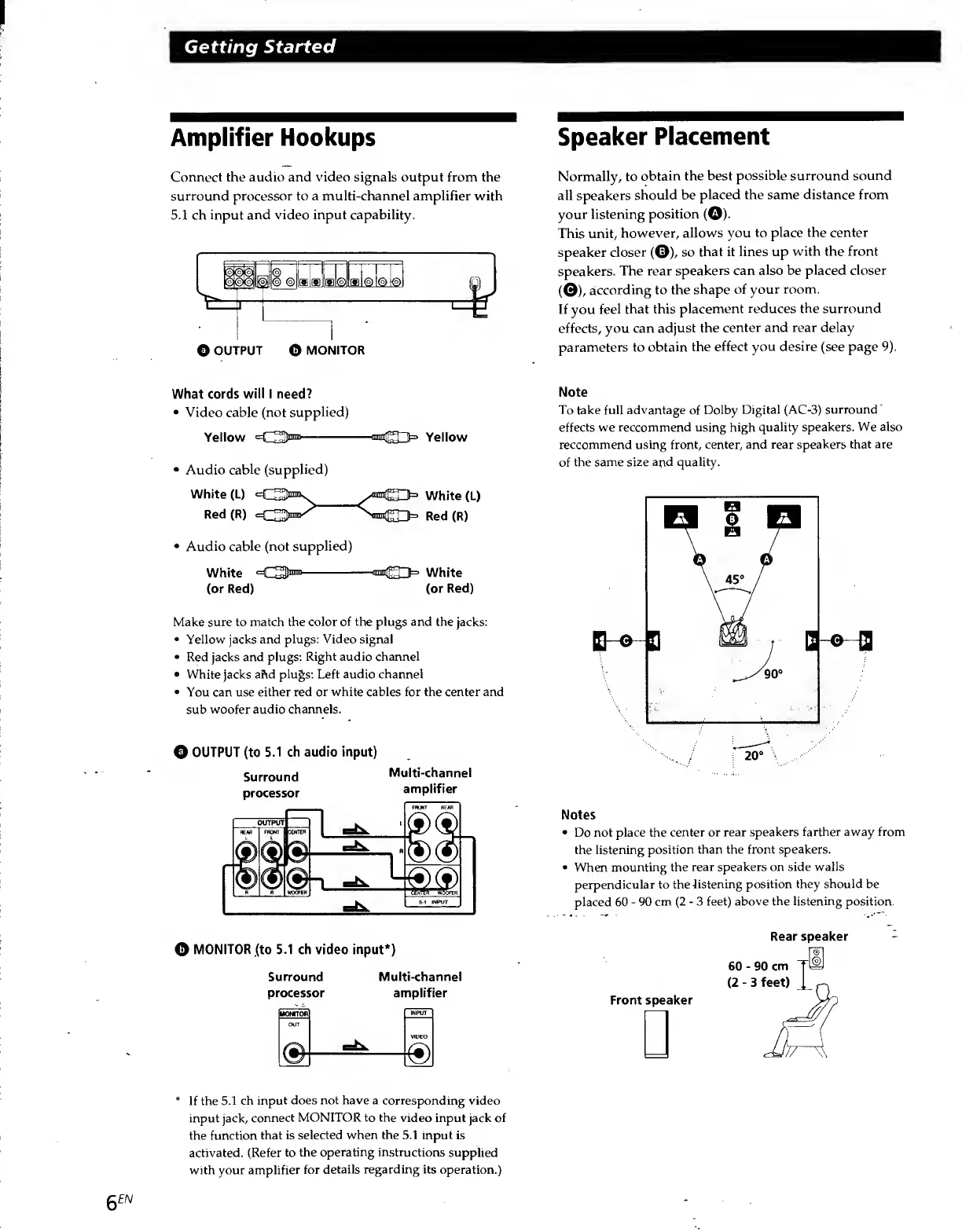
Amplifier
Hookups
Connect
the
audio
and
video
signals
output
from
the
surround
processor
to
a
multi-channel
amplifier
with
5.1
ch
input
and
video
input
capability.
Speaker
Placement
Normally,
to
obtain
the
best
possible
surround
sound
all
speakers
should
be
placed
the
same
distance
from
your
listening
position
(©).
This
unit,
however,
allows
you
to
place
the
center
speaker
closer
(©),
so
that
it
lines
up
with
the
front
speakers.
The
rear
speakers
can
also
be
placed
closer
(©),
according
to
the
shape
of
your
room.
If
you
feel
that
this
placement
reduces
the
surround
effects,
you
can
adjust
the
center
and
rear
delay
parameters
to
obtain
the
effect
you
desire
(see
page
9).
What
cords
will
I
need?
Video
cable
(not
supplied)
Yellow
=€3®
-““(S3
3
Yellow
Audio
cable
(supplied)
White
(L)
Q
\
White
(L)
Red
(R)
<=C3pnr
Red
(R)
Audio
cable
(not
supplied)
White
<<3®
-
C33=
White
(or
Red)
(or
Red)
Make
sure
to
match
the
color
of
the
plugs
and
the
jacks:
Yellow
jacks
and
plugs:
Video
signal
Red
jacks
and
plugs:
Right
audio
channel
White
jacks
a
Fid
plugs:
Left
audio
channel
You
can
use
either
red
or
white
cables
for
the
center
and
sub
woofer
audio
channels.
©
OUTPUT
(to
5.1
ch
audio
input)
Surround
Multi-channel
processor
amplifier
Note
To
take
full
advantage
of
Dolby
Digital
(AC-3)
surround
effects
we
reccommend
using
high
quality
speakers.
We
also
reccommend
using
front,
center,
and
rear
speakers
that
are
of
the
same
size
and
quality.
Notes
Do
not
place
the
center
or
rear
speakers
farther
away
from
the
listening
position
than
the
front
speakers.
When
mounting
the
rear
speakers
on
side
walls
perpendicular
to
the
listening
position
they
should
be
placed
60
-
90
cm
(2-3
feet)
above
the
listening
position.
©
MONITOR
(to
5.1
ch
video
input*)
Surround
Multi-channel
processor
amplifier
Rear
speaker
60
-
90
cm
(2
-
3
feet)
Front
speaker
*
If
the
5.1
ch
input
does
not
have
a
corresponding
video
input
jack,
connect
MONITOR
to
the
video
input
jack
of
the
function
that
is
selected
when
the
5.1
input
is
activated.
(Refer
to
the
operating
instructions
supplied
with
your
amplifier
for
details
regarding
its
operation.)
6
EN

Related product manuals