EasyManua.ls Logo

Sony SDP-E800 - Getting Started: Connections and Notes; Digital Source Connections; Analog Source Connections; Important Notes and Warnings

Sony SDP-E800
44 pages
Print Icon
To Next Page IconTo Next Page
To Previous Page IconTo Previous Page
Loading...
Getting
Started
=
:
signal
flow
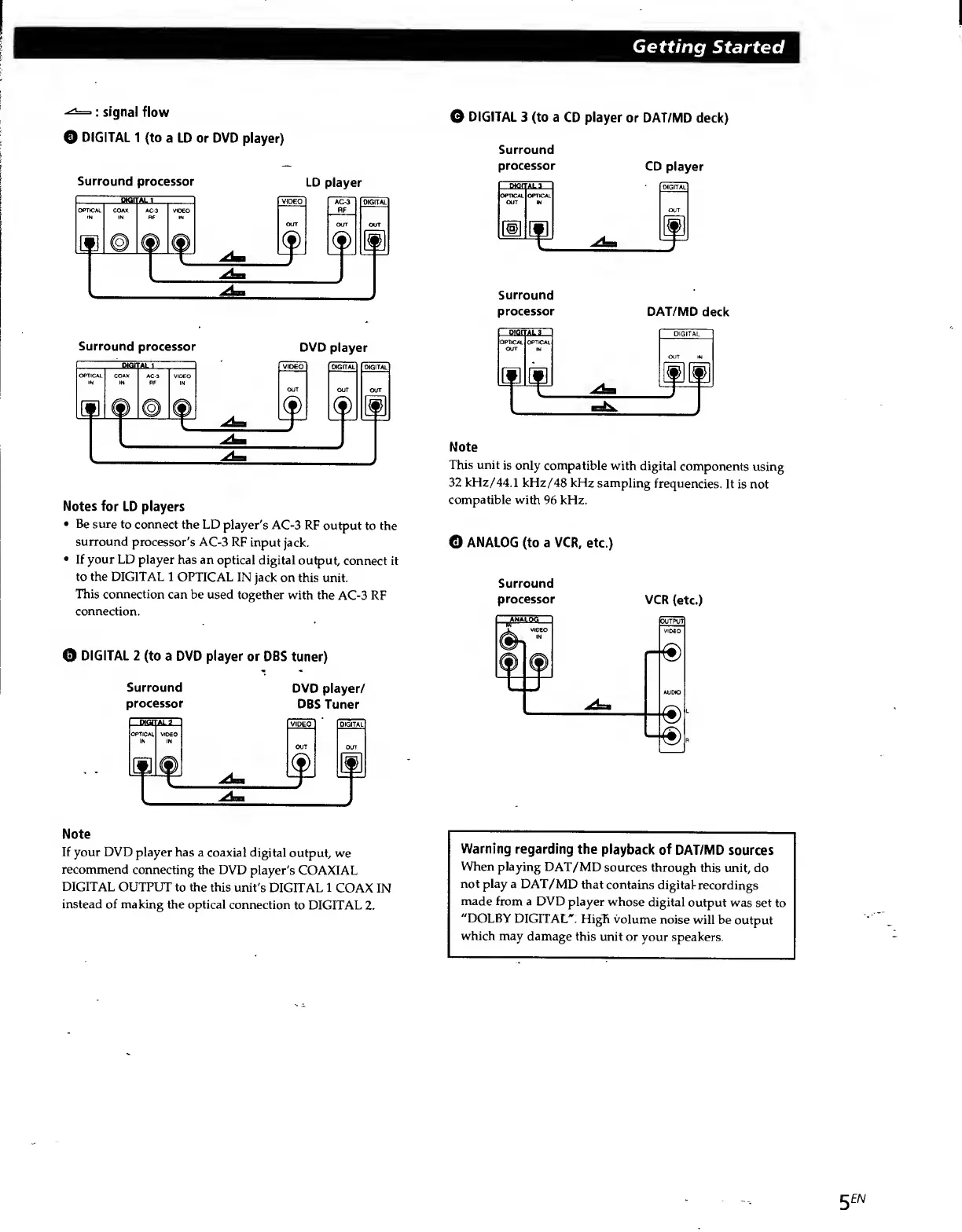
O
DIGITAL
1
(to
a
LD
or
DVD
player)
Surround
processor
LD
player
Surround
processor
DVD
player
Notes
for
LD
players
Be
sure
to
connect
the
LD
player's
AC-3
RF
output
to
the
surround
processor's
AC-3
RF
input
jack.
If
your
LD
player
has
an
optical
digital
output,
connect
it
to
the
DIGITAL
1
OPTICAL
IN
jack
on
this
unit.
This
connection
can
be
used
together
with
the
AC-3
RF
connection.
Q
DIGITAL
2
(to
a
DVD
player
or
DBS
tuner)
Surround
DVD
player/
processor
DBS
Tuner
Note
If
your
DVD
player
has
a
coaxial
digital
output,
we
recommend
connecting
the
DVD
player's
COAXIAL
DIGITAL
OUTPUT
to
the
this
unit's
DIGITAL
1
COAX
IN
instead
of
making
the
optical
connection
to
DIGITAL
2.
O
DIGITAL
3
(to
a
CD
player
or
DAT/MD
deck)
Surround
processor
CD
player
Surround
processor
DAT/NID
deck
Note
This
unit
is
only
compatible
with
digital
components
using
32
kHz/44.1
kHz/48
kHz
sampling
frequencies.
It
is
not
compatible
with
96
kHz.
O
ANALOG
(to
a
VCR,
etc.)
Surround
processor
VCR
(etc.)
Warning
regarding
the
playback
of
DAT/MD
sources
When
playing
DAT/MD
sources
through
this
unit,
do
not
play
a
DAT/MD
that
contains
digital-recordings
made
from
a
DVD
player
whose
digital
output
was
set
to
"DOLBY
DIGITAL*.
HigTi
volume
noise
will
be
output
which
may
damage
this
unit
or
your
speakers.
5
EN

Related product manuals