EasyManua.ls Logo

Sony SDP-E800 - Getting Started: Speaker and Sound Adjustments; Sub woofer Settings; Adjusting Delay Time; Adjusting Speaker Volume

Sony SDP-E800
44 pages
Print Icon
To Next Page IconTo Next Page
To Previous Page IconTo Previous Page
Loading...
Getting
Started
Sub
woofer
Initial
setting
is
:
SUB
WOOFER
IYES)
If
you
connect
a
suh
woofer,
select
"YES"
to
output
the
LFE
(low
frequency
extension)
channel
from
the
sub
woofer.
If
you
do
not
connect
a
sub
woofer,
select
"NO".
This
activates
the
Dolby
Digital
(AC-3)
bass
redirection
circuitry
and
outputs
the
LFE
signals
from
other
speakers.
In
order
to
take
full
advantage
of
the
Dolby
Digital
(AC-3)
bass
redirection
circuitry,
we
recommend
setting
the
sub
woofer's
cut
off
frequency
as
high
as
possible.
(However,
when
using
an
amplifier
with
5.1
ch
inputs,
set
the
sub
woofer's
cut
off
frequency
to
match
the
characteristics
of
the
amplifier.)
4
Use
digital
processing
control
buttons
(<
/
>)
to
adjust
the
level
of
the
parameter.
Adjusting
the
delay
time
The
delay
time
allows
you
create
a
more
effective
surround
effect
by
adding
a
sense
of
depth
to
the
center
or
rear
channels.
Longer
delay
times
create
a
greater
sense
of
depth.
1
Press
POWER
on
the
front
panel
to
turn
on
the
processor.
2
Press
DPC
MODE
repeatedly
until
"OTHER
SETUP"
appears
in
the
display
3
Use
digital
processing
control
buttons
(A
/
V)
to
select
the
parameter
you
want.
Center
speaker
delay
-
Initial
setting
is
:
CENTER
DELAY
Oms
Use
this
parameter
to
add
a
sense
of
depth
to
the
center
channel.
Center
speaker
delay
time
can
be
set
in
1
ms
steps
from
0
to
5
ms.
Rear
speaker
delay
Initial
setting
is
:
REAR
DELAY
5ms
Use
this
parameter
to
add
a
sense
of
depth
to
the
rear
channels.
When
"PRO
LOGIC"
is
displayed,
the
actual
delay
time
is
15ms
longer
than
the
time
shown
in
the
display.
Rear
speaker
delay
time
can
be
set
in
5
ms
steps
from
0
to
15
ms.
4
Use
digital
processing
control
buttons
(<
/
>)
to
adjust
the
level
of
the
parameter.
Adjusting
the
speaker
volume
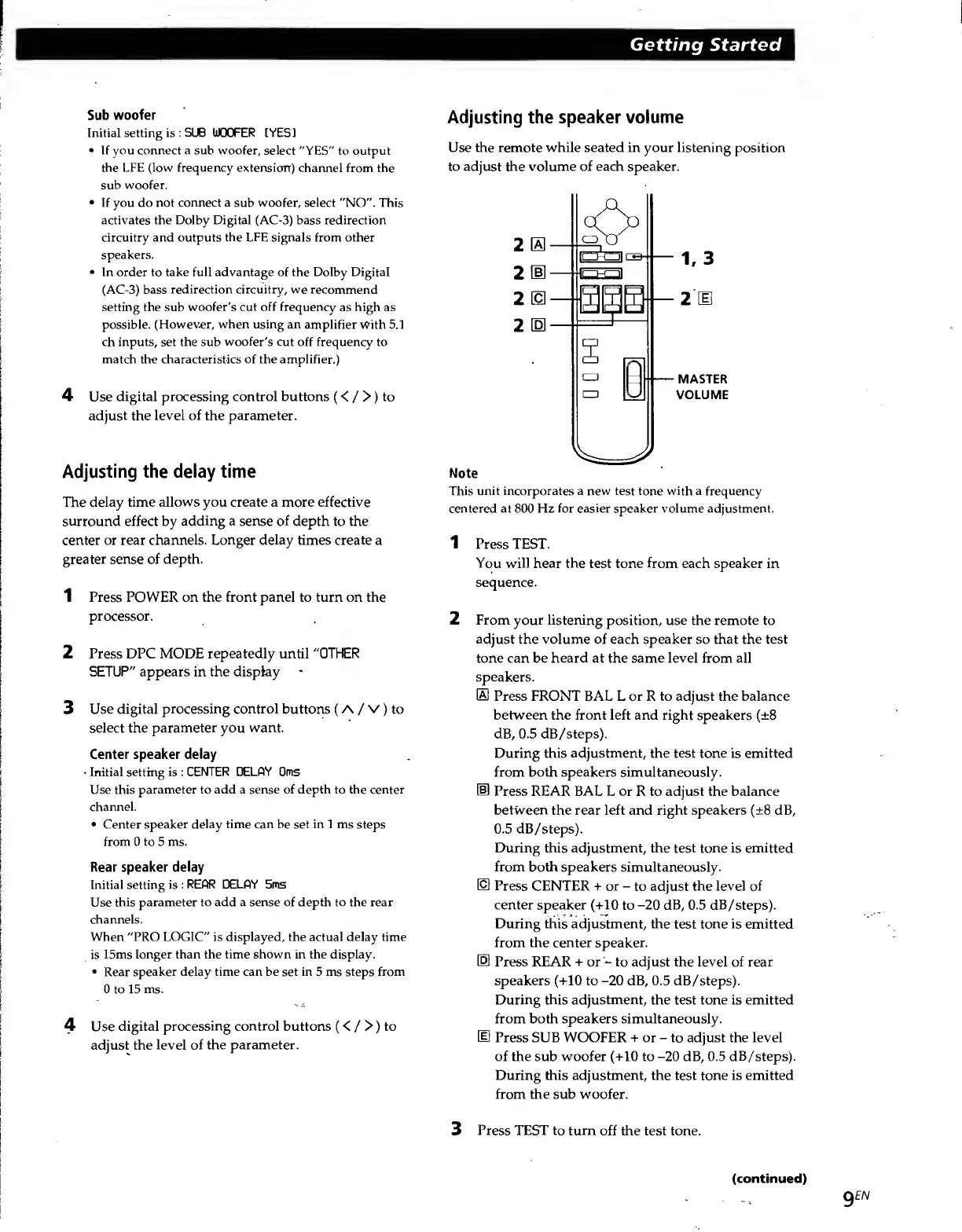
Use
the
remote
while
seated
in
your
listening
position
to
adjust
the
volume
of
each
speaker.
2
0
2
E
2
m
2
E
Note
This
unit
incorporates
a
new
test
tone
with
a
frequency
centered
at
800
Hz
for
easier
speaker
volume
adjustment.
1
Press
TEST.
You
will
hear
the
test
tone
from
each
speaker
in
sequence.
2
From
your
listening
position,
use
the
remote
to
adjust
the
volume
of
each
speaker
so
that
the
test
tone
can
be
heard
at
the
same
level
from
all
speakers.
®
Press
FRONT
BAL
L
or
R
to
adjust
the
balance
between
the
front
left
and
right
speakers
(±8
dB,
0.5
dB/steps).
During
this
adjustment,
the
test
tone
is
emitted
from
both
speakers
simultaneously.
®
Press
REAR
BAL
L
or
R
to
adjust
the
balance
between
the
rear
left
and
right
speakers
(±8
dB,
0.5
dB/steps).
During
this
adjustment,
the
test
tone
is
emitted
from
both
speakers
simultaneously.
IS
Press
CENTER
+
or
-
to
adjust
the
level
of
center
speaker
(+10
to
-20
dB,
0.5
dB/steps).
During
this
adjustment,
the
test
tone
is
emitted
from
the
center
speaker.
[0
Press
REAR
+
or
-
to
adjust
the
level
of
rear
speakers
(+10
to
-20
dB,
0.5
dB/steps).
During
this
adjustment,
the
test
tone
is
emitted
from
both
speakers
simultaneously.
Press
SUB
WOOFER
+
or
-
to
adjust
the
level
of
the
sub
woofer
(+10
to
-20
dB,
0.5
dB/steps).
During
this
adjustment,
the
test
tone
is
emitted
from
the
sub
woofer.
3
Press
TEST
to
turn
off
the
test
tone.
9
EN
(continued)

Related product manuals