EasyManua.ls Logo

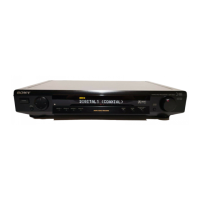
Sony SDP-E800 - Precautions; On safety; On power sources; On placement

Sony SDP-E800
44 pages
Print Icon
To Next Page IconTo Next Page
To Previous Page IconTo Previous Page
Loading...
WARNING
To
prevent
fire
or
shock
hazard,
do
not
expose
the
unit
to
rain
or
moisture.
A
W3
*
'oONOT
open”
00
'
NO
refer
sen
O
REDUCE
THE
RISK
OF
ELECTRIC
SHOCK.
NOT
REMOVE
COVER
(OR
SACK)
USCR^ERWCEASie
PARTS
INS®*
(ICING
TO
QUALIFIED
SERVICE
PERSONNEL
A
This
symbol
is
intended
to
alert
the
user
to
the
presence
of
uninsulated
"dangerous
voltage"
within
the
product's
enclosure
that
may
be
of
sufficient
magnitude
to
constitute
a
risk
of
electric
shock
to
persons.
CAUTION
You
are
cautioned
that
any
change
or
modifications
not
expressly
approved
in
this
manual
could
void
your
authority
to
operate
this
equipment.
Owner's
record
The
model
and
serial
numbers
are
located
on
the
rear
of
the
unit.
Record
the
serial
number
in
the
space
provided
below.
Refer
to
them
whenever
you
call
upon
your
Sony
dealer
regarding
this
product.
Model
No.
SDP-E800
Serial
No.
_
For
the
customers
in
Canada
CAUTION
TO
PREVENT
ELECTRIC
SHOCK,
DO
NOT
USE
THIS
POLARIZED
AC
PLUG
WITH
AN
EXTENSION
CORD,
RECEPTACLE
OR
OTHER
OUTLET
UNLESS
THE
BLADES
CAN
BE
FULLY
INSERTED
TO
PREVENT
BLADE
EXPOSURE.
A
This
symbol
is
intended
to
alert
the
user
to
the
presence
of
important
operating
and
maintenance
(servicing)
instructions
in
the
literature
accompanying
the
appliance.
IMPORTANT
This
equipment
Fias
been
tested
and
found
to
comply
with
the
limits
for
a
Class
B
digital
device,
pursuant
to
Part
15
of
the
FCC
Rules.
These
limits
are
designed
to
provide
reasonable
protection
against
harmful
interference
in
a
residential
installation.
This
equipment
generates,
uses,
and
can
radiate
radio
frequency
energy
and,
if
not
installed
and
used
in
accordance
with
the
instructions,
may
cause
harmful
interference
to
radio
communications.
However,
there
is
no
guarantee
that
interference
will
not
occur
in
a
particular
installation.
If
this
equipment
does
cause
harmful
interference
to
radio
or
television
reception,
which
can
be
determined
by
turning
the
equipment
off
and
on,
the
user
is
encouraged
to
try
to
correct
the
interference
by
one
or
more
of
the
following
measures:
-
Reorient
or
relocate
the
receiving
antenna.
-
Increase
the
separation
between
the
equipment
and
receiver.
-
Connect
the
equipment
into
an
outlet
on
a
circuit
different
from
that
to
which
the
receiver
is
connected.
-
Consult
the
dealer
or
an
experienced
radio/TV
technician
for
help.
Precautions
On
safety
Should
any
solid
object
or
liquid
fall
into
the
cabinet,
unplug
the
processor
and
have
it
checked
by
qualified
personnel
before
operating
it
any
further.
On
power
sources
Before
operating
the
processor,
check
that
the
operating
voltage
is
identical
with
your
local
power
supply.
The
operating
voltage
is
indicated
on
the
nameplate
at
the
rear
of
the
processor.
This
unit
is
not
disconnected
from
the
AC
power
source
(mains)
as
long
as
it
is
connected
to
the
wall
outlet,
even
if
the
unit
itself
has
been
turned
off.
If
you
are
not
going
to
use
the
processor
for
a
long
time,
be
sure
to
disconnect
the
processor
from
the
wall
outlet.
To
disconnect
the
AC
power
cord,
grasp
the
plug
itself;
never
pull
the
cord.
One
blade
of
the
plug
is
wider
than
the
other
for
the
purpose
of
safety
and
will
fit
into
the
wall
outlet
only
one
way.
If
you
are
unable
to
insert
the
plug
fully
into
the
outlet,
contact
your
dealer.
AC
power
cord
must
be
changed
only
at
the
qualified
service
shop.
On
placement
Do
not
install
the
appliance
in
a
confined
space,
such
as
a
bookcase
or
built-in
cabinet.
Place
the
processor
in
a
location
with
adequate
ventilation
to
prevent
heat
buildup
and
prolong
the
life
of
the
processor.
Do
not
place
the
processor
near
heat
sources,
or
in
a
place
subject
to
direct
sunlight,
excessive
dust
or
mechanical
shock.
Do
not
place
anything
on
top
of
the
cabinet
that
might
block
the
ventilation
holes
and
cause
malfunctions.
On
operation
Before
connecting
other
components,
be
sure
to
turn
off
and
unplug
the
processor.

Related product manuals