Reconstructing Data Volume (Changing RAID Types) (Only the NSR-100/50)
22
3
Use the arrow keys on the keyboard to select [IDE
DiskOnModule], and press Enter.
Startup from DiskOnModule (DOM) begins.
After startup, the DOM menu appears.
4
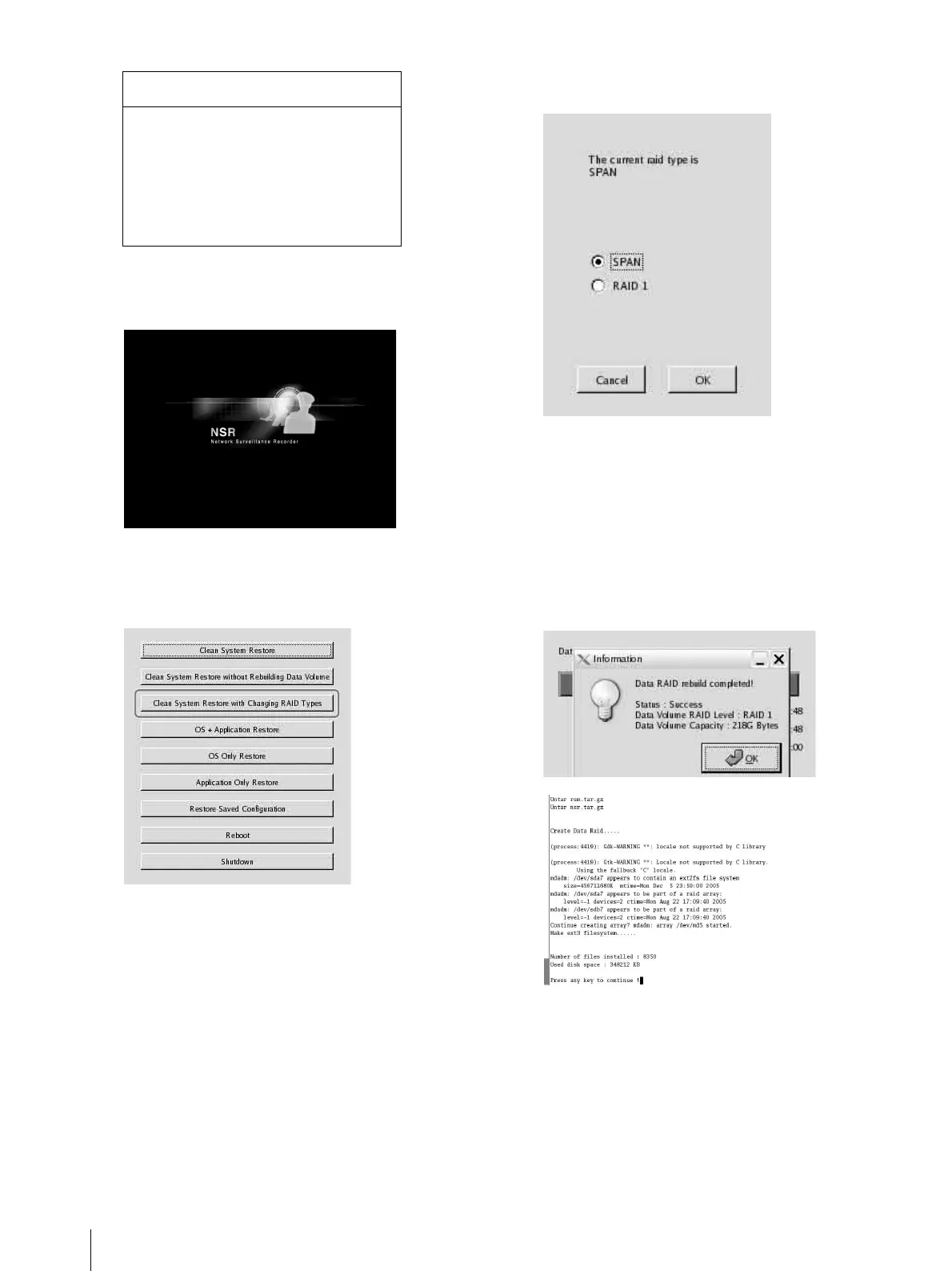
Click the third item from the top, [Clean System
Restore with Changing RAID Types].
The RAID Type selection screen appears.
5
Select the RAID Type, and click [OK].
Example: For the NSR-50
The confirmation screen appears.
6
Click [OK].
RAID reconstruction for data volume and full
system restoration begins.
This process can take up to about 5 hours. A
progress bar appears during the process.
When the process successfully completes, a
notification screen appears.
Example: For an NSR-50 with RAID 1 selected
7
Press Enter after the process completes and the
message [Press any key to continue!] appears.
The screen returns to the DOM menu.
8
Click [Reboot].
The NSR reboots, and the Setup Wizard appears.
Boot Menu
1.QSI DVD+/-RW SDW-0826
2. WDC WD2500JD-22HBC0-(S1)
3. WDC WD2500JD-22HBC0-(S2)
4. PQI IDE DiskOnModule-(SM)
<Enter Setup>



 To Next Page