Features and Functions
9
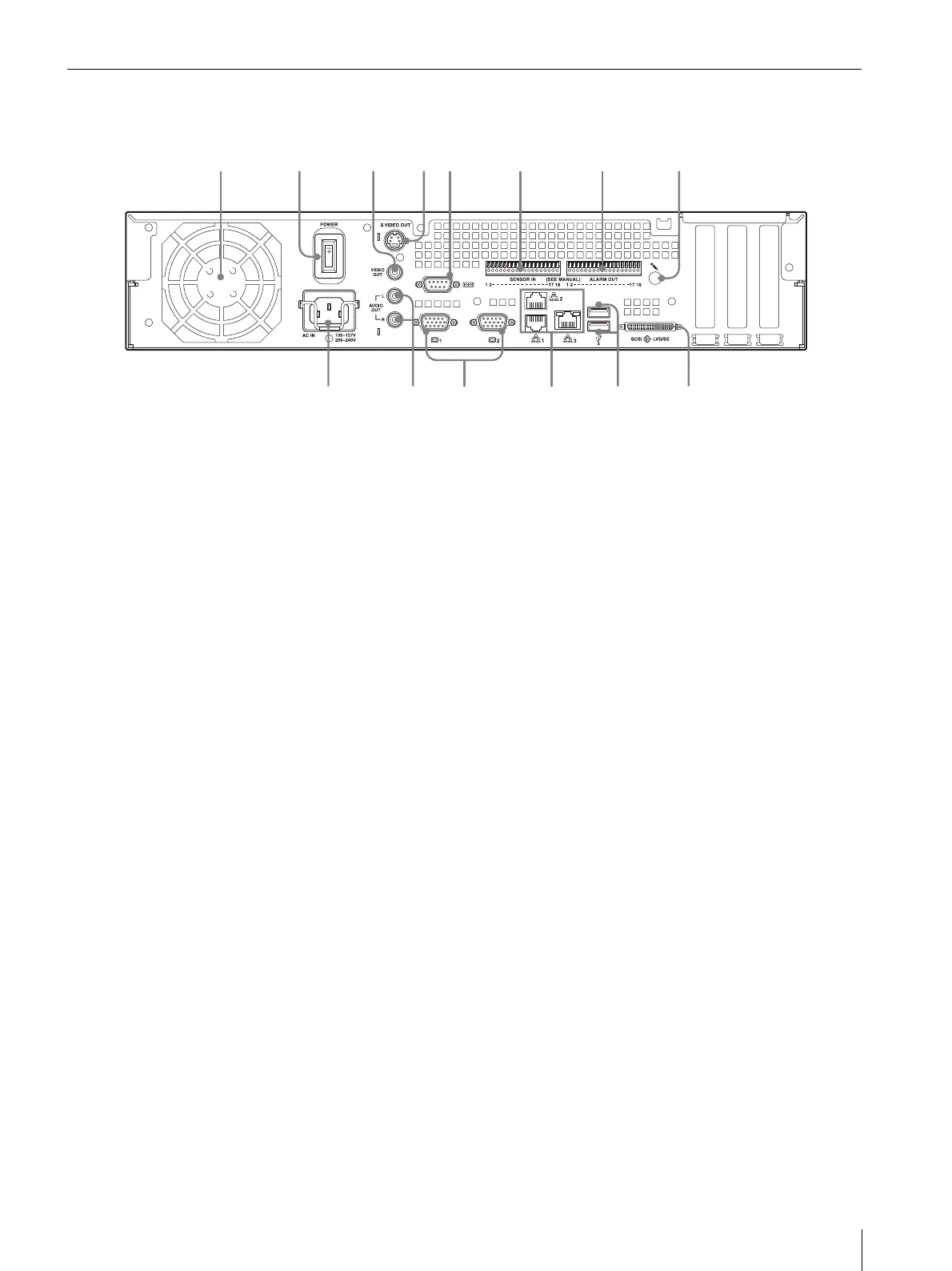
Rear
NSR-100/50
A Fan
Take care not to obstruct the fan grille. If the grille is
obstructed, heat may build up in the unit, leading to
damage and/or fire.
B Power switch
Press the switch in the a position to turn on the unit.
C Video output connector
Use this connector to output video to a peripheral video
device, such as a VCR.
The displayed images are the same as those for monitor
connector 1.
D S-video output connector
Use this connector to output video to a peripheral video
device equipped with an S-video connector.
The displayed images are the same as those for monitor
connector 1.
E Serial connector (RS-232C)
Use this connector to connect the control line of the
uninterruptible power supply (UPS).
F Sensor input connector
Use this connector to connect the sensor input lines.
For connection details and wiring diagrams for sensor
inputs, see “I/O Port” (page 27).
G Alarm output connector
Use this connector to connect the alarm output lines.
For connection details and a wiring diagram for alarm
output, see “I/O Port” (page 27).
H Audio input connector*
Use this connector to input audio from a peripheral
audio device, such as a microphone.
I SCSI connector*
Use this connector to connect a peripheral SCSI device.
J USB connector
Use this connector to connect a USB keyboard, mouse,
USB flash memory or the RM-NS10 remote control to
the NSR.
K LAN connectors (1 to 3)
Use these connectors to connect 10 Base-T, 100 Base-
TX, or 1000 Base-T network cables to the NSR.
LAN1: Network cameras
LAN2: Remote Clients
LAN3: External storage devices**
L Monitor connectors (1 and 2)
Use these connectors to connect a monitor.
M Audio output connectors (L and R)
Use these connectors to output audio to a peripheral
audio device.
N Power supply connector
Use this connector to connect the power cord.
* This feature is not currently supported.
** The external storage device is not supported depending on
the software version. Consult your dealer.
231 654 7 8
s
a
d
f



 To Next Page