55
Setting the display or sound track language
DVD Settings and Adjustements
Setting the display or sound track
language
You can set various languages for the disc’s
menu, sound track or subtitle.
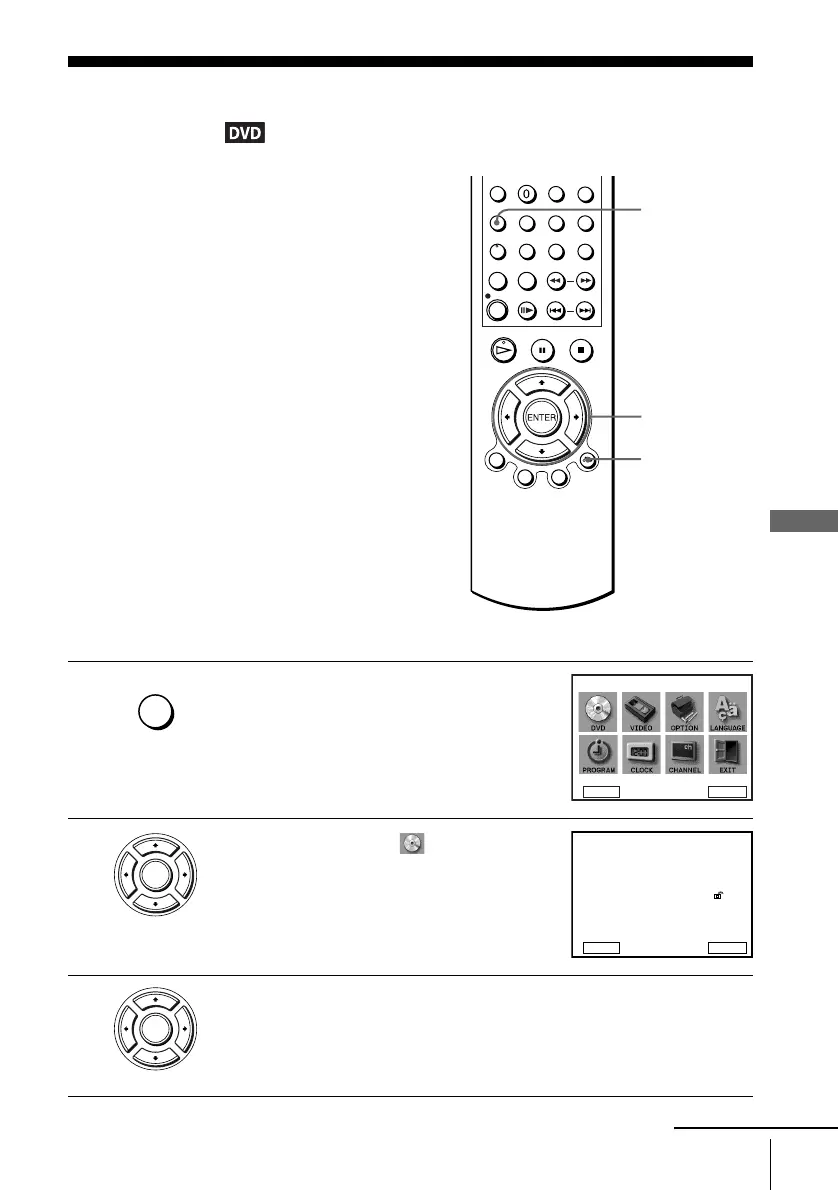
1
Press SET UP when the DVD player is in stop
mode
.
The “SETUP MENU” appears.
2
Press V/v/B/b to select (DVD Setup),
then press ENTER.
The “DVD SETUP” menu appears.
3
Press V/v to select the language setup item from the displayed list:
“DVD Menu,” “Audio,” or “Subtitle.”
Then press ENTER.
V/v/B/b
ENTER
SET UP
O RETURN
SET UP
DVD Setup
RETURN
SETUP MENU
Vv
b
B
ENTER
ENTER
DVD Menu
Subtitle
Audio Setup
Screen Setup
Parental
Audio
English
Audio Follow
Original
RETURN
DVD SETUP
ENTER
Unlocked
v
V
ENTER
continued














 To Next Page