47
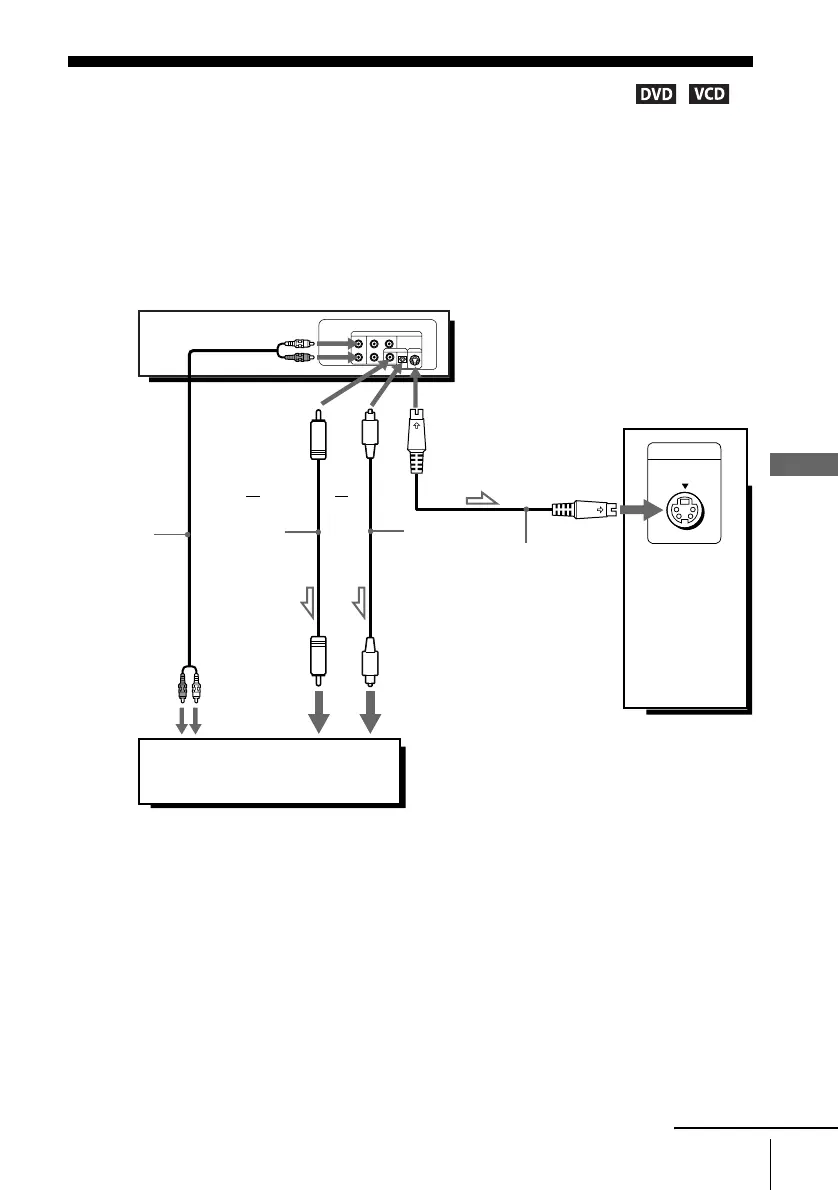
S-Video/Component Video hookup
Advanced Hookups
S-Video/Component Video hookup
Make audio connections using the LINE OUT AUDIO L/R jacks or DIGITAL AUDIO OUT
(OPTICAL or COAXIAL) jacks on the right side of the DVD-VCR when you use S-VIDEO/
Component Video hookup.
A Use this hookup if your TV has an S VIDEO input jack
• Connect an S VIDEO cord (not supplied). You will enjoy high quality images.
Notes
• Set “Video Out” to “S-Video” in the “SCREEN SETUP” menu (page 52) to view pictures
from the S VIDEO jack.
• The connection using S VIDEO OUT jack is only for the DVD player.
INPUT
S VIDEO
l : Signal flow
(DVD only)
TV or AV amplifier
TV
S VIDEO cord
(not supplied)
DVD-VCR
Audio cord
(not supplied)
Coaxial
digital cord
(not supplied)
Optical digital
cord (not
supplied)
Remove jack
cap before
connecting
or
or
to coaxial or optical
digital input
to audio
input
continued














 To Next Page