1-8
32
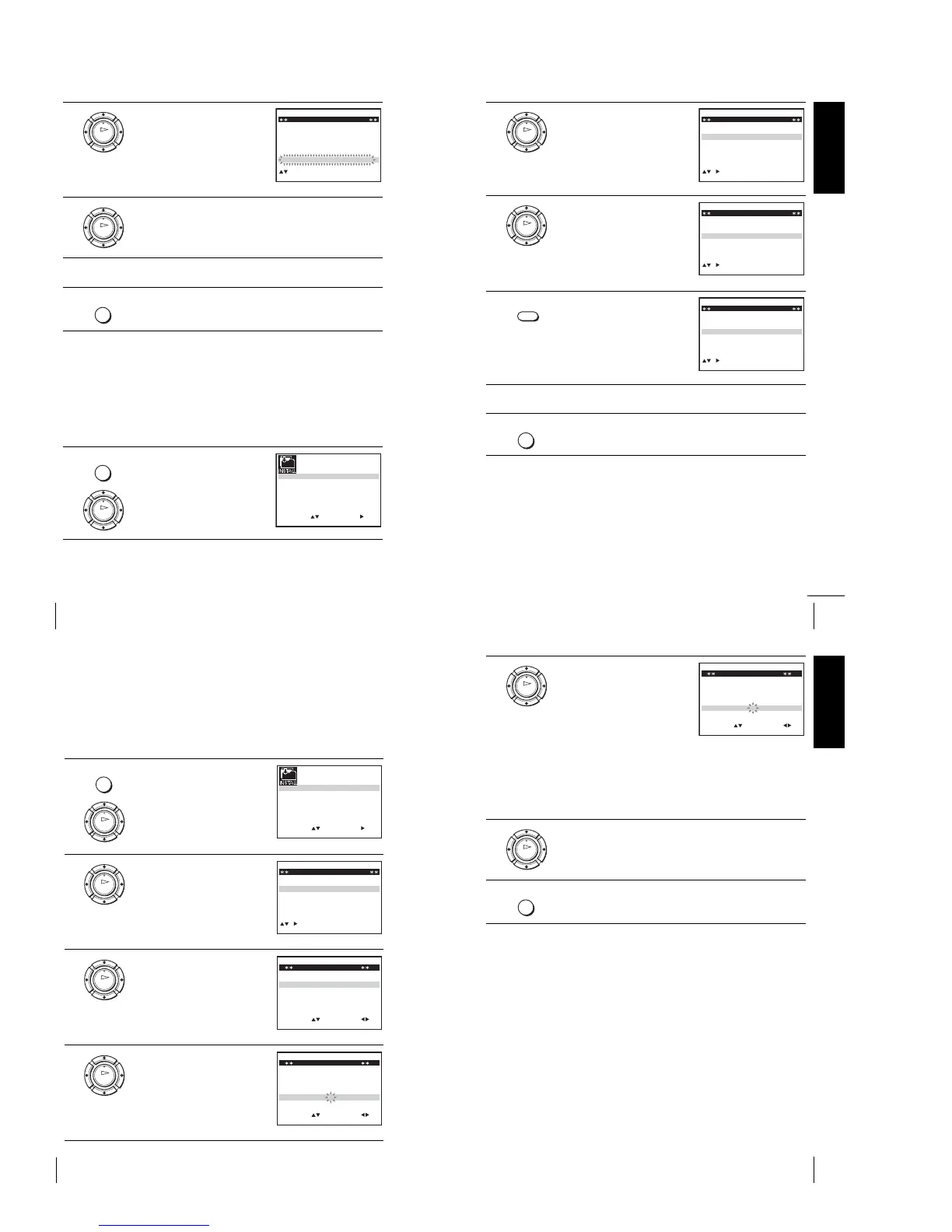
Changing/disabling programme positions
Disabling unwanted programme positions
After presetting channels, you can disable unused programme positions. The disabled
positions will be skipped later when you press the PROG +/– buttons.
Before you start…
•Turn on the VCR and the TV.
•Set the TV to the video channel.
•Refer to “Index to parts and controls” for button locations.
4
Press OK, then press M/m to move
to the desired programme position.
5
Press OK to confirm the setting.
6
To change the programme position of another station, repeat steps 3
through 5.
7
Press MENU to exit the menu.
1
Press MENU, then press M/m/</
, to highlight INSTALLATION,
and press OK.
OK
CH
MENU:
SWAPPING OK
TV STATION TABLE
:
5
4
3
2
1
0
0
0
0
2
3
3
2
9
2
0
7
L
I
C
A
M
J
D
A
N
K
E
B
–
–
–
–
OFF
OFF
OFF
OFF
PR NAME DEC
EXIT
OK
MENU
MENU
OK
SET
MENU:
:
OK:END
SELECT
AUTO SET UP
MANUAL SET UP
SMARTLINK
32:VCR OUTPUT CH
:
EXIT
TV SYSTEM
:G
Getting Started
33
Changing/disabling programme positions
Note
•Be sure to select the programme position you want to disable correctly. If you
disable a programme position by mistake, you need to reset that channel manually.
2
Press M/m to highlight MANUAL
SET UP, then press ,.
3
Press M/m to highlight the row
which you want to disable.
To display other pages for
programme positions 6 to 80, press
M/m repeatedly.
4
Press CLEAR.
The selected row will be cleared as
shown on the right.
5
Repeat steps 3 and 4 for any other programme positions you want to
disable.
6
Press MENU to exit the menu.
OK
CH
EXIT MENU:CLEAR:DELETE
SWAPPING OK
TV STATION TABLE
:
5
4
3
2
1
0
0
0
0
3
3
2
2
2
0
9
7
I
C
L
A
J
D
M
A
K
E
N
B
–
–
–
–
OFF
OFF
OFF
OFF
PR NAME DEC
OK
MENU:CLEAR:DELETE
SWAPPING OK
TV STATION TABLE
:
5
4
3
2
1
0
0
0
0
3
3
2
2
2
0
9
7
I
C
L
A
J
D
M
A
K
E
N
B
–
–
–
–
OFF
OFF
OFF
OFF
PR CH NAME DEC
EXIT
CLEAR
CH
MENU:CLEAR:DELETE
SWAPPING OK
TV STATION TABLE
:
5
4
3
2
1
0
0
0
3
3
2
2
0
7
I
C
A
J
D
A
K
E
B
–
–
–
OFF
OFF
OFF
PR NAME DEC
EXIT
MENU
continued
34
Changing/disabling programme positions
Changing the station names
Yo u can change or enter the station names (up to 4 characters). The VCR must
receive channel information for station names to appear automatically*.
*not available on SLV-SE630N and SE430K
Before you start…
•Turn on the VCR and the TV.
•Set the TV to the video channel.
•Refer to “Index to parts and controls” for button locations.
1
Press MENU, then press M/m/</
, to highlight INSTALLATION
and press OK.
2
Press M/m to highlight MANUAL
SET UP, then press ,.
3
Press M/m to highlight the row
which you want to change or enter
the station name, then press ,.
To d is pla y other pages for
programme positions 6 to 80, press
M/m repeatedly.
4
Press M/m to highlight NAME, then
press ,.
MENU
OK
SET
MENU:
:
OK:END
SELECT
AUTO SET UP
MANUAL SET UP
SMARTLINK
32:VCR OUTPUT CH
:
EXIT
TV SYSTEM
:G
OK
CH
MENU:CLEAR:DELETE
SWAPPING OK
TV STATION TABLE
:
5
4
3
2
1
0
0
0
0
0
3
3
3
2
2
3
2
0
9
7
–
I
C
L
A
–
J
D
M
A
–
K
E
N
B
–
–
–
–
–
OFF
OFF
OFF
OFF
OFF
PR NAME DEC
EXIT
OK
MENU:OK:END
SELECT
MANUAL TUNING
PR : 5
CH : 033
MFT : –
DECODER : OFF
NAME : ––––
:
SET :
EXIT
OK
MENU:OK:END
SELECT
MANUAL TUNING
PR : 5
CH : 033
MFT : –
DECODER : OFF
NAME : ––––
:
SET :
EXIT
Getting Started
35
Changing/disabling programme positions
5
Enter the station name.
1 Press M/m to select a character.
Each time you press M, the
character changes as shown
below.
A t B t … t Z t 0 t 1 t
… t 9 t A
2 Press , to set the next
character.
The next space flashes.
To correct a character, press </, until the character you want
to correct flashes, then reset it.
You can set up to 4 characters for the station name.
6
Press OK to confirm the new name.
7
Press MENU to exit the menu.
OK
EXIT MENU:OK:END
SELECT
MANUAL TUNING
PR : 5
CH : 033
MFT : –
DECODER : OFF
NAME : O– – –
:
SET :
OK
MENU



 To Next Page