1-9
36
Setting the Canal Plus decoder
Setting the Canal Plus decoder
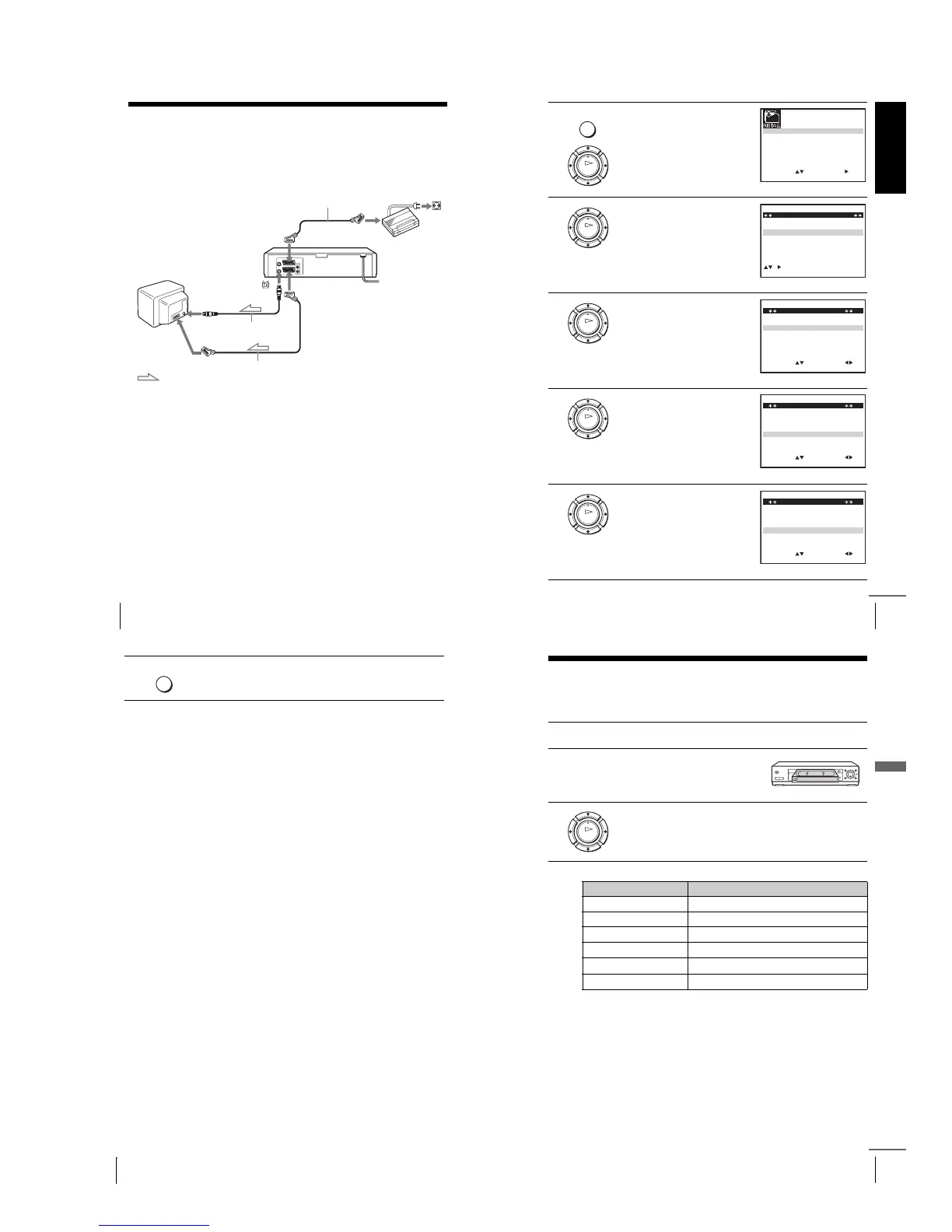
Yo u can watch or record Canal Plus programmes if you connect a decoder (not
supplied) to the VCR.
Connecting a decoder
Setting Canal Plus channels
To watch or record Canal Plus programmes, set your VCR to receive the channels
using the on-screen display.
In order to set the channels correctly, be sure to follow all of the steps below.
Before you start…
•Turn on the VCR, the TV, and the decoder.
•Set the TV to the video channel.
•Refer to “Index to parts and controls” for button locations.
LINE-3 (DEC/EXT)*
1
or
LINE-2 (DEC/EXT)*
2
AERIAL IN
LINE-1 (EURO AV)
Aerial cable (supplied)
Scart cable
(not supplied)
Scart
(EURO-AV)
Scart cable (not supplied)
Canal Plus
decoder
: Signal flow
Scart
(EURO-AV)
Getting Started
37
Setting the Canal Plus decoder
1
Press MENU, then press M/m/</
, to highlight INSTALLATION
and press OK.
2
Press M/m to highlight MANUAL
SET UP, then press ,.
3
Press M/m to highlight the row
which you want to set for the
decoder, then press ,.
To display positions 6 to 80, press
M/m repeatedly.
4
Press M/m to highlight DECODER.
5
Press , to set DECODER to ON,
then press OK.
MENU
OK
SET
MENU:
:
OK:END
SELECT
AUTO SET UP
MANUAL SET UP
SMARTLINK
32:VCR OUTPUT CH
:
EXIT
TV SYSTEM
:G
OK
CH
MENU:CLEAR:DELETE
SWAPPING OK
TV STATION TABLE
:
5
4
3
2
1
0
0
0
0
0
3
3
3
2
2
3
2
0
9
7
–
I
C
L
A
–
J
D
M
A
–
K
E
N
B
–
–
–
–
–
OFF
OFF
OFF
OFF
OFF
PR NAME DEC
EXIT
OK
MENU:OK:END
SELECT
MANUAL TUNING
PR : 5
CH : 033
MFT : –
DECODER : OFF
NAME : ––––
:
SET :
EXIT
OK
EXIT MENU:OK:END
SELECT
MANUAL TUNING
PR : 5
CH : 033
MFT : –
DECODER : OFF
NAME : ––––
:
SET :
OK
MENU:OK:END
SELECT
MANUAL TUNING
PR : 5
CH : 033
MFT : –
DECODER : ON
NAME : ––––
:
SET :
EXIT
continued
38
Setting the Canal Plus decoder
Notes
•To superimpose subtitles while watching Canal Plus programmes, make both
decoder-VCR and VCR-TV connections using 21-pin Scart cables that are
compatible with the RGB signals. You cannot record subtitles on the VCR.
•When you watch Canal Plus programmes through the RFU input of the TV, press
t TV/VIDEO so that the VIDEO indicator appears in the display window.
*
1
SLV-SE830N
*
2
SLV-SE730N, SX730N, SE630N and SE430K
6
Press MENU to exit the menu.
MENU
39
Playing a tape
Basic Operations
Basic Operations
Playing a tape
Before you start...
•Refer to “Index to parts and controls” for button locations.
Additional tasks
1
Turn on your TV and set it to the video channel.
2
Insert a tape.
The VCR turns on and starts playing
automatically if you insert a tape with
its safety tab removed.
3
Press H (play).
When the tape reaches the end, it will rewind automatically.
To Press
Stop play x (stop)
Pause play X (pause)
Resume play after pause
X (pause) or
H (play)
Fast-forward the tape
M (fast-forward) during stop
Rewind the tape
m (rewind) during stop
Eject the tape
Z (eject)
OK
continued



 To Next Page