17
GB
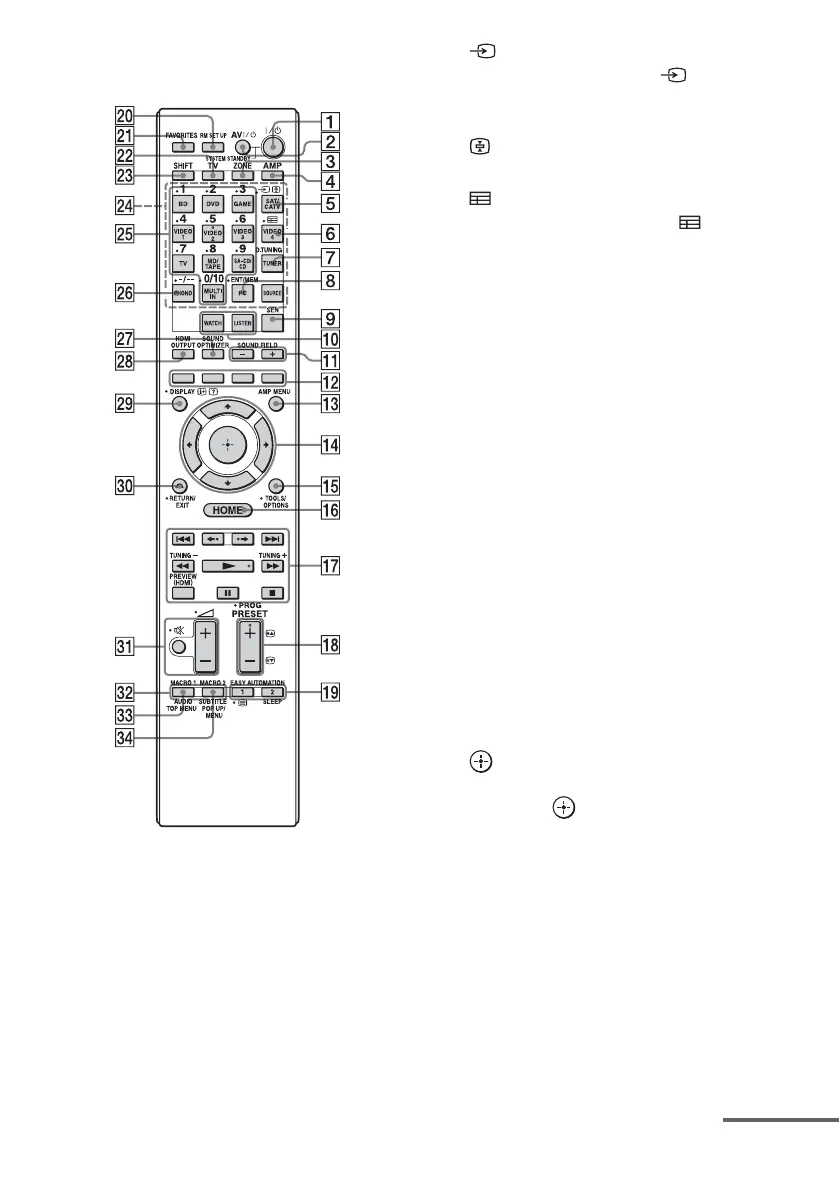
Multifunction remote control
(RM-AAL042)
A ?/1 (on/standby)
Turns the receiver on or off.
B AV ?/1 (on/standby)
Turns the video/audio equipment that the
remote is assigned to operate on or off.
C ZONE (page 68)
D AMP
Activates the receiver operation for main
zone.
E (Input select)
Press TV (ws), then press (Input
select) to select the input signal (TV or
video).
(Text hold)
In text mode: Holds the current page.
F (Guide)
Press SHIFT (wd), then press (Guide)
to display the on-screen program guide.
G D.TUNING (page 58)
Press SHIFT (wd), then press D.TUNING
to enter direct tuning mode.
H ENT/MEM
Press SHIFT (wd), then press ENT/MEM
to enter the value or track using the
numeric buttons (wg), or press ENT/
MEM, then press the numeric buttons
(wg) to select a preset number to which a
station is stored during tuner operation.
I SEN
Accesses the home page of the Sony
Entertainment Network (SEN), a network
service provided by Sony.
J WATCH, LISTEN (page 51)
K SOUND FIELD +/– (page 61, 62, 64)
L Color buttons
Works according to the guide on the TV
screen.
M AMP MENU (page 115)
N V/v/B/b
Press V/v/B/b to select the menu items.
Then press to enter the selection.
O TOOLS/OPTIONS (page 49, 57, 60)
Displays and selects items from option
menus.
P HOME (page 49)
Displays the home menu on the TV
screen.
Q m/M
1)
, x
1)
, X
1)
, N
1) 2)
,
./>
1)
Press the buttons to operate the DVD
player, Blu-ray Disc Player, CD player,
MD deck, tape deck, equipment
continued















 To Next Page