68
GB
What you can do with the
Multi-zone function
You can enjoy images and sounds from a
device connected to the receiver in a zone
other than the main zone. For example, you
can watch the DVD in the main zone and listen
to the CD in zone 2 or zone 3.
When using an IR repeater (not supplied), you
can operate both a device in the main zone and
Sony receiver in zone 2 or zone 3 from zone 2
or zone 3 using the remote control.
Use an IR repeater when you install the
receiver in a place where signals from the
remote control cannot reach.
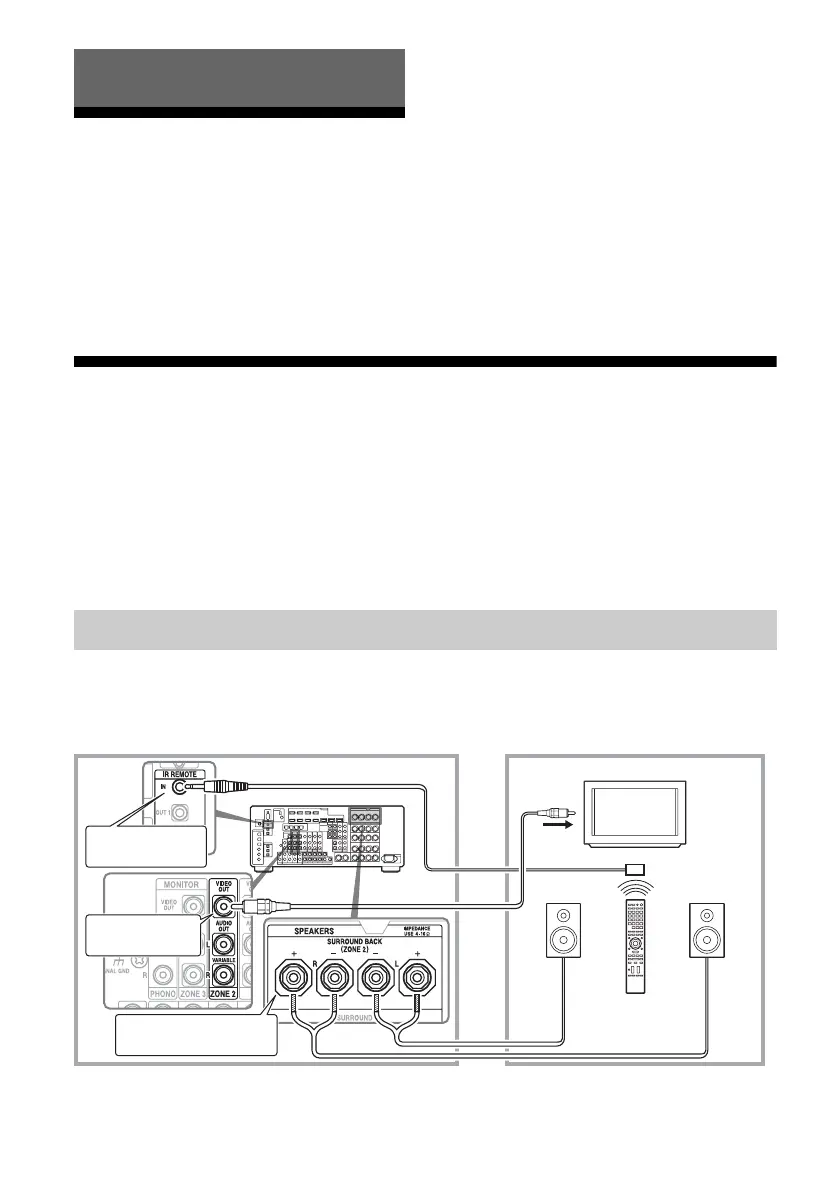
Making a multi-zone connection
To output to zone 2: Signals from equipment connected to analog input jacks are output through
the ZONE 2 VIDEO/AUDIO OUT or ZONE 2 OUT component jacks. The ZONE 2 VIDEO/
AUDIO OUT or ZONE 2 OUT component jacks cannot output the signals from HDMI IN jacks.
To output the HDMI signals, use HDMI ZONE 2 OUT jacks.
To output to zone 3: Only signals from equipment connected to the analog input jacks are output
through the ZONE 3 OUT jacks. No signals are output from equipment connected to only the
digital input jacks.
1 Outputs sound from speakers in zone 2 using the SURROUND
BACK (ZONE 2) terminals of the receiver.
Using Multi-zone Features
1: Zone 2 connections
Main zone Zone 2
TV
monitor
ZONE 2 VIDEO
OUT*
B
STR-DA5800ES
B
SURROUND BACK
(ZONE 2)
A
Multifunction remote
control
IR REMOTE IN















 To Next Page