29
GB
Getting Started
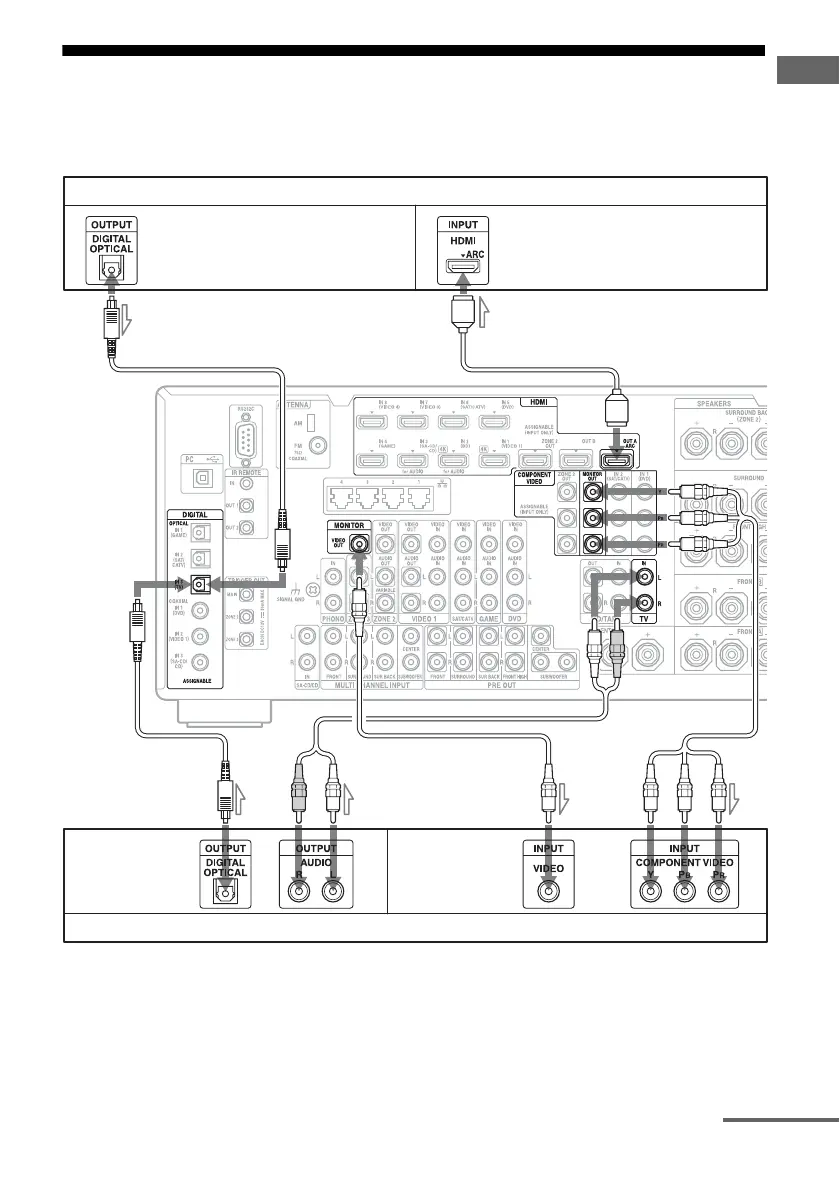
2: Connecting the monitor
You can watch the selected input image when you connect the HDMI OUT or MONITOR OUT
jacks to a TV. You can operate this receiver using the on-screen GUI (Graphical User Interface).
It is not necessary to connect all the cords. Connect cords according to the jacks of your equipment.
A Optical digital cord (not supplied)
B Audio cord (not supplied)
C Video cord (not supplied)
D Component video cord (not supplied)
E HDMI cable (not supplied)
We recommend that you use a Sony HDMI
cable.
* If you connect the receiver to an Audio Return
Channel (ARC)-compatible TV’s HDMI jack
via an HDMI cable, this connection is not
necessary.
** If you connect the receiver to an Audio
Return Channel (ARC)-compatible TV,
connect it to an HDMI jack designated by
“ARC” on the TV.
TV monitor with an HDMI jack
AB
Audio signals*
CD
E
Video signals**
TV monitor without an HDMI jack
Audio signals Video signals
or or
A
continued















 To Next Page