53
GB
Enjoying images/sound
Notes
• Do not remove the USB device during operation.
To avoid data corruption or damage to the USB
device, turn the receiver off when removing the
USB device.
• If you connect a WALKMAN to the receiver,
operate the WALKMAN using the remote control
of the receiver the same way you do when you
connect other USB devices to the receiver. You
cannot use the controls on the WALKMAN.
• Some USB devices may not work with this
receiver.
• The receiver can recognise Mass Storage Class
(MSC) devices (such as flash memory or an HDD).
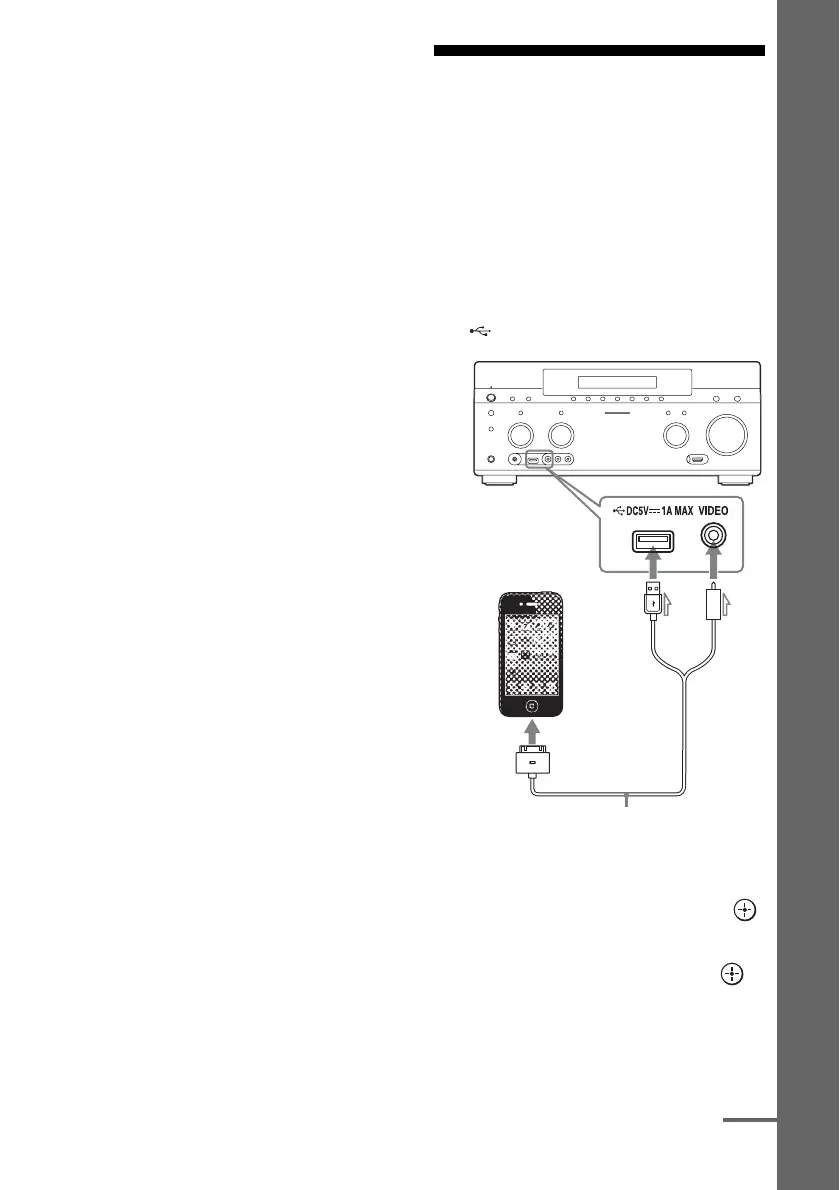
iPod/iPhone
You can enjoy the music/video/photo and
charge the battery of an iPod/iPhone via the
receiver.
For details on the compatible iPod/iPhone
models with this function, see page 54.
Note
You cannot use headphones during playback.
1 Connect the iPod/iPhone to the
(USB) port on the receiver.
2 Select “Watch” or “Listen” from
the home menu, then press .
3 Select “My Video,” “My Music,”
or “My Photo,” then press .
Note
If no picture is output, change the setting for
“Playback Resolution” (page 106).
iPod/iPhone
(not supplied)
Apple Composite AV Cable
(not supplied)
continued















 To Next Page