EasyManua.ls Logo

Sony STR-DG510 - Connecting DVD Recorders

Sony STR-DG510
71 pages
Print Icon
To Next Page IconTo Next Page
To Previous Page IconTo Previous Page
Loading...
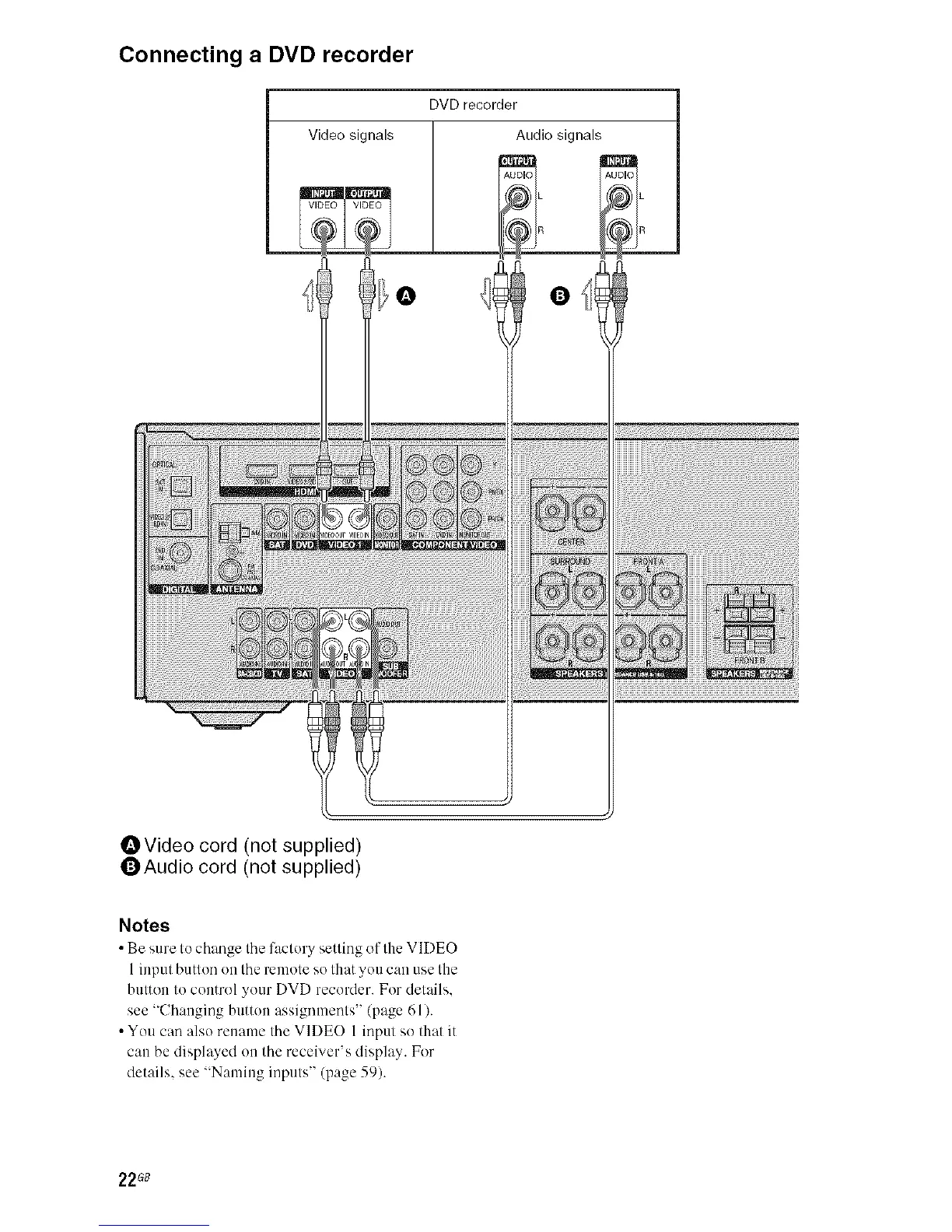
Connecting a DVD recorder
DVD recorder
Audio signalsVideo signals
VIE _
i _![@

i!ii!ii!iii_i_ii_iii_iiiiiiiiiiiiiiiiiiiiiiiiiiiiiiiiiiiiiiiiiiiiiiiiiiiiiiiiiiiiiiiiiiiiiiiiiiiiiii_2_l_!_!_!_!_!_!_!_!_!_!_!_!_!_!_!_!_!_!_!_!_!_!_!_!_!_!_!_!_!_!_!_!_!_!_!_!_!_!_!_!_!_!_!_!_!_!_!_!_!_!_!_!_!_!_!_!_!_!_!_!_!_!_!_!_!_!_!_!_!_!_!_!_!_!_!_!_!_!_!_!_!_!_!_!_!_!_!_!_!_!_!_!_!_!l_
OVideo cord (not supplied)
QAudio cord (not supplied)
Notes
Be sure to ch;_oge tire f:_ctery setting of the VIDEO
1input button ee the remote so that you can use the
button to control your DVD recorder. For details.
see "Changing button assignments" (page 61).
You can also rename the VIDE() 1 input so that it
can be displ_ycd on the receiver's display. For
details, see "Naming inputs" (page 59).
22G8

Other manuals for Sony STR-DG510

Related product manuals