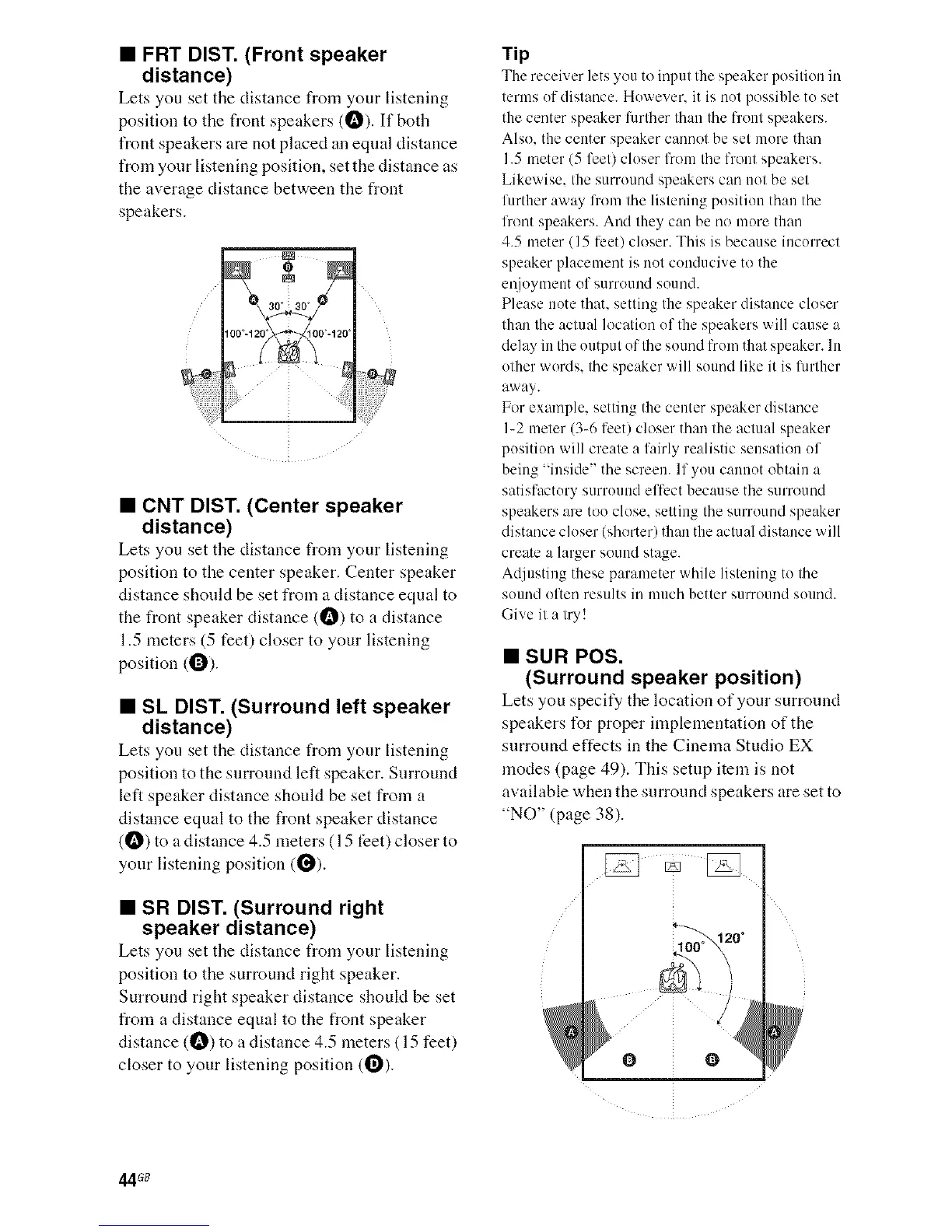
• FRT DIST. (Front speaker
distance)
Lets you set tile distance from your listening
position to the front speakers (O). If both
front speakers are not placed an equal distance
from your listening position, set the distance as
the average distance between the front
speakers.
• CNT DIST. (Center speaker
distance)
Lets you set tile distance from your listening
position to the center speaker. Center speaker
distance should be set from a distance equal to
the front speaker distance CO) to a distance
1.5 meters (5 feet) closer to your listening
position (O).
• SL DIST. (Surround left speaker
distance)
Lets you set tile distance from your listening
position to the surronnd left speaker. Surround
left speaker distance should be set from a
distance equal to the front speaker distance
(!_) to a distance 4.5 meters (15 feet) closer to
your listening position (i_).
• SR DIST. (Surround right
speaker distance)
Lets you set the distance from your listening
position to the surround right speaker.
Surround right speaker distance shoukt be set
from a distance equal to the front speaker
distance (_) to a distance 4.5 meters ( 15 feet)
closer to your listening position (1_).
Tip
The receb_,er lets 5ou to input the speaker position in
terms of distance. However. it is not possible to set
the center speaker lurther than the front speakers.
Also. the center speaker canuot be set more than
1.5 meter (5 feet) closer from the front speakers.
Likewise. the surround speakers can not be set
l_Lrtheraway li'om the listeniug position than the
lhont speakers. And they can be no more than
4.5 meter (15 lhet) closer. This is because incorrect
speaker placement is not conducive to the
m_joymmLtof surround sound.
Please note that, setting the speaker distance closer
than the actual location of the speakers will cause a
delay iLLthe output of the sound from that speaker. ILL
other words, the speaker will souud like it is flmher
away.
For example, setting the center speaker distance
I-2 meter (3_6 feet) closer than the actual speaker
position will create a lairly realistic sensation of
being "inside" the screen. If you cannot obtain a
satisfactory surround effect because the surro/lnd
speakers are too close, setting the surround speaker
distance closer (shorter) than the actual distance will
create a larger sound stage.
Adjusting these parameter while listening to the
sound of tin/results in much better surround sound.
Give it a try!
• SUR POS.
(Surround speaker position)
Lets you specify the location of your surround
speakers t\_r proper implementation of the
surround effects in the Cinema Studio EX
modes (page 49). This setnp item is not
available when the surround speakers are set to
"NO" Cpage 38).
/
0 0
44G8



 To Next Page